Coding agents have changed how software gets built. Engineers use Claude Code, Codex, Cursor, and our own Zencoder stack to write, test, and review code faster than any of us imagined a year ago. That's great. But ask any engineer how they actually spend their day, and coding is maybe a quarter of it. The rest is chasing information, sitting in meetings, running reviews, writing emails, prepping documents, and generally keeping a business moving.
Today we're launching Zenflow Work, a major expansion of the Zenflow orchestration platform we introduced last December. Zenflow Work is built for that other 75 percent of the day: the planning, the coordination, the reporting, and the communication that consume most of an engineer's time, and most of everyone else's too.
It's a free update. You can try it at zencoder.ai/zenflow-work.
.webp?width=1210&height=605&name=Introducing-Zenflow-Work%20(1).webp)
Why now
When we launched Zenflow in December, the premise was simple. As AI agents get more capable, we should run them the way companies run people: with multiple specialists, structured workflows, and clear handoffs, not one cowboy agent winging it. Four months later, two things have become clear.
First, multi-model orchestration isn't just "nice in theory." We now have the data to prove it works, and it works well enough to build product around. More on that below.
Second, developers are already using coding agents for non-coding work. Anthropic published data showing roughly half of Claude Code usage happens outside of coding. We see the same pattern in Zencoder usage, and I hear it from users of Cursor and Codex too. The tools are powerful enough that people reach for them even when the task isn't strictly "write me this function." The problem is that the interfaces were designed for engineers who are comfortable with Git, PRs, work trees, and command-line configuration. Most of the rest of the world (including many engineers doing non-coding work) doesn't want to touch any of that.
I've seen this movie before. When I started Wrike more than a decade ago, engineers had Jira and loved it. Marketing teams tried to use Jira and hated it. Not because Jira was a bad tool, but because the power was wrapped in complexity that didn't match how non-engineers wanted to work. That gap is what created Wrike, Asana, Monday, Notion, and the whole modern work management category. The same gap exists today with AI agents, and closing it is exactly what Zenflow Work is built for.
What's new in Zenflow Work
Three changes worth understanding, all layered on the Zenflow platform that engineering teams already run in production.
 1. A simpler interface for non-engineering work. The full Zenflow coding experience is intact. On top of it, we added a streamlined mode that doesn't expose Git, work trees, PRs, branches, or commits. It's just a prompt, the integrations, and your agent. Business users can ask for what they need in plain language, and when a workflow needs configuration, our AI assistant turns the natural-language description into the right config behind the scenes. It's given us several "wow" moments, and we hope you'll feel the same.
 2. Scheduled automations. Instead of prompting the agent every time, you can put work on autopilot. A Zenflow agent can assemble your standup brief from Jira every morning before you sit down. It can compile release notes from merged PRs every Friday. It can draft a weekly stakeholder update from real project data and save it to your Gmail drafts for review. These are things every team "should" do and most teams skip because they take time. Now they happen without anyone having to remember. We love putting busy-work on auto-pilot, so we can focus on things that really require our attention.
3. Goal-oriented agents that chase outcomes across sessions. Today, when an engineer opens a PR, they typically come back, check for review comments, and either address them by hand or re-invoke the agent. Zenflow Work lets you hand the agent a goal instead of a prompt: "Open the PR, watch for review comments, and address them until it's ready to merge." The agent stays on the goal across hours or days, waking up when there's work to do and standing down when the goal is met. The same pattern applies to sales follow-ups, invoice collection, incident response, and plenty of other workflows that used to require a human in the loop for every single step.
On top of these three, we've added a curated set of business integrations. Jira, Linear, Notion, Amplitude, Miro, and Sentry are production-ready today with user-friendly authentication. This is where most of our early usage is concentrated.
We also support native file handling for PPTX, PDF, XLSX, and DOCX, covering a wide range of common business workflows.
Integrations with Gmail, Google Calendar, and Drive, as well as HubSpot, are currently in early access. Setup can still be a bit involved, but we're actively improving the experience and expanding the list of supported tools.
To round it out, there's a built-in browser tab that lets the agent read websites, inspect elements, and capture screenshots as part of its workflow.
We're building toward a messaging-first experience. You can already talk to your agent from Telegram, with Slack and Discord support in early access.
Today, that means interacting with the Zenflow agent to start new tasks remotely, ask data questions, or trigger workflows in integrated apps. Richer interaction patterns, like channel mentions, acting on running workflows, and threaded conversations, are on the near-term roadmap, alongside support for more messengers.
A few concrete examples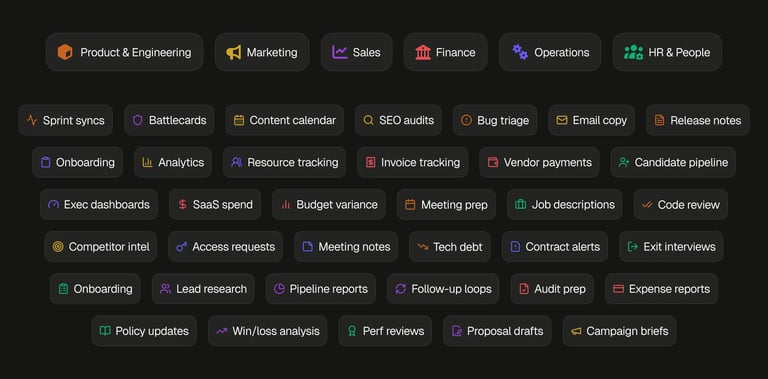
Once you stack a simpler UX, scheduled automations, goal-oriented agents, and real integrations, the interesting part isn't any single feature. It's what a single task now looks like end to end.
- Morning standup, ready before you sit down. The agent searches Jira for issues updated in the last 24 hours, groups them by what shipped, what's in progress, and what's blocked, and writes a five-bullet summary in your task chat. Every morning. Zero effort.
- Release notes from merged PRs. The agent reads every PR merged to main this week, categorizes by feature, fix, and improvement, and writes user-facing release notes in Google Docs. What used to take half a day becomes a ten-minute review.
- Meeting prep without tab-switching. The agent checks tomorrow's Google Calendar, finds every Jira and Linear issue mentioned in the invites, pulls current status, reads the Notion spec, and writes a prep doc. 45 minutes of tab-switching becomes one task. Noise-cancelling tools handle the call itself.
- Proposal first draft from a single email. The agent reads a prospect thread, drafts a proposal in Google Docs, asks "they mentioned SOC 2, should I add a security section?", and refines based on your answer. A three-hour writing session becomes a 20-minute review.
- SaaS spend audit. The agent scans Gmail for subscription receipts, cross-references against your approved vendor list in Notion, and flags duplicates and anything unused for 30+ days. Most companies carry 20–40 percent SaaS waste. This finds it without an audit engagement.
- Performance review prep. The agent pulls six months of Jira and Linear tickets for each team member, reads their 1:1 notes in Notion, and writes a structured prep doc. Managers walk into review conversations with facts, not impressions.
None of these are toy examples. The workflows are live in the product today, saving us time and letting us focus on the more important parts of our days. As we improve and add more integrations every week, more and more of that routine will be automated.
The multi-model results: 2.7x cheaper at equal or better quality
Today is also the day we put evals behind what we've been saying about multi-model orchestration all along. Two concrete results.
Plan and implement: 2.7x cheaper, equal or better quality. The standard pattern for AI-first engineering is spec-driven development: plan first, implement second. We ran an experiment on the hardest subset of SWE-bench Pro, holding the planner fixed to Claude Opus (arguably the best planner on the market today) and swapping in different models for the implementation phase. The best performing implementer turned out to be Gemini Flash, not Opus. The reason is intuitive: Opus already put its best foot forward in the plan, so running it again to implement doesn't add much. A fast, cheaper model executing a good plan catches up, and in some cases pulls ahead. On cost per resolved task, the Opus-plan, Gemini-Flash-implement pipeline came in about 2.7x cheaper than running Opus end to end, a roughly 60 percent reduction in total pipeline cost at equal or better quality.
Code review: better precision and recall at one fifth the cost. Code review has become the next bottleneck for teams that accelerated engineering with AI. Open source maintainers are publicly banging the drum about being overwhelmed with AI-generated PRs, and enterprise teams are quietly drowning in the same problem. So we built our own eval on real PRs with real human feedback, measuring precision (how many flagged issues are actually real) and recall (how many real issues the tool actually catches). With a simple Zenflow config using multiple models for review, we beat the most expensive commercial review tool on both metrics, at roughly one fifth the cost per PR.
Neither result is magic. They come from a principle I keep coming back to: a frontier lab is never going to recommend that you plug a competitor's model into your pipeline. It's not in their interest, even when it's in yours. And there's a structural reason the pattern works: if Opus wrote the code, there's a good chance Opus is blindsided to its own mistakes, while Gemini or Codex catch them (and vice versa). Independent perspectives beat groupthink, just like in a well-run team.
How Zenflow Work is different from an OpenClaw-style assistant
A fair question I get a lot: how is Zenflow Work different from OpenClaw? OpenClaw was a breakthrough moment and it exposed a lot of people to what's possible when you give an agent real tools. But it was also a security nightmare. Within about a month of going viral in late January, OpenClaw had roughly eight critical and high-severity CVEs disclosed against it, starting with a one-click RCE (CVE-2026-25253) on February 3. The skills marketplace filled up with thousands of unvetted plugins. And in one widely covered incident, an OpenClaw agent connected to a senior AI safety researcher's Gmail mass-deleted her inbox despite explicit instructions not to, because a context-window compaction had silently summarized away the safety constraint. OpenClaw is a wonderful proof-of-intent product for hackers and tinkerers. It's not a product I see on business users' work laptops.
Zenflow Work takes the opposite approach. Instead of maximum surface area and "figure it out yourself," we started from a platform that engineering teams already use in production and extended it with:
- A curated set of vetted integrations, not an open skill marketplace with no trust boundaries.
- A security perimeter that's appropriate for a business user clicking a button, not just an engineer who knows where all the knives are.
We believe there is much more to be done in the AI industry to find the right balance between security and usability, and we will continue to pursue that mission. Think about your mobile phone. Would you rather leave it unlocked (like a coding agent in YOLO mode), protect it with a 12-character random password you retype every time (like an untuned sandbox), or unlock it instantly with your fingerprint (secure and effortless)? Zenflow Work is aiming for the fingerprint.
Accuracy without constant oversight
The other question I hear is "how do you keep the agent accurate without a human watching every step?" The honest answer is: the same way you'd introduce any new process in a company. You start in dual mode. The agent runs, a human reviews, and you use that period to calibrate the system and establish what "good enough" looks like for that specific workflow. Once confidence is high, you graduate to a double-LLM pattern where a second model checks the first for consistency and only escalates to a human when something looks off. Zenflow makes this a config change, not a rewrite.
It also helps that the workflows we're starting with (standup briefs, release notes, stakeholder updates, meeting prep, proposal drafts) have a very different risk profile from medical diagnoses or financial transactions. They're internal artifacts consumed by teammates who have their own context and will naturally catch errors. You get three layers of quality control: structured source data going in, automated consistency checks in the middle, and informed human readers at the end.
This is the kind of system thinking I believe every team is about to need. One-shot prompting will still work for ad hoc questions. But for the recurring work, the winning approach is to engineer a small system of agents, checks, and humans, the same way you'd design any other reliable process. Everyone becomes a manager. It's a different skill than being a great individual contributor, and it's worth practicing.
Model-agnostic, still free
Zenflow Work runs on the same foundation as the coding product. It's model-agnostic: Claude, GPT, Gemini, and open-source models like Kimi and GLM are all supported. You can bring your own Anthropic or OpenAI subscription, use a Zencoder subscription that covers all the major providers, or mix and match. The core product is free. Plugins are available for VS Code and JetBrains.
Enterprise customers get the usual: SOC 2 Type II, ISO 27001, and ISO 42001 certifications, plus the ability to bring your own endpoints and keys.
Where this is going
I believe 2026 is the year the techniques advanced engineers have been quietly using with AI for the past year get democratized. Multi-agent orchestration, plan-implement pipelines, cross-model review, goal-oriented agents that persist across sessions: all of these exist today as hand-rolled scripts, custom configs, and tribal knowledge on a few elite engineering teams. They work. They just aren't accessible outside of a small group of people with the time and skill to wire them up.
Our job is to take those capabilities, wrap them in UX a first-time user can pick up in an afternoon, and ship them to everyone. Not just engineers doing coding work. Engineers doing non-coding work. PMs. Marketers. Sellers. Finance. HR. The work they do looks different on the surface, but underneath it's the same pattern: repetitive, multi-step, crossing several tools, with a clear definition of done that nobody has the time to chase.
Zenflow Work is our first step in that direction, and we're iterating in the open. There's a lot more coming.
Try it today at https://zencoder.ai/zenflow-work. We're shipping integration improvements and documentation updates every week, and I'd genuinely love to hear what works, what doesn't, and what you'd automate first.
![From Idea to Production: Modern AI Engineering Cycle [Guide]](https://zencoder.ai/hs-fs/hubfs/Idea%20%E2%86%92%20Spec%20%E2%86%92%20Workflow%20%E2%86%92%20Production_%20The%20Modern%20AI%20Engineering%20Cycle.png?width=800&height=400&name=Idea%20%E2%86%92%20Spec%20%E2%86%92%20Workflow%20%E2%86%92%20Production_%20The%20Modern%20AI%20Engineering%20Cycle.png)
![AI Orchestration: How High-Quality AI Output Happens [Guide]](https://zencoder.ai/hs-fs/hubfs/Screenshot%202025-12-18%20at%2012.14.20%20AM.png?width=800&height=400&name=Screenshot%202025-12-18%20at%2012.14.20%20AM.png)