The first wave of AI in the IDE was, honestly, a party trick. Ghost text finished your line, a chat panel explained a regex, and once in a while a snippet actually compiled. It was useful, it was fast, and it was fundamentally the same shape as the tools we already had: you did the work, and the assistant sat next to you.
The next wave is going to look nothing like that.
What is coming, and in a lot of places is already here, is a shift in where the AI actually runs. Not in the editor tab. In the workspace. On the file system. Inside the shell. Across branches. I have been calling it Autonomous Workspace Engineering, and it is the first pattern that genuinely changes what a developer's day looks like.
The passive copilot ceiling
Copilots are great at writing code. They are terrible at everything around the code.
Push a branch, wait for CI, tab over to the browser to read the failure, tab back to the terminal, tab back to the AI to ask why, paste the error, get a fix, paste the fix, run again. Multiply by every real engineering task you did last week.
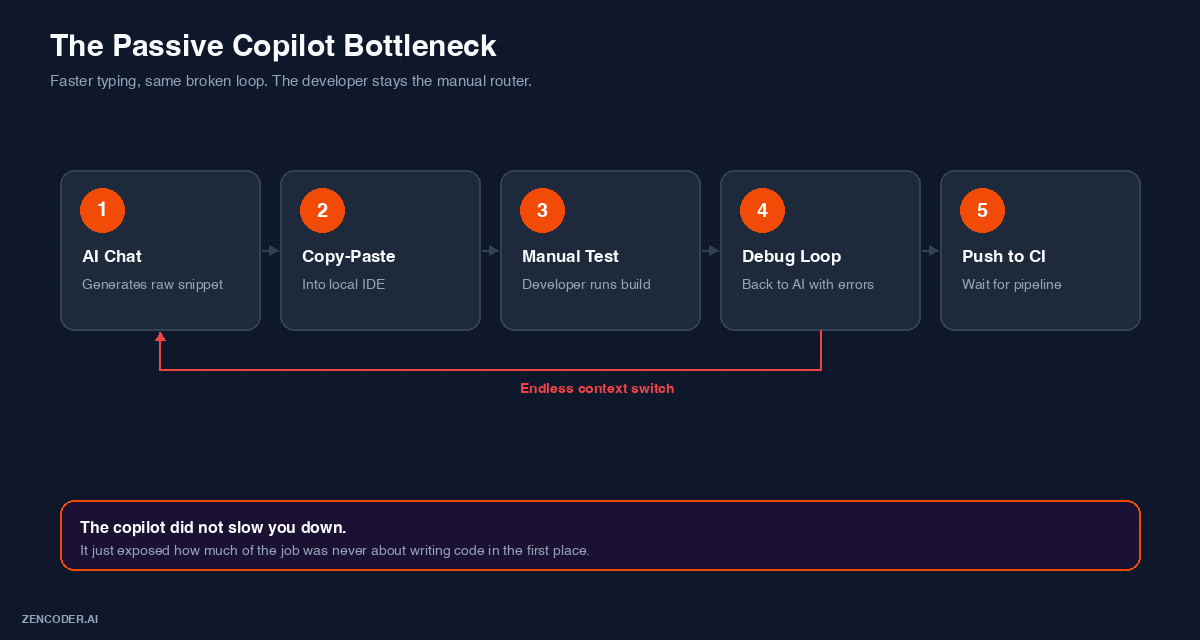
Passive copilots accelerate one step of the loop and expose all the friction in the other four. The developer stays the manual router between chat, IDE, terminal, and CI.
The copilot did not slow you down. The copilot made the writing part faster, which just exposed how much of the job was never really about writing in the first place. The bottleneck moved. It did not disappear.
What "workspace-level" actually means
Autonomous Workspace Engineering is not a smarter chat. It is a different scope of access. The agent gets the same things you get when you sit down at your machine: a file system, a shell, a git client, a test runner, a way to spin up an isolated branch and try something without breaking your setup.
That sounds scary until you use it. Then it just sounds obvious.
Here is the split I keep drawing on whiteboards when people ask what changed:
| Capability | Passive Copilot | Autonomous Workspace Engineering |
|---|---|---|
| Execution scope | The current file, maybe | The workspace, shell, git, and test harness |
| Editing scope | Line and function suggestions | Multi-file, dependency-aware changes |
| Verification | You run the tests | The agent runs, reads, and fixes |
| Workflow shape | Reactive chat | Structured plan with gates |
| Parallelism | One prompt at a time | Multiple worktrees in parallel |
Once you have used a system that can actually run its own tests and read its own logs, going back to copy-paste feels like using a fax machine.
The three things this pattern gets right
Every AWE setup I have seen work in production has the same three ingredients. They are not glamorous. They are what makes the difference.
Isolated git worktrees. The agent never touches your active branch. Every task gets its own worktree, its own dependencies, its own test runs. You never come back from lunch to find your local checkout mysteriously refactored.
A local verification loop. Waiting on centralized CI to tell you something obvious is a waste of everyone's time. The agent should be running the same lint, build, and test steps you would run, right there in its sandbox, and self-correcting when they fail.
A visible plan. No hidden background threads. The agent's steps live in an interactive to-do list you can read, pause, edit, and reorder. This one detail is the difference between "the AI did something" and "we shipped something together."
Where Zenflow fits
Zenflow is our take on what AWE looks like when you build it end to end instead of bolting it onto an editor. When you create a task, a few things happen without you having to ask:
- A clean, isolated worktree gets set up in the background.
- A structured plan appears in the To-Do panel, in plain language.
- The agent starts making multi-file changes that match the existing style of the codebase, not a generic template.
- Lint, build, and tests run locally, and failures loop back into the plan for a fix pass.
- A tidy commit shows up, ready for you to review the way you would review a teammate's PR.
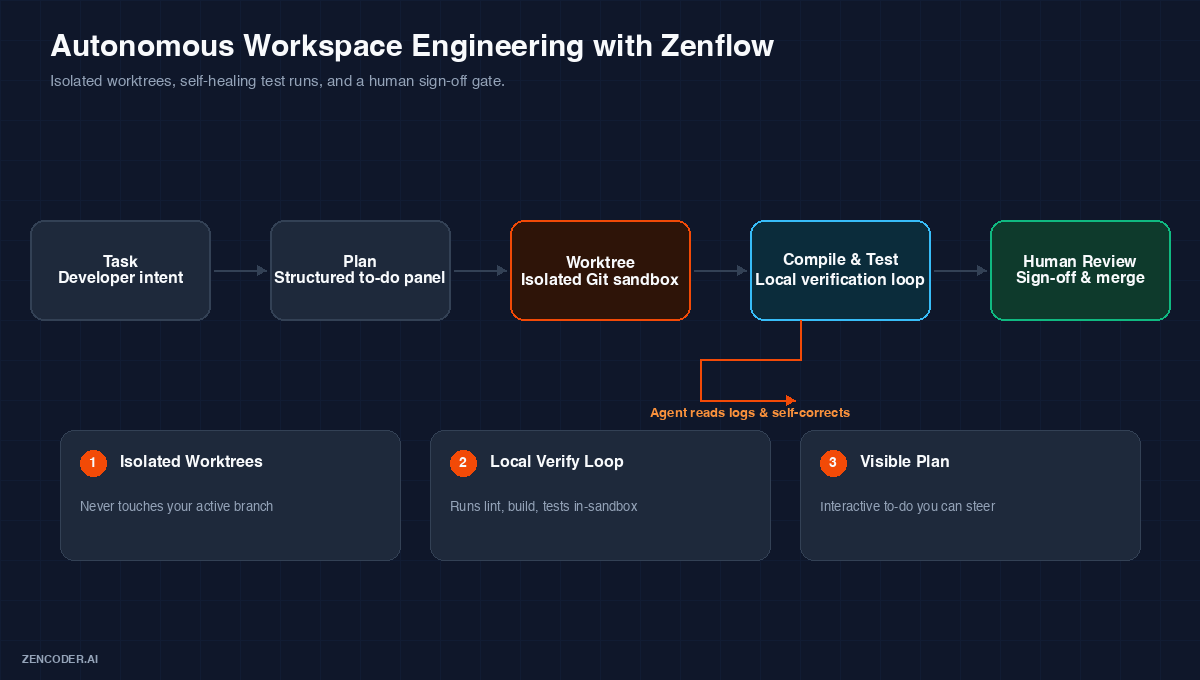
Zenflow strings the pieces of Autonomous Workspace Engineering together: an isolated worktree, a local verify loop that self-corrects on failure, and a clean human review gate at the end.
None of the individual pieces are new. Worktrees, local test runners, structured plans, they all existed before. What is new is that a system can now string them together on your behalf, and stay out of the way when you want to take back the keyboard.
Why this actually matters
Developer productivity is not really about how fast you type. It is about how many hours a day you get to spend thinking, and how many you spend context-switching.
The reason AWE feels different is not because it writes better code. It is because it takes the tedious, expensive, focus-shattering parts of the loop, environment setup, waiting on CI, chasing lint errors, hunting through logs, and quietly handles them in the background while you go do the part of the job you actually enjoy.
Copilots gave us autocomplete for code. Autonomous workspace engineering gives us autocomplete for the workflow. That is a much bigger deal, and the teams that lean into it early are going to look, in a year, like the teams that adopted CI in 2015 looked in 2017. Not miraculous. Just quietly, permanently ahead.