Did you know that 84% of developers now use or plan to use AI tools in their development process, with over half incorporating them into their workflow daily? With the rise of intelligent coding assistants, AI has become an essential part of modern software development workflows. Windsurf and Cursor are two popular options, but they differ in many aspects, from their core AI capabilities and editor integrations to customization options. In this article, we will break down Windsurf (formerly Codeium) vs. Cursor to help you decide which AI coding tool best fits your workflow, project needs, and development style.
And if neither feels like the perfect choice, we’ll also introduce an alternative option, Zencoder, for those seeking a more versatile and well-rounded AI coding tool.

Windsurf vs. Cursor: Key Differences
Before explaining the key differences, here is a quick overview of what awaits you:
|
Feature |
Cursor |
Windsurf |
|
Code Generation & Editing |
Fast flow-state coding with Tab-based autocomplete, smart rewrites, and cursor-aware multi-line edits |
Structured, high-impact edits using Cascade, Fill-in-the-Middle completions, and strong cross-file consistency |
|
Agent Mode & Task Automation |
Autonomous Agent Mode for end-to-end task execution, error fixing, and command running |
Collaborative agent with tighter developer control and guidance |
|
Codebase Awareness & Chat |
Real-time cursor-aware chat with instant grep and rapid inline reasoning |
Deep persistent understanding of large or multi-repository codebases with context pinning and citations |
|
Integrations & Ecosystem |
Standalone IDE with one-click import of VS Code extensions, themes, and keybindings |
Dedicated editor plus plugins for VS Code, JetBrains IDEs, and Vim for flexible adoption |
|
Code Reviews & Quality Assurance |
Immediate in-editor feedback like Bugbot with quick one-click fixes |
Automated pull request reviews with structured feedback and guideline enforcement |
|
Customization & Workflow Control |
Lightweight rules, scoped memories, reusable prompts, and custom commands |
Enterprise-grade customization with MCP integrations, custom tools, and organization-wide governance |
|
Privacy, Security & Compliance |
SOC 2 certified with configurable data usage and enterprise-ready security |
Strong legal assurances, no training on non-permissive code, and SaaS, on-prem, or VPC deployment options |
|
Pricing |
It has a Free plan and three paid plans starting at $20 per month for individuals. For businesses, it offers a Team plan from $40 per month and an Enterprise plan. |
It offers a Free plan, paid plans that start at $15 per month, and an Enterprise plan. |
Windsurf Overview

Windsurf (formerly Codeium) is an AI-powered coding environment designed to keep developers fully in flow while working on complex codebases. Its core feature, Cascade, acts as an intelligent agent that understands your intent, navigates large projects, fixes issues, and even runs tools and terminal commands on your behalf. Windsurf also introduces a powerful “Tab” workflow that lets developers move, generate, and refactor code with minimal friction and almost no context switching. With built-in memory, automatic lint fixing, MCP integrations, and Turbo mode, Windsurf connects your editor, tools, and terminal into a single AI-powered workspace.
Pricing
Windsurf offers a Free plan, two paid plans starting at $15 per month, and an Enterprise plan with custom pricing.

Cursor Overview

Cursor is an AI-powered code editor designed to dramatically boost developer productivity by combining fast, accurate autocomplete with autonomous coding agents. It offers flexible workflows, from lightweight Tab completions and targeted edits to full agent-driven tasks that turn ideas into working code. Cursor deeply understands entire codebases, integrates with tools like GitHub and Slack, and supports leading models from OpenAI, Anthropic, Google, and xAI. It includes built-in model selection, codebase indexing, instant search (grep), in-editor code review, and planning/debug modes to support everyday development tasks at different stages of the workflow.
Pricing
For individuals, Cursor offers a Free plan and three paid plans starting at $20 per month.
For businesses, Cursor offers a Team plan starting at $40 per month and an Enterprise plan with custom pricing.

Windsurf (Codeium) vs. Cursor: Detailed Comparison and Final Verdict
1. Code Generation & Editing
When comparing code generation and editing, the focus is on speed, accuracy, and how naturally the tool fits into daily coding flow.
🟢 Cursor
Cursor is optimized for flow-state coding. Its Tab-based autocomplete, smart rewrites, and multi-line edits feel instantaneous and intuitive. The editor predicts not just what you’ll type next, but where you’ll edit next, enabling rapid, cursor-aware changes across files. Scoped edits and natural-language commands make small-to-medium refactors feel effortless, and the overall experience is tuned for fast iteration inside a single, cohesive IDE.
🔵 Windsurf
Windsurf leans toward structured, high-impact edits. With Cascade, it can perform large multi-file changes, schema updates, and refactors with strong contextual grounding. Its inline Fill-in-the-Middle (FIM) completions and Supercomplete go beyond basic autocomplete, often generating entire logical blocks. Windsurf emphasizes correctness and consistency across the codebase rather than pure typing speed.
🔴 Verdict
If your priority is fast, fluid editing and minimizing friction while coding, Cursor feels more natural. If you frequently perform large, cross-file changes and want more deliberate, structured edits, Windsurf has the edge.
2. Agent Mode & Task Automation
This category evaluates how independently the tools can plan, execute, and complete tasks.
🟢 Cursor
Cursor’s Agent Mode is designed to complete tasks end-to-end. It understands your codebase, executes terminal commands (with confirmation), fixes compiler and runtime errors, and can reason step-by-step through implementation plans. Cursor agents can also be triggered from Slack, mobile, or the web, making them useful beyond the IDE.
🔵 Windsurf
Windsurf’s Cascade acts as a hybrid agent, capable of autonomous action, but often positioned as a collaborator rather than a fully independent worker. It excels at multi-file refactors, command generation, and repository-wide reasoning, but typically requires more developer direction than Cursor’s “delegate and review” model.
🔴 Verdict
Cursor is better suited for hands-off task delegation, where you can hand over a task and review the result afterward. Windsurf, by contrast, is ideal for a more collaborative workflow, giving you tighter control and oversight throughout the process.
3. Codebase Awareness & Chat
In this aspect, the key factor is how deeply each tool understands existing code and supports interactive reasoning.
🟢 Cursor
Cursor Chat is tightly integrated into the editor, maintaining constant awareness of your active file, cursor position, and nearby code. With tools like @Codebase, instant grep, and one-click apply, it enables fast debugging, inline explanations, and seamless navigation without breaking flow. Cursor shines in real-time, conversational problem solving, where quick iterations and immediate feedback are critical.
🔵 Windsurf
Windsurf emphasizes a deep, persistent understanding of the entire codebase, including support for large and even multi-repository projects. Features such as context pinning, inline citations, and LLM-powered search allow it to answer high-level architectural questions and explain unfamiliar systems with clear references back to the source. This makes it especially strong for onboarding, system exploration, and long-running investigations.
🔴 Verdict
Cursor is ideal for rapid, edit-focused workflows where you want tight feedback loops and immediate assistance tied to what you’re actively modifying. Windsurf, on the other hand, excels at navigating complex, unfamiliar, or sprawling codebases, offering a broader, more traceable understanding of the system as a whole.
4. Integrations & Ecosystem
When choosing the best option for you, consider how naturally each tool fits into existing development workflows, editors, and supporting infrastructure.
🟢 Cursor
Cursor operates as a standalone IDE, but makes onboarding easy by allowing one-click import of VS Code extensions, themes, and keybindings. It also supports MCP servers for connecting external tools, services, and data sources, along with CLI and web-based agents for more flexible automation. The tradeoff is that adopting Cursor typically requires committing to a new primary editor, which may be a larger shift for some teams.
🔵 Windsurf
Windsurf takes a more flexible approach, offering both a dedicated editor and plugins for popular environments such as VS Code, JetBrains IDEs, and Vim. This makes it easier to adopt incrementally, especially within teams that already have strong editor preferences or mixed toolchains. Its MCP support further extends integration possibilities by enabling connections to internal tools, APIs, and custom workflows.
🔴 Verdict
Cursor delivers a cohesive, all-in-one experience if you’re willing to standardize on its IDE. Windsurf is better suited for teams that prioritize flexibility and gradual adoption across multiple editors and environments.
5. Code Reviews & Quality Assurance
Another important factor is how effectively each platform helps identify issues, enforce standards, and improve overall code quality throughout the development lifecycle.
🟢 Cursor
Cursor includes tools like Bugbot, which flags potential issues directly inside the editor and often suggests one-click fixes. It also supports AI-assisted review commands and diff-based suggestions, making it easy to catch mistakes early while coding. The emphasis is on rapid, developer-centric feedback during implementation, rather than on formalized pull-request or CI-driven review processes.
🔵 Windsurf
Windsurf extends code review beyond the editor with dedicated PR review automation. It can automatically analyze pull requests against organizational guidelines, generate structured PR descriptions, and surface clear, actionable feedback for reviewers. This approach is especially well-suited to teams that rely on consistent standards and well-defined review workflows.
🔴 Verdict
Cursor excels at providing immediate feedback to individual developers as they write code. Windsurf stands out in structured, team-wide quality assurance and pull request review pipelines.
6. Customization & Workflow Control
Customization determines how well each tool can adapt to individual preferences, team conventions, and organization-wide standards.
🟢 Cursor
Cursor supports rules, scoped memories, and reusable prompts, allowing developers and teams to define coding behaviors and standards at the project or directory level. Custom commands help streamline repetitive tasks and common workflows, while the overall configuration remains relatively lightweight and easy to manage. This makes Cursor flexible without feeling overly complex or heavy.
🔵 Windsurf
Windsurf focuses on deeper, enterprise-grade customization. It supports custom tools, MCP integrations, and organization-wide review and governance rules that can be enforced consistently across teams. These richer configuration options enable tighter alignment with internal processes, compliance requirements, and standardized workflows.
🔴 Verdict
Cursor provides adaptable customization with minimal setup and overhead. Windsurf is a stronger fit for organizations that require centralized control and enforceable standards at scale.
7. Privacy, Security & Compliance
Some of the most important aspects to evaluate are data protection processes, security controls, and compliance requirements.
🟢 Cursor
Cursor is SOC 2 certified and offers a solid set of enterprise-grade security controls. It provides configurable data usage options and emphasizes transparency in how data is handled and stored. These safeguards make Cursor a strong fit for most professional teams that need reliable security without excessive operational complexity.
🔵 Windsurf
Windsurf places greater emphasis on legal assurances and data security. It explicitly avoids training on non-permissive code and supports a range of deployment models, including SaaS, on-prem, and in-VPC options. This flexibility makes it particularly well-suited for regulated industries, security-sensitive organizations, and government environments with strict compliance or data residency requirements.
🔴 Verdict
Cursor is secure and enterprise-ready for most teams. Windsurf is the better choice when strict compliance guarantees, data residency controls, or on-prem deployment are non-negotiable.
Windsurf vs. Cursor: Which Tool to Choose?
Depending on your development workflows, you may want to choose Cursor if your priority is speed, flow-state coding, and autonomous task execution. At the same time, Windsurf is better suited for teams that need broader editor compatibility, lightweight adoption, and AI assistance without committing to a standalone IDE.
However, despite their advantages, both tools have reported limitations that are worth considering before committing:
- Windsurf: While strong at large-scale reasoning, Windsurf can suffer from slower performance in certain workflows, especially during extensive multi-file operations. Users also report poor or irrelevant suggestions at times, as well as limitations in localized context understanding, which can lead to outputs that don’t fully match developer intent and require additional guidance or correction.
- Cursor: Some developers report poor or inconsistent code suggestions, particularly in complex or edge-case scenarios, along with occasional inaccuracies that require manual review. Its more advanced features, such as Agent Mode and deep customization, can introduce complexity and a learning curve, making it less approachable for less-experienced developers.
If neither Cursor nor Windsurf feels like the perfect fit, and you’re looking for a more balanced, all-in-one AI coding assistant that combines strong code generation with dependable accuracy, Zencoder is a perfect alternative.
Why Should You Try Zencoder?
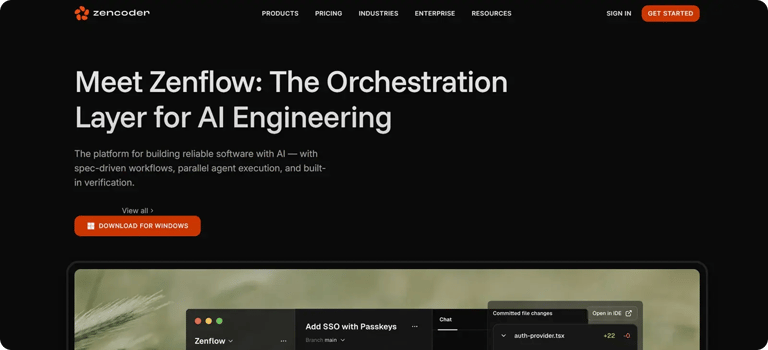
Zencoder is an AI-powered coding agent that enhances the software development lifecycle (SDLC) by improving productivity, accuracy, and creativity through advanced artificial intelligence solutions. It integrates seamlessly with existing development environments and supports over 70 programming languages, ensuring compatibility with leading IDEs such as Visual Studio Code and JetBrains.
Zencoder uses its advanced Repo Grokking™ technology to perform an in-depth analysis of your entire codebase, identifying structural patterns, architectural logic, and custom implementations with precision.
Key Features:
1️⃣ Zenflow – Zenflow is an AI-first engineering platform that coordinates multiple AI agents to build, test, and ship reliable software.
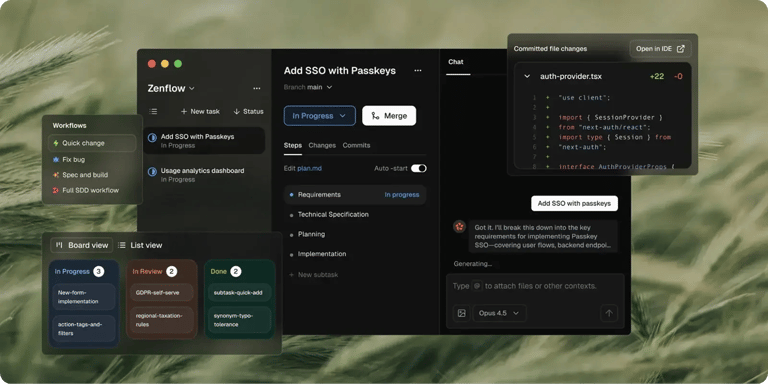
Here’s what Zenflow lets you do:
- Flexible workflows – Use proven workflows out of the box or create custom, team-specific processes.
- Requirements-first development – Agents read your specs, PRDs, and architecture docs before writing code, keeping implementations aligned with real requirements.
- Built-in validation – Every workflow includes automated testing and cross-agent code review. Failures are fixed automatically before anything reaches you.
- Multi-agent orchestration – Specialized agents for coding, testing, refactoring, review, and verification work together with shared context.
- Parallel execution – Run multiple tasks at once in isolated environments so features, fixes, and refactors move faster without conflicts.
2️⃣ Zen CLI – This Universal CLI Platform is the first developer-first platform that unifies CLIs and IDEs into one seamless workflow. With Zen CLI, you can:
- Bring any CLI tool – Bring your favorite CLI (Claude Code, Codex, Gemini, Grok, or your own) and connect it directly to VS Code and JetBrains, with full debugging, IntelliSense, and smooth context switching.
- Connect multi-repo intelligence – Get unified visibility across multiple repositories, making it easier to code, test, and review with full project awareness.
- Deploy anywhere – Run fully on-prem, hybrid, or in the cloud with air-gapped support, enterprise-grade security, and zero external dependencies.
- Modernize your architecture – Built on a JSON-RPC foundation that makes it easy to plug in new CLIs and IDE tools as the ecosystem evolves.
3️⃣ AI Coding Assistant – Streamline your development process with a fully integrated AI solution that supports developers through intelligent code completion, automated code generation, continuous real-time code review, and a real-time chat assistant. This enables teams to improve code quality, maintain consistency, and accelerate delivery across the entire software lifecycle.
4️⃣ Multi-Repo Search – Index and search across multiple repositories to give AI agents a unified understanding of complex, multi-repo architectures. Repositories can be easily added and managed through a centralized web admin panel, enabling agents to access, navigate, and query all indexed code on demand.
5️⃣ Zen Agents – Zen Agents are customizable AI teammates that understand your code, integrate seamlessly with your tools, and can be launched in seconds.

Here’s what you can do:
- Build smarter – Create specialized agents for tasks like pull request reviews, testing, or refactoring, tailored to your architecture and frameworks.
- Integrate quickly – Connect to tools like Jira, GitHub, and Stripe in minutes with our no-code MCP interface, letting agents operate seamlessly within your existing workflows.
- Deploy instantly – Deploy agents across your organization with one click, with auto-updates and shared access to keep teams aligned and expertise scalable.
- Explore marketplace – Discover a growing library of open-source, prebuilt agents ready to drop into your workflow. See what other developers are building, or contribute your own agents to help the community move faster.
6️⃣ Zentester – Zentester uses AI to automate testing at every level, so you can catch bugs early and ship high-quality code faster. You describe what you want to test in plain English, and it will take care of the rest, adapting as your code evolves.
Here’s what it does:
- Our intelligent agents understand your app and interact naturally across the UI, API, and database layers.
- As your code changes, Zentester automatically updates your tests, eliminating the need for constant rewriting.
- From individual unit functions to full end-to-end user flows, every layer of your app is thoroughly tested at scale.
- Zentester’s AI identifies risky code paths, uncovers hidden edge cases, and generates tests based on how real users interact with your app.
7️⃣ Security treble – Ensures enterprise-grade protection with SOC 2 Type II, ISO 27001, and ISO 42001 certifications, making Zencoder the only AI coding agent with all three.
Sign up today and streamline your workflow with our powerful AI features!