Claude Code Skills and Subagents are two powerful ways to extend what AI can do in development workflows, but they’re often confused with each other. While both help automate tasks and structure AI behavior, they work in very different ways. Understanding these differences can help you decide which approach fits your project best. In this article, we will explore Claude Code Skills vs. Subagents to help you get a clearer picture of what each one is designed to do.

What Are Claude Code Skills?
Claude Skills are reusable, user-defined capabilities that extend the Claude agent’s functionality within Claude Code. A skill is typically implemented as a folder containing a SKILL.md file with YAML front matter describing the skill’s metadata, triggers, and instructions. The Claude Code environment loads these definitions and makes them available to Claude during a session. Once created, a skill can be invoked automatically when a user’s prompt matches its description, or manually via explicit commands.
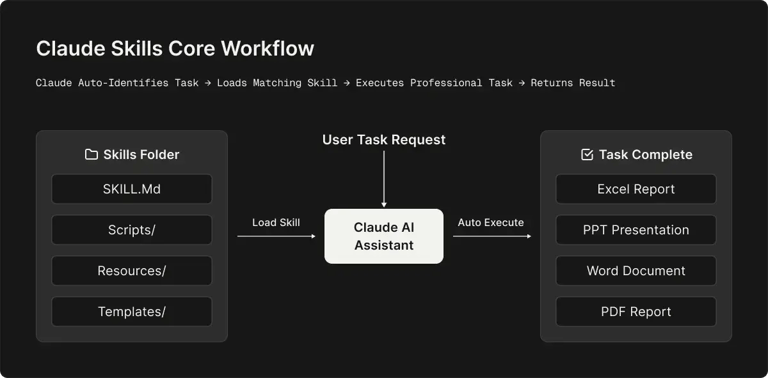
For example, imagine you create a skill called architecture-diagram that explains how to generate architecture diagrams for your codebase. Later, if someone asks Claude about system architecture, Claude can automatically apply that skill to produce the diagram.
Claude Code Skills Core Features
Below is an overview of the main features and capabilities that power Claude Skills:
|
Feature |
What It Does |
Why It’s Useful |
|
Official Preset Skills |
Built-in tools for working with common formats such as Excel, PowerPoint, Word, and PDF. These skills are ready to use without setup. |
Instantly enables professional document creation, editing, and data processing without additional configuration |
|
Automatic Smart Invocation |
Claude automatically detects when a skill is needed based on the user’s request and activates it without manual selection. |
Eliminates the need to learn commands or choose tools manually |
|
Custom Skills |
Users can create their own specialized skills using the skill-creator system to match personal workflows or business needs. |
Allows automation of repetitive or complex tasks tailored to specific processes |
|
Cross-Platform Compatibility |
Skills work across Claude.ai, Claude Code, and API integrations. |
Can be created once and reused across different environments and applications |
|
On-Demand Loading |
Only the instructions and resources required for the current task are loaded. |
Keeps responses fast and efficient without slowing down Claude’s performance |
|
Code Execution Support |
Skills can include scripts such as Python for data processing, automation, or analysis. |
Enables advanced capabilities like data analysis, file processing, and automated workflows |
When to Use Claude Skills?
Use Claude Code Skills when you want Claude to remember a specific workflow or knowledge and to apply it whenever it’s relevant. The following are common situations where Claude Skills can be helpful:
1. Standardized Workflows
Skills are great for processes you perform the same way every time. Examples include:
- Running a pull request review checklist
- Generating changelogs
- Formatting code
- Creating documentation pages in a consistent style
Instead of repeating the instructions each time, you can store the workflow as a skill, and Claude follows it automatically.
2. Expert Knowledge
Skills can also store rules, conventions, or guidance you want Claude to consistently follow. For example:
- Enforcing coding conventions
- Adding reminders like “always include type signatures”
- Providing templates, such as pull request templates or commit message guidelines
3. Interactive Commands
Skills are also useful for creating tasks you would normally run manually and repeatedly during your workflow. Examples include:
- A /refactor skill that reviews and cleans up your most recent code changes
- A /test-all skill that runs your full test suite and summarizes the results
These skills act like custom commands, allowing you to trigger common development tasks quickly while ensuring they run the same way every time.
What Are Claude Code Subagents?
Claude Subagents allow Claude Code to run specialized assistants in parallel behind the scenes. Instead of one assistant handling everything in a single conversation, Claude can delegate certain tasks to dedicated helpers designed for specific roles. A subagent has its own context window, system prompt, and permissions, allowing it to operate independently of the main conversation.
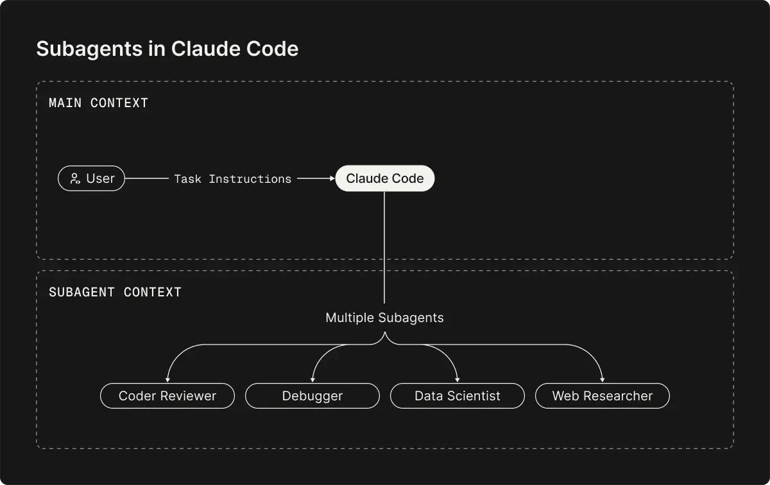
When the main Claude session encounters a task aligned with a specialist’s role, it can delegate the work to that subagent, which completes the task independently and returns the results to the main conversation. For example, you might create a code reviewer whose role is to analyze code and suggest improvements. When you ask Claude to review a project, it can delegate the task to this reviewer. The agent examines the code using its own context, generates feedback, and sends the results back to the main conversation.
Claude Code Subagents Core Features
Below is an overview of the main features and capabilities of Claude Subagents.
|
Feature |
What It Does |
Why It’s Useful |
|
Automatic Task Delegation |
Claude can automatically route requests to the most appropriate subagent based on the task at hand. |
Reduces manual switching and ensures the best tool handles each task |
|
Manual Agent Invocation |
Developers can explicitly call a subagent using commands such as /agent. |
Gives developers precise control over which specialized agent runs a task |
|
Custom System Prompts |
Each subagent can be configured with its own instructions, behavior rules, and expertise area. |
Enables highly tailored AI assistants optimized for specific workflows |
|
Tool Access Control |
Developers can define which tools each subagent is allowed to use. |
Improves safety and prevents agents from executing unintended actions |
|
Workflow Automation |
Multiple subagents can be chained together to perform complex workflows (e.g., generate code → test → deploy). |
Automates multi-step development pipelines, reducing manual work |
|
YAML Configuration |
Subagents can be created using Markdown files with YAML front matter for configuration. |
Makes agents easy to version, edit, and share in repositories |
|
Context Preservation |
Main conversation context remains intact while subagents process delegated tasks. |
Allows long development discussions without losing earlier information |
|
Team Collaboration |
Subagents can be stored in project repositories and shared across teams. |
Ensures consistent tooling and workflows across development teams |
When to Use Claude Code Subagents?
Use Claude Code Subagents when a task is large, complex, or involves processing a lot of information that you don’t want cluttering your main conversation. The following are common situations where subagents are helpful:
1. Large or Multi-Step Tasks
Subagents are ideal when a task requires analyzing many files or performing multiple steps. If the work was done directly in the main conversation, it could quickly fill the context with unnecessary details. For example:
- Reviewing a large section of a codebase
- Researching how authentication is implemented across multiple files
- Analyzing logs or large datasets
2. Isolating Heavy Processing
Subagents help prevent your main conversation from becoming overloaded with intermediate data. For instance, if Claude needs to read dozens of files to answer a question, a subagent can:
- Read and process the files in its own session
- Extract the key findings
- Return a concise summary
3. Using Different Models or Tools
Subagents can be configured with different models, tools, or permissions depending on the task at hand. Examples include:
- A fast lookup subagent using the Haiku model for quick searches
- A data analysis subagent with specialized libraries or GPU support
- A build subagent that can execute commands but cannot modify files
4. Parallel or Specialized Work
Subagents work well when you want multiple specialized agents working on different parts of a task. Common examples include:
- Code reviews
- Large-scale refactors
- Deep research tasks
- Multi-step analysis across a codebase
Claude Code Skills vs. Subagents: Key Differences
While both Skills and Subagents extend Claude Code’s capabilities, they do so in fundamentally different ways. Below is a breakdown of key differences in how they operate and when to use them.
1. Invocation and Autonomy
Skills are passive instructions that the main Claude agent uses when needed. Claude can automatically invoke a skill if the prompt matches its description, or you can trigger it manually with a /skill-name command.
Subagents, by contrast, are active mini-agents. When Claude determines a task fits a subagent’s role, it launches it as a separate process that runs independently from the main agent.
🔴 Verdict:
Use a Skill when you want Claude to seamlessly integrate a capability into its own reasoning (e.g., a built-in command or helper prompt). Use a Subagent when you need a distinct worker to run a task in isolation.
2. Context and Isolation
Skills run inside Claude’s main context window. When a skill is used, its instructions and relevant content are added to the current conversation, which can take up context space (though Claude loads them progressively to reduce this).
Subagents have their own separate context window. Any files or data they process stay within that isolated context, leaving the main conversation unchanged.
🔴 Verdict:
Choose Skills for tasks that won’t overload your session’s context. Opt for Subagents when you need to prevent context bloat or want tasks truly sandboxed (e.g., parallel code analysis or searches).
3. Task Suitability
Skills work best for structured workflows or repeatable expertise that can be encoded as instructions, such as generating documentation, applying refactoring patterns, or following a checklist.
Subagents are better for open-ended or resource-intensive tasks. They can handle multi-step workflows, process large sets of files, or run longer operations independently. Subagents can also run in parallel, letting multiple specialized agents work on different parts of a task.
🔴 Verdict:
Use Skills for routine, predictable tasks that fit a single command. Use Subagents for complex, exploratory workflows that benefit from isolation or parallel execution.
4. Tools, Models, and Control
Skills run under the main agent’s model and tool permissions. By default, they use the same capabilities Claude has, unless you explicitly restrict them.
Subagents can be configured with different models and tool sets. For example, one subagent might use a faster, lightweight model with read-only tools, while another may have full editing permissions. This allows finer control over cost, speed, and safety.
🔴 Verdict:
Use a Subagent when you need a specialized setup (e.g., a different model or limited permissions). Use a Skill when the default environment is sufficient.
Use Claude Code More Effectively with Zencoder
While Claude Code Skills and Subagents extend Claude’s capabilities for automation and task delegation, developers often use multiple AI tools across different environments. This can create fragmented workflows in which powerful CLI tools, IDE extensions, and enterprise features exist in separate systems rather than in a unified development experience. This is where Zencoder can help you.
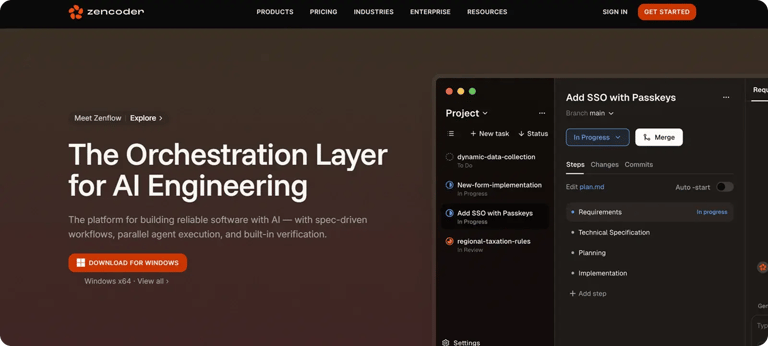
Zencoder’s Universal AI Platform addresses these limitations by unifying AI coding tools, IDE integration, and enterprise features in a single environment. Instead of forcing developers to choose between powerful CLI tools and convenient IDE extensions, Zencoder brings both together on a single platform.
With Zencoder, developers can:
- Work with their existing AI subscriptions, such as Claude, ChatGPT, or Gemini
- Access AI coding tools directly inside VS Code or JetBrains IDEs
- Switch between AI providers instantly depending on the task
- Add enterprise-grade capabilities without additional infrastructure
Setting Up Claude Code with Zencoder
The setup process is straightforward. After installing Zencoder and your preferred AI CLI tool, you simply configure the runtime inside Zencoder. Before getting started, make sure you have:
- Node.js 18 or newer
- A Claude subscription with Claude Code access
🟢 Step 1: Install Claude Code by Anthropic – Visit the Claude Code by Anthropic page to choose a plan that includes access to Claude Code. Then, install the Claude Code CLI. Use npm to install it by running:

🟢 Step 2: Authenticate Claude Code – Run the following command to log in with your Claude account:

You will be prompted to authenticate through the terminal.
🟢 Step 3: Select Claude Code as the runtime in Zencoder – Once authentication is complete:
- Open Zencoder in your IDE
- Click the settings icon in the chat interface
- Under Agent CLI, select Claude Code from the available runtimes
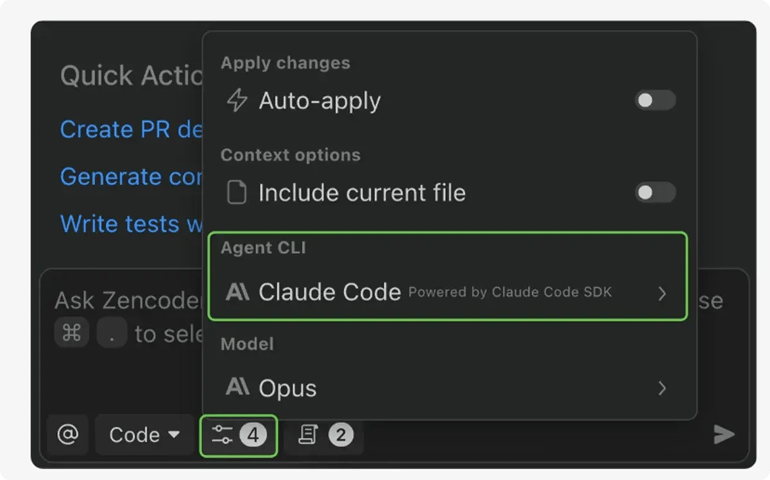
After selecting Claude Code and completing the login process, you’ll see a confirmation message indicating that Claude Code is ready to use.
Once configured, Claude Code works inside Zencoder just like any other runtime. You can select different agents or create custom agents directly from the model selector. For example, a Review Agent can analyze the current file in your editor and provide feedback on potential improvements.
Because Claude Code runs within Zencoder, it integrates with all of the platform’s development features, including:
1️⃣ Zenflow – Zenflow is an AI-first engineering orchestration layer that coordinates multiple specialized agents to plan, build, test, review, and ship software. Instead of relying on manual sequencing, Zenflow enables parallel workflows, allowing generated code to be automatically tested and refined before reaching developers.
2️⃣ Deep tool integrations – Zencoder integrates with more than 20 developer tools, enabling AI agents to operate directly within IDEs, repositories, and CI/CD pipelines. This provides lifecycle awareness across development workflows and reduces context switching between tools.
3️⃣ Zentester – Zentester provides autonomous testing by generating, executing, and maintaining tests across the full stack, using natural language instructions. It continuously adapts to code changes, identifies risky paths and edge cases, and maintains high test coverage without requiring manual updates.
4️⃣ Zen Agents – Zen Agents function as customizable AI teammates that understand your organization’s codebase, tools, and workflows. Teams can deploy specialized agents for tasks such as code reviews, refactoring, or integrations, allowing expertise to scale consistently across projects.
5️⃣ AI Coding Assistants – The built-in AI coding assistants help accelerate development through context-aware code completion, production-ready code generation, and continuous AI-assisted reviews. It works alongside developers in real time to improve code quality, security, and consistency.
6️⃣ Multi-repository search – Multi-repo search enables AI agents to index and reason across complex multi-repository architectures. This allows agents to trace dependencies, understand system-wide context, and make informed changes across large codebases rather than isolated files.
Start with Zencoder for free today and supercharge Claude Code with a unified AI coding platform built for modern development.