Autonomous AI agents are AI systems that can independently plan, make decisions, and take action to achieve a goal.
If you're looking to automate repetitive work and significantly improve your productivity with AI, autonomous agents are a solid choice. In this article, you'll learn how to build autonomous AI agents to automate complex tasks and workflows.

Key Takeaways
- Start with a clear purpose before building your agent
Define exactly what your autonomous AI agent should do, who will use it, and how much autonomy it should have. A focused goal makes it much easier to choose the right architecture, tools, and workflows. - An autonomous agent is more than just an AI model
Successful agents need solid AI models, as well as memory, planning, APIs, business systems, and guardrails. These components enable the agent to reason through tasks, use external tools, and reliably complete multi-step workflows. - Your data, integrations, and testing have the biggest impact on performance
Even the best AI model won't perform well without accurate data and access to the right systems. Having the right data sources and testing real-world scenarios can have a greater impact than choosing a powerful AI model. - Plan for security, scalability, and ongoing improvement
Autonomous agents need safeguards such as permission controls, human approvals for sensitive actions, error handling, and feedback systems. These help reduce risks while allowing your agents to improve over time and scale across your organization. - Zencoder helps you build and deploy agents faster
If you want to launch autonomous AI agents without building every workflow from scratch, Zencoder's Zenflow provides ready-to-use agent templates, built-in integrations with tools you already use, and everything you need to automate workflows.
What Are Autonomous AI Agents?
Autonomous AI agents are software systems that can understand goals, make decisions, and complete tasks with minimal human intervention. Instead of simply answering prompts or following a fixed set of rules, they analyze information, create a plan, take action using tools such as APIs, databases, or code, and adapt their approach based on the results.
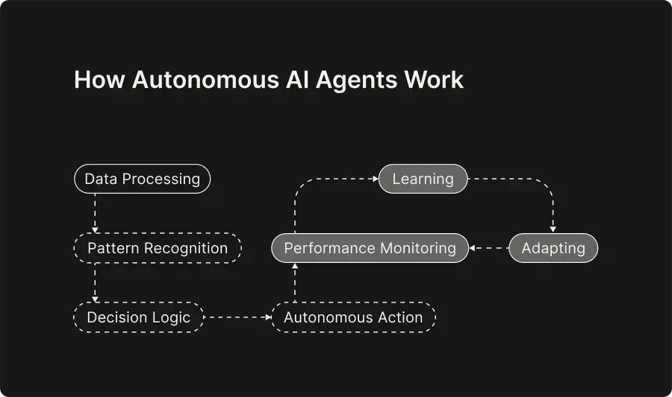
This ability to reason, act, and improve over time makes them well-suited for handling complex, multi-step workflows across a wide range of business and development tasks.
Types of Autonomous AI Agents
Autonomous AI agents can be classified based on how they make decisions and interact with their environment. Below are examples of key autonomous agent types:
- Simple reflex agents – Simple reflex agents respond immediately to what is happening. They follow predefined if-then rules to decide what action to take and do not remember previous events, so they’re suitable for simple, predictable tasks.
- Model-based reflex agents – Model-based reflex agents make decisions based on past events and changes in their environment. This internal model helps them understand situations more accurately, even when they don't have complete information.
- Goal-based agents – Goal-based agents are designed to achieve a specific objective rather than reacting to inputs. They evaluate different options, plan ahead, and choose the actions most likely to achieve the desired outcome.
- Utility-based agents – Utility-based agents take decision-making a step further by comparing the possible outcomes of different actions. Instead of choosing any solution that meets a goal, they select the one that offers the greatest overall value based on factors such as cost, speed, efficiency, or accuracy.
- Learning agents – Learning agents continuously improve as they gain experience. By analyzing feedback from previous actions, they adapt their behavior over time and become better at handling new situations.
- Multi-agent systems – Multi-agent systems consist of multiple AI agents working together on the same problem. Instead of one agent doing everything, different agents handle specialized tasks while coordinating their efforts to solve complex problems efficiently.
How to Build Autonomous AI Agents?
Building an autonomous AI agent requires careful planning, from defining its purpose to selecting the right models, tools, and workflows. Below are eight key steps that will help you design, build, and deploy an effective autonomous AI agent.
Step 1: Define the Agent's Role
Before building an autonomous AI agent, clearly define what it should do and where it will be used. A well-defined role keeps the agent focused and prevents it from becoming a generic assistant that doesn't solve real problems.
Start by deciding on:
- The tasks it should perform (e.g., customer support, sales, or procurement)
- Who will interact with it (employees, customers, or both)
- Its level of autonomy, including whether it will be able to complete tasks independently or require human approval for certain actions
Step 2: Choose the Right AI Platform and Tools
The platform and tools you choose will determine how easily you can build, deploy, and manage your AI agent. When evaluating a platform, look for features such as:
- Support for the right AI models to match your use case and performance requirements
- Integrations with external systems so the agent can access and act on external data
- Memory and context management to help the agent maintain conversations and make more informed decisions
- Workflow automation that enables the agent to complete tasks across multiple systems with minimal human intervention
- Monitoring, security, and access controls to ensure the agent operates reliably and safely in production environments
Step 3: Design the Agent’s Architecture
Before development, map out how your AI agent will work from input to final action. Start by writing the full workflow: what the user asks, how the agent interprets the request, what tools or data it needs, what actions it takes, and when it seeks human approval. Break the architecture into key parts:
- Input: Where the request comes from, such as a chat interface, app, or internal tool
- Reasoning: How the AI model understands the request and decides what to do next
- Planning: How the agent breaks a larger goal into smaller steps
- Tools and data: Which APIs, databases, browsers, or business systems the agent can access
- Memory: What information the agent should remember during or across tasks
- Guardrails: When the agent should stop, ask for approval, or escalate to a human
- Output: What the agent should deliver, such as an answer, report, ticket update, or completed action
Step 4: Prepare the Agent's Knowledge and Data
Once you've identified the data sources your agent needs, prepare them so the AI can retrieve and use information effectively. Low-quality or outdated data will lead to poor decisions, regardless of how capable the underlying model is. Before deployment, consider:
- Cleaning and organizing internal documents, databases, and knowledge bases
- Connecting business systems and APIs that provide the information the agent needs
- Using Retrieval-Augmented Generation (RAG) with a vector database when the agent must search large collections of documents
- Keeping data updated and implementing appropriate security and access controls
- Applying AI DLP to prevent sensitive data from being exposed through the agent’s retrievals or outputs
Step 5: Choose and Configure the AI Model
The AI model you choose will determine how well your agent understands requests, reasons through problems, and completes tasks. Popular options include:
- OpenAI GPT models for general-purpose reasoning, coding, and conversational tasks
- Anthropic Claude models for long-context reasoning, coding, and document analysis
- Google Gemini models for multimodal capabilities and integration with Google services
- Open-source models such as Llama, Mistral, or Qwen for organizations that need self-hosting, greater customization, or more control over their data
When evaluating models, pay attention to the following aspects:
|
Model Aspect |
What You Should Do |
|
Task performance |
Choose a model that performs well for your primary use case, such as coding, customer support, content generation, or data analysis. |
|
Reasoning ability |
If your agent needs to plan, solve complex problems, or make multi-step decisions, prioritize models with strong reasoning capabilities. |
|
Speed and cost |
Balance response quality with API costs and latency, especially if the agent handles a high volume of requests. |
|
Deployment |
Decide whether to use a cloud-hosted model or deploy an open-source model locally based on your security, compliance, and infrastructure requirements. |
|
Customization |
Consider whether you need configurable system prompts, model parameters, or fine-tuning to better align the agent with your business needs. |
Once you've selected a model, configure it with clear system instructions, prompts, and parameters that define how the agent should behave. If your workflow involves multiple tasks, you can also use separate models for different responsibilities. For example, you may use one for planning and another for code generation or data analysis.
Step 6: Integrate Tools and Build the Agent
Now it's time to turn your design into a working agent. Whether you're building with code or using a no-code platform, you ultimately need to connect your AI models with the tools and systems they need to perform real tasks. Depending on your use case, your agent may need access to:
- CRM platforms
- Calendar and scheduling tools
- Databases and knowledge bases
- File storage systems
- Web browsers
- APIs and third-party services
- Custom business applications
You'll also need to define when and how the agent should use each tool. This is typically done through prompts, workflows, or function calls that guide the model's decision-making and help ensure accurate, reliable execution.
Depending on the complexity of your agent, you may also implement orchestration logic to determine which tools or specialized sub-agents to use, in what order, and how information is passed between them. This helps the agent coordinate multi-step workflows more efficiently and ensures each component handles the tasks it's best suited for.
To keep your agent secure and reliable, implement:
- Error handling to manage unexpected failures
- Retry mechanisms for temporary issues or failed requests
- Secure authentication for accessing external tools and services
- API rate-limit management to prevent request limits from being exceeded
Step 7: Add Memory and Feedback Systems
To make your AI agent more effective over time, give it the ability to remember relevant information and learn from feedback. Most autonomous agents use two types of memory:
- Short-term memory to keep track of the current conversation, task progress, and recent actions
- Long-term memory to store user preferences, past interactions, and important domain knowledge
Use vector databases to help agents retrieve relevant information from previous interactions based on meaning rather than exact keywords. It's also important to avoid storing unnecessary information. Keeping memory focused on relevant tasks improves performance and reduces the risk of the agent retrieving outdated or irrelevant context.
Finally, implement feedback mechanisms so the agent can continuously improve. These may include:
- User ratings or thumbs up/down
- Human reviews and approvals
- Performance monitoring and evaluation
- Human-in-the-loop workflows for sensitive or high-risk decisions
Step 8: Test, Deploy, and Monitor Your Agent
Before deploying your AI agent, test it thoroughly to ensure it performs as expected in both routine and complex scenarios. During testing, evaluate:
- Task accuracy and response quality
- Response speed and overall performance
- Its ability to handle unexpected inputs
- Its ability to recover from errors without failing
Once you're confident in its performance, deploy the agent to the platforms where users will interact with it. After deployment, continuously monitor your agent to ensure it remains reliable and secure. Track metrics such as task success rates, response times, system uptime, and error logs to quickly identify issues and areas for improvement.
Challenges in Building Autonomous AI Agents
Building reliable and secure agents comes with several challenges that developers should plan for.
- Tool and API issues – Agents may choose the wrong tool, send incorrect requests, or encounter API or network failures. Adding retries, fallback options, and clear rules for tool usage makes agents more reliable.
- Security and unauthorized actions – Agents often have access to sensitive systems, so security should be a top priority. Protect them with permission controls, input validation, and safeguards against attacks such as prompt injection.
- Errors spreading between agents – In multi-agent systems, one mistake can quickly affect the rest of the workflow. Checking each agent's output and adding human approval or emergency-stop mechanisms helps prevent larger failures.
- Limited or changing information – Agents do not always have complete or up-to-date information when making decisions. Giving them access to real-time data and allowing them to reassess their decisions improves accuracy.
- Integration and scaling – Connecting AI agents to existing tools, databases, and business software can be difficult, and multi-agent systems become more complex to manage as they grow. Standardized integrations and proper orchestration make it easier to scale AI agents.
- Cost and resource management – Running advanced AI models, storing long-term memory, and making frequent API calls can become expensive over time. Keep costs under control by using smaller models for simpler tasks, limiting unnecessary API calls, and storing only the information the agent actually needs.
Build Autonomous AI Agents Effortlessly with Zencoder
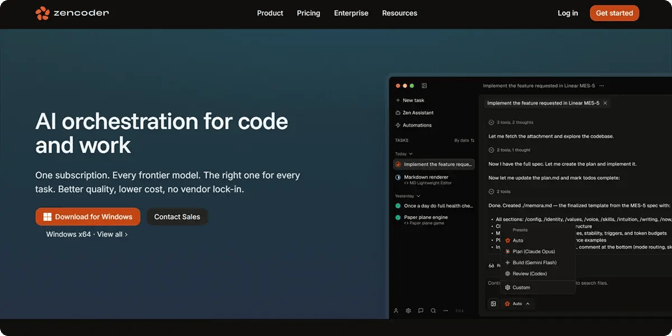
Zencoder's Zenflow enables organizations to build and deploy autonomous, goal-driven workflows that integrate with the tools they already use. Rather than automating individual tasks, Zenflow's AI agents can:
- Break complex goals into smaller, manageable steps
- Coordinate actions across connected business applications
- Monitor progress and adapt workflows as new information becomes available
- Automate work across tools such as Jira, Linear, GitHub, Gmail, Google Calendar, Google Docs, HubSpot, Slack, and Notion
Zencoder provides a marketplace of ready-to-use autonomous agent templates, so teams don't have to build workflows from scratch. They can select templates for common business tasks, customize them to match their goals, tools, and processes, and deploy them much faster. Zenflow can support a wide range of business workflows, including:
- Product and engineering – Zenflow agents can automatically create standup summaries, track work across tools such as Jira, Linear, GitHub, and documentation platforms, send customer feedback to the appropriate engineering team, and flag outdated software or potential security issues.
- Finance – Agents can collect financial information from various systems, prepare reports, organize key documents, and automatically handle repetitive administrative tasks.
- Marketing – They can track how campaigns are performing, gather customer feedback, monitor conversations about product launches, and create reports that clearly show what's working and what needs to improve.
- Sales – Agents can find and research potential customers, collect key company information, write personalized sales emails, remind teams to follow up, and help keep every sales opportunity moving.
- Operations – Zenflow agents can integrate information from various business tools, track project progress, automate routine tasks, and keep everyone updated on the latest project status.
- HR and people – They can help write job descriptions, support employee onboarding, prepare performance reviews, and summarize employee feedback to help HR teams make better decisions.
Start your free trial today and build autonomous AI agents that can plan, act, and automate work across the tools your team already uses.

FAQ:
1. How long does it take to build an autonomous AI agent?
A simple autonomous AI agent can often be built in a few days using no-code or low-code platforms, while more advanced, enterprise-grade agents may take several weeks or months. The timeline depends on the agent's complexity, integrations, and testing requirements.
2. What is the difference between an AI chatbot and an autonomous AI agent?
The biggest difference between autonomous AI agents and AI chatbots lies in what they can do. AI chatbots mainly provide information and assist through conversation, while autonomous AI agents can take action, use tools, and complete tasks on a user's behalf.
3. Do autonomous AI agents need human oversight?
Yes. Even highly autonomous agents should involve human oversight for sensitive, high-risk, or irreversible actions. You can use approval steps and escalation rules to determine when the agent can act independently and when a person needs to intervene.
4. Can you build an autonomous AI agent without coding?
Yes. No-code and low-code platforms can let you create agents by configuring workflows, integrations, and actions without building the entire system yourself. Custom coding may still be necessary for complex integrations or highly specialized requirements.
5. Do autonomous AI agents need to be trained from scratch?
No. Most autonomous AI agents use existing AI models and are configured with prompts, tools, workflows, and access to relevant data. Training or fine-tuning a model is only necessary when your use case requires more specialized behavior or domain-specific performance.