
AI-powered developer workflow automation helps teams reduce repetitive tasks, speed up development cycles, and improve productivity by integrating intelligent tools into everyday coding and deployment processes.
According to the 2025 Stack Overflow Developer Survey, 84% of developers are already using or planning to use AI tools in their workflows, with more than half using them daily. In this article, you’ll learn how to automate developer workflows with AI so you can streamline your development process, ship faster, and work more efficiently.

Key Takeaways
- Start small by automating repetitive, low-risk tasks
Focus first on workflows like test generation, boilerplate code, documentation, and release notes. These tasks are easy to validate, deliver quick wins, and help teams build trust in AI-assisted development without introducing major risk.
- AI improves developer productivity by reducing busywork
AI tools can speed up coding, testing, reviews, and debugging while reducing context switching and repetitive manual effort. This gives engineers more time to focus on architecture, problem-solving, and high-value development work.
- Strong governance and human oversight are still essential
AI-generated code should never bypass code review, testing, or security validation. Clear usage policies, automated quality checks, and human approval processes are critical to prevent unreliable code and security vulnerabilities from reaching production.
- The best AI tools integrate directly into your existing workflow
Successful adoption depends on choosing tools that work naturally with your IDEs, repositories, CI/CD pipelines, and documentation systems. Strong context awareness, reasoning ability, and customization options matter just as much as code generation quality.
- Platforms like Zencoder help teams automate the entire engineering lifecycle
Instead of offering basic autocomplete alone, Zencoder combines AI coding assistance, autonomous workflow agents, testing automation, multi-repo support, and CI/CD orchestration into a single platform. Features like Repo Grokking™, Zenflow, and Zentester help teams automate development workflows at scale while improving code quality, testing, and delivery speed.
Benefits of Automating Developer Workflows with AI
AI automation helps development teams eliminate repetitive work, improve consistency, and free up time for high-value engineering tasks. The key benefits of automating developer workflows with AI are:
- Accelerated productivity and faster delivery – AI automates repetitive tasks like generating boilerplate code, writing tests, and refactoring routine code, which helps developers complete work faster. JetBrains’ 2025 survey found that almost 90% of AI users save at least one hour per week.
- Improved code quality and test coverage – AI helps identify risky patterns, recommend best practices, and generate tests earlier in the development cycle.
- Faster feedback loops and shorter development cycles – Automated reviews, testing, and static analysis provide immediate feedback without waiting on teammates, helping teams identify and fix issues earlier in the workflow.
- Reduced cognitive load and fewer context switches – By handling repetitive documentation, triage, and maintenance work, AI allows engineers to stay focused on high-impact problem-solving. Recent data shows that daily AI users were 58% more focused and 81% more satisfied with their jobs than non-AI users.
- Scalable knowledge sharing and faster onboarding – AI can surface useful context from codebases, tickets, and documentation, making knowledge easier to access across teams. Around 58% of developers already use AI for requirements engineering, while many teams rely on AI to generate design documents, release notes, and technical summaries.
Which Developer Workflows Can You Automate?
Any workflow built around repeatable steps, structured inputs, or historical data is a strong candidate for AI automation. Here are some of the highest-impact workflows you can start streamlining today:
|
Workflow Area |
How AI Helps |
|
Requirements gathering and planning |
Summarises customer interviews, extracts user stories from issue trackers, and generates acceptance criteria |
|
Design and architecture assistance |
Proposes system designs, generates UML diagrams, and evaluates architectural trade-offs using existing patterns |
|
Code generation and completion |
Writes scaffolding, API integrations, and functions from natural-language prompts |
|
Refactoring and code improvement |
Detects anti-patterns, suggests abstractions, and automatically applies coding standards |
|
Generates test cases, predicts high-risk tests based on code changes, and analyzes test coverage |
|
|
Code review and static analysis |
Flags bugs, security risks, and style violations automatically |
|
Bug detection and root-cause analysis |
Analyzes logs, stack traces, and commit history to prioritize issues and recommend fixes |
|
Documentation generation |
Creates API documentation, README files, inline comments, and developer guides from source code and commits, which teams can then turn a static PDF into an interactive flipbook for easier sharing and reading |
|
Dependency and version management |
Suggests upgrades, checks compatibility, and applies migrations automatically |
|
CI/CD pipeline orchestration |
Optimizes build pipelines, caching, rollout strategies, and flaky test detection; for recurring background workloads, batch job scheduling coordinates run times and dependencies |
How to Automate Developer Workflows with AI in 7 Steps
Here are seven practical steps to automate developer workflows with AI and improve productivity:
Step 1: Map Your Current Workflow and Identify Pain Points
Developers often spend more time reviewing, debugging, and planning than actually writing new code, so it’s important to understand where the biggest inefficiencies exist. Ask questions like:
- Which parts of the workflow are repetitive or manual?
- Where do mistakes happen most often?
- Which processes rely heavily on human memory or constant context switching?
- What tasks consume the most time without adding significant value?
Document the workflow from requirements through deployment, then use metrics like review time, build failures, and context switching to identify bottlenecks and prioritize improvements. A clear baseline makes it easier to measure progress and justify automation efforts.
Step 2: Start with Low-Risk, High-Impact Tasks
While many parts of the development workflow can be automated, it’s best to start small and focus on low-risk tasks that deliver immediate value. Begin with processes that have predictable inputs and outputs, such as generating tests, formatting code, writing boilerplate, or compiling release notes, where mistakes are easy to detect and correct. This approach helps teams build confidence in AI-assisted workflows before expanding automation into more complex or security-critical areas.
Step 3: Choose the Right AI Tools for Your Stack
Once you’ve identified the best opportunities for automation, the next step is selecting tools that fit naturally into your existing workflow.
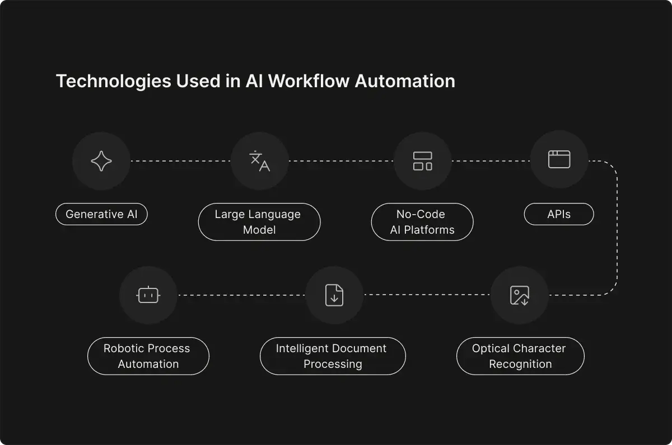
While many AI tools promise faster development and higher productivity, not all of them will align with your team’s processes, security requirements, or engineering stack, so it’s important to evaluate them carefully before adoption. The table below highlights the most important factors to consider.
|
Category |
What to Evaluate |
Why It Matters |
|
Integration |
Compatibility with IDEs, repositories, and CI/CD pipelines |
A well-integrated tool fits naturally into daily workflows and reduces context switching. |
|
Code quality |
Accuracy, reliability, and maintainability of generated code |
Higher-quality output means fewer bugs, less rework, and faster reviews. |
|
Reasoning capability |
Strength in debugging, refactoring, and architectural tasks |
Strong reasoning makes the tool more useful beyond simple code completion. |
|
Context window |
Ability to understand large codebases and long conversations |
Better context improves consistency across files, systems, and ongoing tasks. |
|
Security and privacy |
Handling of source code, prompts, and training data |
Strong security practices are essential for safe enterprise adoption. |
|
Cost structure |
Pricing model, token usage, and cost predictability |
Clear pricing helps teams manage budgets as adoption grows. |
|
Customization |
Ability to adapt workflows, prompts, or internal knowledge |
Flexible tools add more value by aligning with how your team already works. |
|
Vendor reputation and adoption |
Enterprise adoption, roadmap, and customer satisfaction |
Widely trusted tools are more likely to offer long-term stability and support. |
🟢 Note: To explore the top AI workflow automation tools available today, check out our article: 9 Best Tools for Automating AI Workflows [2026 Comparison].
Step 4: Integrate AI into Your Existing Toolchain
Once you’ve selected an AI tool, the next step is to integrate it into the platforms and workflows your team already uses. Connect AI assistants across your development stack using extensions, plugins, APIs, or webhooks. This can include integrations with:
- Code editors and IDEs
- Source control repositories
- Issue tracking systems
- CI/CD pipelines
- Documentation platforms
Step 5: Establish Policies, Guardrails, and Human Oversight
Without proper governance, AI can amplify errors, security risks, and poor engineering practices. Industry research from 2026 found that 96% of developers do not fully trust AI-generated code, while 61% said AI often produces code that appears correct but is ultimately unreliable. To use AI safely and effectively in software development, you should:
- Define clear usage policies – Establish clear rules for how AI tools can be used across the software development lifecycle. These policies should define which tasks require human approval, how AI-generated code is documented, and how governance aligns with frameworks such as the NIST AI Risk Management Framework.
- Introduce strong quality controls – AI-generated code should go through the same validation processes as human-written code before being merged into production systems. This includes static analysis, automated testing, and security scanning, as well as additional review mechanisms such as AI “judge” systems that filter unreliable outputs.
- Protect against prompt injection and supply-chain risks – Security controls should be implemented to detect malicious prompts, validate dependencies, and maintain audit trails of prompts, responses, and model activity.
- Keep humans in the loop – Human oversight should remain mandatory for any code that reaches production, regardless of how advanced the AI system appears. This is especially important given that only 48% of developers consistently review AI-assisted code before committing it.
Step 6: Pilot with a Small Scope and Measure Outcomes
Start with a small pilot project to evaluate how automation improves your development workflow before expanding it across the organization. For example, you could automate test generation for a single service or introduce an AI reviewer for internal tools. Measure outcomes over time using metrics such as:
- Time saved
- Bug counts
- Code quality
- Number of review comments
- Developer satisfaction
Step 7: Iterate, Refine, and Expand
Use pilot results to improve prompts, refine tooling, and gradually expand automation into related tasks. Give AI clear instructions, style guides, and examples so it aligns with your standards. As confidence grows, extend automation to areas like documentation, bug triage, and release notes while continuing to monitor quality and productivity.
Challenges of Automating Developer Workflows with AI
To successfully adopt AI in developer workflows, teams need to understand the challenges and limitations of AI-generated code. Here are the key considerations to keep in mind:
- Inaccurate or unreliable code generation – AI-generated code can appear correct while introducing subtle bugs, security vulnerabilities, or inefficient logic that may not be detected until later in the development cycle.
- Security and privacy risks – Sharing proprietary code, internal documentation, or sensitive data with AI tools can create compliance and security concerns if proper controls are not in place.
- Overreliance on AI-generated outputs – Developers may gradually trust AI suggestions without fully reviewing them, increasing the risk of low-quality code, hidden defects, or poor architectural decisions reaching production.
- Limited understanding of business context – While AI tools are good at pattern recognition and code generation, they often lack a deeper understanding of product requirements, business logic, and long-term system goals.
- Integration complexity – Introducing AI into existing development workflows may require changes to tooling, infrastructure, governance policies, and CI/CD pipelines, especially in large engineering organizations.
- Inconsistent output quality – AI responses can vary significantly depending on prompts, context, and model limitations, making consistency difficult without standardized workflows and review processes.
Automate Developer Workflows with Zencoder
As AI becomes a core part of modern software development, teams need tools that go beyond simple code suggestions and actually help orchestrate, verify, and accelerate the entire engineering workflow. This is where Zencoder can help you.
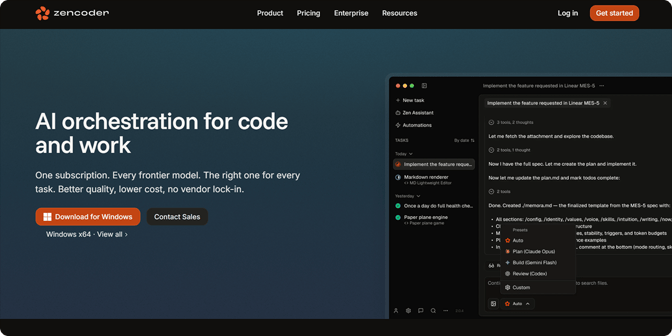
Zencoder is an AI-powered coding and workflow automation platform designed to streamline software development across the entire engineering lifecycle. Instead of functioning as a simple coding assistant, Zencoder uses intelligent AI agents to automate code generation, testing, refactoring, documentation, reviews, and workflow orchestration across IDEs and CI/CD pipelines.
Its platform combines AI coding assistance, autonomous agents, workflow automation, and AI-driven testing into a unified solution that helps development teams reduce repetitive tasks, improve software quality, and accelerate delivery.
Here are some of Zencoder’s key features:
1. Repo Grokking™ – Zencoder’s proprietary Repo Grokking™ technology deeply analyzes your entire codebase to understand architecture, dependencies, coding patterns, and project-specific logic across multiple repositories. This gives AI agents a deeper understanding of your development environment, enabling more accurate code generation, smarter debugging, safer refactoring, and better consistency across projects.
2. Zenflow – Zenflow is Zencoder’s AI-first engineering workflow engine that coordinates multiple AI agents to build, test, review, and ship reliable software. Rather than relying on a single assistant, Zenflow combines specialized agents for coding, testing, refactoring, review, and verification into one automated workflow system.
With Zenflow, teams can:
- Automatically verify code through testing and cross-agent reviews before deployment
- Build software directly from specifications, PRDs, and architecture documentation
- Execute multiple development tasks in parallel without code conflicts
- Use prebuilt workflows for features, bug fixes, and refactoring
- Create custom workflows tailored to internal engineering processes
3. AI Coding Assistant – Zencoder’s AI Coding Assistant helps developers write, review, and improve code faster through intelligent automation and real-time guidance. The assistant includes:
- Context-aware code completion to reduce repetitive typing and improve accuracy
- Automated code generation for production-ready implementations
- AI-powered code reviews that identify bugs, security risks, and style issues early
- A built-in chat assistant that provides coding guidance and workflow support
4. Zentester – Zentester is Zencoder’s AI-powered testing platform designed to automate testing across the software development lifecycle. Developers can describe what they want to test in plain English, and Zentester automatically generates and maintains tests as the codebase evolves. Zentester can:
- Automatically update tests when application logic changes
- Generate unit, integration, and end-to-end tests at scale
- Identify risky code paths and hidden edge cases
- Simulate real user behavior across interfaces, APIs, and databases
5. Multi-Repo Search – Zencoder’s Multi-Repo Search allows AI agents to index and search across multiple repositories at once, making it easier to work with large and complex codebases. Developers can manage repositories through a centralized web admin panel while giving AI agents the broader context they need to understand dependencies, shared components, and cross-repository relationships more effectively.
Start your free trial with Zencoder today and automate your entire software development workflow with AI-powered coding, testing, and delivery.

FAQ:
1. What skills do developers need to work effectively with AI-powered development tools?
Developers don’t need to be AI specialists to benefit from AI-assisted workflows. The most successful teams combine strong coding fundamentals with good review, debugging, and critical thinking skills to validate AI-generated output and maintain code quality.
2. Can small development teams benefit from AI workflow automation, or is it mainly for enterprises?
AI workflow automation can be valuable for teams of any size, not just large enterprises. Smaller teams often see fast results because AI helps reduce repetitive work, speed up development, and allows engineers to focus on higher-impact tasks with fewer resources.