Are you looking for a tool that can automate AI workflows from start to finish? As AI-driven processes grow more complex, the right automation tools are essential for efficiently managing models, data, and integrations. Many tools claim to support AI automation, but not all can deliver scalability, flexibility, and real production reliability. In this article, we selected the nine best tools to automate AI workflows so you can build, run, and optimize AI processes with ease.

9 Best AI Workflows Automation Tools to Try in 2026
Before exploring our top picks, here is a quick overview:
|
Name |
Best for |
Pricing |
|
Zencoder |
AI-driven software development workflows with autonomous coding, testing, and CI/CD agents |
Free plan, Starter $19, Core $49, Advanced $119, Max $250 per user/month, Enterprise custom pricing |
|
Zapier |
No-code automation across thousands of SaaS apps with AI agents and business workflows |
Free plan, paid plans from $29.99 per month, Enterprise custom pricing |
|
n8n |
Technical teams needing flexible, self-hostable, API-first, and AI-powered workflows |
Paid plans from €24 (around $28.5) per month, Enterprise custom pricing |
|
Gumloop |
No-code AI workflow automation with built-in AI actions and governance |
Free plan, paid plans from $37 per month, Enterprise custom pricing |
|
Make |
Visual, scalable automation and AI agents across thousands of apps |
Free plan, paid plans from $10.59 per month, usage-based, Enterprise custom pricing |
|
Vellum AI |
Building, evaluating, and governing AI agents for operational workflows |
Free plan, paid plans from $25 per month, Enterprise custom pricing |
|
Relay.app |
No-code creation of AI agents with human-in-the-loop business workflows |
Free plan, paid plans from $38 per month, Enterprise custom pricing |
|
Workato |
Enterprise-grade AI-powered integration and automation at scale |
Pricing not publicly disclosed |
|
Lindy AI |
AI personal assistant for email, calendar, meetings, and admin automation |
Free plan, Pro $49 per month, Enterprise custom pricing |
How We Selected the Best AI Workflows Automation Tools
To identify the best tools to automate AI workflows in 2026, we:
✅ Analyzed 25+ AI-powered automation and agent platforms, spanning no-code tools, low-code orchestration engines, and enterprise-grade iPaaS solutions, with a focus on reliability, scalability, and real-world adoption
✅ Evaluated agentic capabilities and autonomy, prioritizing tools that go beyond simple trigger-based automation to support multi-step reasoning, decision-making, and persistent AI agents that can operate with minimal human intervention
✅ Compared workflow complexity and flexibility, assessing each platform’s ability to handle branching logic, conditional execution, human-in-the-loop approvals, error handling, and long-running workflows across multiple systems
✅ Reviewed integration depth and ecosystem support, including native connections to SaaS apps, APIs, databases, AI models, CRMs, email, calendars, and developer tools, as well as extensibility via webhooks, code, or custom actions
1. Zencoder

Zencoder is an AI-powered coding agent that automates and accelerates software development workflows by using intelligent agents to generate, test, and refine production-ready code, reducing repetitive tasks and boosting developer productivity. Its spec-driven workflow engine (Zenflow) coordinates multi-agent execution and built-in verification, helping teams enforce quality standards and automate complex processes across IDEs and CI/CD pipelines.
Zencoder also includes AI Agents, which are intelligent digital assistants that go beyond basic support. These agents can automatically repair code in real time, generate documentation and unit tests, and handle repetitive tasks efficiently.
Key Features:
1️⃣ Zenflow – Zenflow is an AI-first engineering platform that coordinates multiple AI agents to build, test, and ship reliable software.
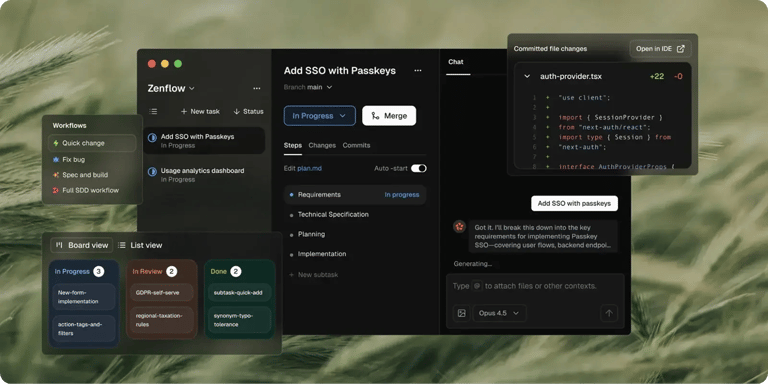
Here’s what Zenflow lets you do:
- Verify before shipping – Every workflow includes automated testing and cross-agent code review. If tests fail, agents automatically fix the issues.
- Coordinate multiple agents seamlessly – Specialized agents (coding, testing, refactoring, review, and verification) work together as a single system.
- Use proven or custom workflows – Battle-tested workflows for features, bugs, and refactors are available out of the box, with full support for custom, team-specific processes.
- Build from specs, not guesses – Agents read your specs, PRDs, and architecture docs before writing code, ensuring implementations stay locked to requirements.
- Run work in parallel – You can execute multiple tasks at the same time in isolated environments, so features, fixes, and refactors move faster without code conflicts.
2️⃣ Zen Agents – Zen Agents are customizable AI teammates that understand your code, integrate seamlessly with your tools, and can be launched in seconds.

Here is what you can do:
- Build smarter – Create specialized agents for tasks like pull request reviews, testing, or refactoring, tailored to your architecture and frameworks.
- Integrate quickly – Connect to tools like Jira, GitHub, and Stripe in minutes with our no-code MCP interface, allowing agents to operate smoothly within your existing workflows.
- Deploy instantly – Deploy agents across your organization with one click, with auto-updates and shared access to keep teams aligned and expertise scalable.
- Explore marketplace – Discover a growing library of open-source, pre-built agents ready to drop into your workflow.
3️⃣ AI Coding Assistant – Enhance your development workflow with a fully integrated AI solution designed to streamline and speed up software delivery. The assistant provides intelligent code completion, automated code generation, and real-time code review to support high-quality development at scale.
- Code Review Agent – Continuous, automated code review ensures adherence to best practices, identifies potential issues early, and enhances security through actionable feedback.
- Code Generation – Generate clean, production-ready, and consistent code tailored to your project requirements and aligned with established coding standards.
- Code Completion – Context-aware suggestions deliver accurate, intelligent completions that minimize errors, improve overall productivity, and maintain development momentum.
- Chat Assistant – Access instant, reliable guidance and personalized coding support, with intelligent recommendations that help keep your workflow efficient.
4️⃣ Zentester – Zentester uses AI to automate testing at every level, helping you catch bugs early and ship high-quality code faster. You can describe what you want to test in plain English, and Zentester automatically adapts as your code evolves.
Here’s what it does:
- As your codebase evolves, Zentester automatically updates your tests, eliminating the need for manual rewrites.
- Every layer of your application is tested at scale, from unit functions to end-to-end user journeys.
- Our intelligent agents understand your application’s architecture and interact seamlessly with the UI, APIs, and database.
- Zentester’s AI spots risky code paths, uncovers hidden edge cases, and creates tests based on real user behavior.
5️⃣ Multi-Repo Search – Index and search across multiple repositories so AI agents can understand and navigate complex, multi-repo architectures. Manage all your repositories from a simple web admin panel, and explore your entire indexed codebase whenever needed.
6️⃣ Security treble – Zencoder ensures enterprise-grade protection with SOC 2 Type II, ISO 27001, and ISO 42001 certifications, making it the only AI coding agent with all three.
Pricing
Zencoder offers a Free plan and a Starter plan (free for 7 days), which starts at $19 per user/month. It also offers a Core plan starting at $49 per user/month, an Advanced plan starting at $119 per user/month, a Max plan starting at $250 per user/month, and an Enterprise plan with custom pricing.


2. Zapier

Zapier is an automation platform that helps teams connect over 8,000 apps and AI tools to build powerful workflows, agents, and chatbots without heavy engineering effort. It allows teams to automate repetitive processes, move data between tools, and scale operations while maintaining visibility, control, and reliability across their workflows.
Key Features:
- AI-powered workflow steps – Embeds intelligence directly into automations to classify data, summarize content, extract insights, and generate outputs as part of multi-step workflows
- Autonomous AI agents – Enables AI to reason, make decisions, and take action across connected apps, functioning more like a digital teammate than a simple trigger-action rule
- Centralized data management with Tables – Stores, updates, and reuses structured data within automations to maintain consistency, context, and state across workflows
- Custom logic with Functions – Allows advanced logic and transformations using code when needed, extending no-code workflows with developer-level flexibility
Pricing
Zapier offers a Free plan, two paid plans starting at $29.99 per month, and an Enterprise plan with custom pricing.

3. n8n

n8n is a workflow automation platform for technical teams. It lets you build complex, multi-step automations using a mix of visual drag-and-drop and real code. n8n stands out for its flexibility and full control over data and execution.
Key Features:
- Multi-step AI agents – Enables building agentic workflows where AI models reason, call tools, trigger APIs, and pass context across multiple steps
- Human-in-the-loop controls – Allows inserting approval, review, or correction steps so humans can validate AI decisions before actions are executed
- LLM-agnostic integration – Supports connecting and switching between different large language models and providers without rewriting workflows
- Data-aware AI automation – Lets AI workflows securely query, transform, and act on internal business data from hundreds of integrated apps and databases
Pricing
n8n offers three paid plans starting at 24€ (about $28.5) per month, and an Enterprise plan with custom pricing.

4. Gumloop

Gumloop is a no-code AI automation platform that lets teams build powerful workflows using a visual, drag-and-drop interface with 125+ app integrations and built-in AI tools. It enables anyone, from marketing to engineering, to automate complex processes quickly, without writing code or managing multiple AI subscriptions.
Key Features:
- AI-enhanced decision routing – Uses AI to dynamically select the optimal next step in a workflow, going beyond static if-then logic
- Event-based automation triggers – Executes workflows in real time based on app events, webhooks, or incoming data
- AI model governance & control – Enables administrators to restrict models, manage API keys, and route AI requests through secure proxies for compliance
- Pre-built AI action nodes – Offers ready-to-use nodes for web scraping, data extraction, summarization, and content generation without custom code
Pricing
Gumloop offers a Free plan, two paid plans starting at $37 per month, and an Enterprise plan with custom pricing.

5. Make (formerly Integromat)

Make is a visual, no-code automation platform that lets teams build, orchestrate, and scale workflows and AI agents across 3,000+ apps in real time. It supports advanced logic, error handling, enterprise-grade security, and AI-driven automation, making it suitable for everything from simple task automation to complex, cross-department business systems.
Key Features:
- AI agents – Enables autonomous agents that reason, decide, and take action across workflows instead of executing fixed, rule-only automations
- Pre-built AI App Integrations – Provides 400+ ready-made AI modules (LLMs, vision, speech, classification) that can be embedded directly into workflows
- Drag-and-drop visual workflow builder – Lets you design complex automation logic and AI data flows without writing code
- Make Grid visual observability – Generates a real-time visual map of all automations and AI workflows so teams can see dependencies, performance, and data flows across complex systems
Pricing
Make pricing plans vary based on the number of credits your team needs. For 10,000 credits, Make offers a Free plan, three paid plans starting at $10.59 per month, and an Enterprise plan with custom pricing.

6. Vellum AI

Vellum AI is a platform for building AI agents that automate repetitive operational work across tools like Google Sheets, Docs, Slack, and CRMs using plain-English instructions. It lets teams run these agents on schedules or triggers, inspect every step of the workflow, and scale automation without managing infrastructure or hosting.
Key Features:
- Workflow evaluation & observability – Enables testing, version comparison, tracing, and debugging of AI workflows to ensure reliability and safe iteration
- Collaborative workflow canvas – Allows cross-functional teams to build, review, and manage workflows together, with role-based access and shared visibility
- Flexible execution interfaces – Supports running workflows via UI, scheduled triggers, or API/code for seamless use across technical and non-technical environments
- Enterprise governance & deployment – Provides RBAC, audit logs, and flexible deployment options (cloud, private VPC, on-prem) to meet security and compliance requirements
Pricing
Vellum AI offers a Free plan, two paid plans starting at $25 per month, and an Enterprise plan with custom pricing.

7. Relay.app

Relay.app is a no-code platform that enables teams to build, deploy, and manage AI agents that automate workflows across a wide range of business applications. It allows organizations to create custom agents, define their capabilities, and continuously refine performance through feedback, without requiring technical or engineering expertise.
Key Features:
- Visual workflow orchestration – Enables drag-and-drop construction of multi-step automations with conditions, branching, and timing controls
- Embedded AI actions – Allows workflows to analyze, summarize, classify, and transform data using built-in AI steps as part of automation logic
- Human-in-the-loop approvals – Inserts review, feedback, or approval checkpoints into automated workflows to maintain control and accountability
- Reusable workflow templates – Supports shared templates and modular components that standardize processes and accelerate workflow creation across teams
Pricing
Relay.app offers a Free plan, two paid plans starting at $38 per month, and an Enterprise plan with custom pricing.

8. Workato

Workato is an enterprise automation platform built on a leading iPaaS that combines integration, workflow automation, and AI to turn prompts into secure, governed business workflows. Its Enterprise MCP provides the context, trust, and accuracy needed to build autonomous, KPI-driven AI agents that work seamlessly across systems and teams.
Key Features:
- Agent studio – Enables low-code creation and deployment of autonomous AI agents that execute multi-step business workflows
- AI-powered actions – Embeds native AI capabilities (e.g., text understanding, summarization, classification) directly into workflows to enhance decision-making and automation outcomes
- Observability & governance – Provides enterprise-grade monitoring, auditing, and policy enforcement to ensure AI workflows operate securely, reliably, and at scale
- MCP registry & gateway – Centralizes discovery, reuse, and secure execution of AI skills and workflow components across teams and applications
Pricing
Workato does not disclose any pricing information on its website.
9. Lindy AI

Lindy AI is an AI-powered personal assistant that proactively manages your email, calendar, meetings, and admin tasks; all you need to do is simply text what you need done. It integrates with your existing work apps, learns your preferences over time, and saves you hours each day by automatically handling scheduling, follow-ups, summaries, and routine busywork.
Key Features:
- No-code workflow design – Enables teams to build and customize automation flows using a visual, drag-and-drop interface
- Prebuilt templates & native integrations – Offers ready-made workflow templates and deep integrations with email, calendar, CRM, Slack, and other core work tools
- Proactive event-driven automation – Automatically detects key signals across inboxes, calendars, and connected apps to trigger workflows without manual prompts
- Multi-step AI agent execution – Orchestrates complex, multi-app actions such as emailing, CRM updates, and notifications within a single automated workflow
Pricing
Lindy AI offers a Free plan, a Pro plan starting at $49 per month, and an Enterprise plan with custom pricing.

How to Choose the Best AI Workflows Automation Tool?
With so many platforms claiming to be the best tools for automating AI workflows, the right choice ultimately depends on how autonomous, scalable, and deeply integrated you want AI to be within your operations.
If your goal is simple, trigger-based automation that connects a wide range of SaaS tools with minimal setup, platforms like Zapier, Make, and Relay.app are excellent choices. They’re ideal for automating repetitive tasks, syncing data across apps, and empowering non-technical teams to move faster without engineering support.
For teams that need more flexibility and technical control, n8n and Vellum AI stand out. These tools allow you to design sophisticated, multi-step workflows with human-in-the-loop validation, model flexibility, and strong observability.
However, if you are looking to automate not just tasks but complete development workflows with built-in quality controls, Zencoder is the perfect solution.
With Zencoder, you can:
- Orchestrate multiple specialized AI agents that build, test, review, and ship software through spec-driven workflows
- Enforce quality automatically with built-in verification, testing, and cross-agent review before anything reaches production
- Deploy customizable Zen Agents as persistent AI teammates that understand your codebase, follow your architecture and standards, and integrate directly with tools like GitHub and Jira to handle ongoing development work
Try Zencoder for free today and automate AI workflows across your development lifecycle.