An AI assistant is a system that helps you complete tasks through natural conversation or a simple interface. It uses NLP and machine learning to understand requests and take action on your behalf.
AI is already a regular workplace assistant, but the tools people use are still largely general-purpose. Among U.S. workers who use AI chatbots at work, 57% use them for research, 52% for editing written content, and 47% for drafting reports and documents, according to Pew Research. Although a general-purpose chatbot works well enough for these tasks, a custom assistant focuses on one specific job, works with your own data and tools, and follows your specific rules.
There are three ways to build your own AI assistant: you can configure a pre-built one, use an AI coding agent to create custom software, or develop the entire application yourself. This guide explains how to choose the right option and execute it.

Key Takeaways
- Choose the build path before choosing the technology
You may not need to write code to build your AI assistant. The choice depends on the control, integrations, and technical complexity you need.
- Start with one specific job
Build the smallest working version first. A custom assistant only needs a basic interface, backend, and model connection to get started. Add instructions, knowledge, memory, and tools once the core works.
- Minimal access is the safe default
Give the assistant access only to the information and actions its job requires, so a mistake or a compromised assistant can’t expose sensitive data or trigger unwanted actions.
- Zencoder gives you two ways to build AI-powered workflows
Use a platform like Zencoder to configure an AI agent around a recurring task, or to plan, build, test, and refine a standalone AI assistant.
What Is an AI Assistant?
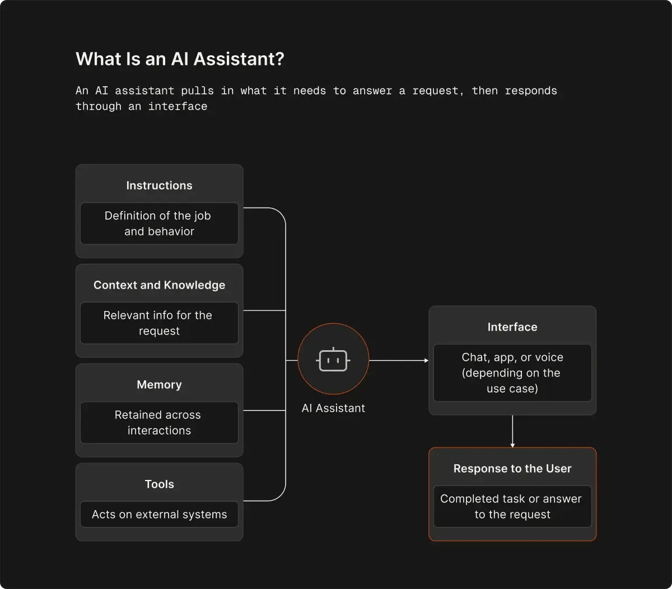
An AI assistant is a software program that relies on artificial intelligence to understand and complete tasks for users. This means that several components need to come together to power this system:
- Model: The AI system that processes requests and generates responses
- Instructions: Rules that define the assistant’s job and behavior
- Context and knowledge: Information the assistant uses to answer a specific request
- Memory: Information it retains across interactions
- Tools: External systems it can search, query, or act on
- Interface: The way the user interacts with it, such as a chat window, website, messaging app, or a voice interface that supports spoken conversation
“Assistant” and “agent” often get used interchangeably, but they differ in key areas, mainly the level of autonomy. Once given a task, an AI agent works independently to plan and decide which steps to take, and it keeps going until the job is done.
The assistant usually responds to your queries, and its complexity depends on the use case. A writing assistant might only need a model and clear instructions, while an AI assistant for customer support may also need access to a CRM, company research, previous conversations, and a calendar. Many products use both: you talk to the assistant, and the agent does the job in the background.
Before You Start: Decide What Your AI Assistant Should Do
AI assistants are useful in almost any marketplace, but that doesn’t mean you should build one universal tool that will cover anything from simple writing tasks to complex engineering. You may end up doing excessive work only to get software that covers the same scope of tasks that general-purpose chatbots can handle. Instead of trying to cover everything, define a specific job for your assistant, starting with the following aspects:
- User: Who will use the assistant?
- Job: What problem should it solve?
- Input: What information will it receive?
- Output: What should it produce?
- Actions: What can it do beyond answering questions?
- Success metric: How will you know it works?
A specific goal like “an AI assistant that researches a sales prospect, checks previous interactions, identifies recent company news, and creates a one-page call brief” gives you something to design and test against.
Choose How You Want to Build Your AI Assistant
There are three ways to build your AI assistant, and the right choice depends on how much personalization the use case requires.
Option 1: Start with a pre-built, customizable assistant
A customizable AI assistant is an existing product you configure to fit your needs. It’s the fastest route to building an assistant, since you don’t need to write code or maintain infrastructure. You start from a template, tell the platform what you need through a chat interface or a setup screen, and connect the assistant to the tools you use.
Option 2: Use an AI coding agent to build a custom assistant
Developers who need an independent assistant with its own interface, business logic, data sources, and permissions should consider this path. With a coding agent, you are building a custom assistant as a standalone application through an automated workflow.
The agent can scaffold the project, connect a model and your data sources, wire up integrations via MCP, and test the result. The finished product can still be a plain, request-driven assistant.
Option 3: Build it manually
Manual development makes sense for complex, highly regulated, or specialized systems where you need complete control over the stack, infrastructure, security, and implementation.
|
Approach |
Technical skill |
Time to running assistant |
Best for |
|
Pre-built customizable assistant |
Low |
Same day |
Recurring team workflows |
|
AI coding agent |
Medium |
Days |
Custom internal tools and product features |
|
Manual development |
High |
Weeks or months |
Complex or highly specialized systems |
Build a Custom AI Assistant: 4 Practical Steps
If you need an assistant that existing platforms can’t provide, and want full control over the data and architecture, building your AI assistant from scratch makes sense. Here’s how to do it.
Step 1: Create the Basic Application
Start with the smallest working version. A basic AI assistant needs:
- A frontend or interface where the user interacts with it
- A backend that handles requests and application logic (Python with FastAPI, Node with Express, etc.)
- A connection to an LLM API (OpenAI, Anthropic, or similar)
- A place to store data if the assistant needs persistent memory or user information
Set up the project folder and initialize a git repo, choose your frontend and backend stack, build a basic chat or task interface, and connect the backend to your chosen model.
Step 2: Turn the Model into an Assistant with Instructions
Once the basic application works, define how the model should behave. Your instructions should cover:
- Role: Who is the assistant?
- Job: What problem should it solve?
- Boundaries: What should it avoid?
- Response format: How should results be presented?
- Escalation rules: When should it ask for clarification or hand work back to a person?
For example:
You are a sales research assistant. Before a sales call, analyze the prospect’s company so the sales representative has enough background. Identify relevant developments, recent news, and leadership changes and produce a short bulleted briefing of no more than one page. If you can’t verify a fact, say so rather than guessing, and flag anything that needs human review before the call.
Store these instructions in the application rather than relying on a one-off prompt typed into the chat window, so you can test and update the configuration.
Step 3: Add Knowledge and Memory
A custom assistant can use information beyond what is built into the model, but each type of information serves a different purpose.
Context is information relevant to the current request, such as the conversation so far or the task at hand. Knowledge is information the assistant can retrieve from documents, databases, or other sources. Memory is retained across interactions.
To set it all up, follow these steps:
- Identify the information the assistant needs.
- Store it in a suitable system, such as a document store for files or a vector database.
- Retrieve the information relevant to the current request.
- Send that information to the model with the user’s request.
- Save information for future interactions only when the assistant needs to remember it.
Avoid sending your entire knowledge base to the model with every prompt. Retrieve what the assistant needs for the task at hand.
Step 4: Add Tools and Actions
Your model can now answer questions, but it needs tools and orchestration to be able to work with the rest of your software. You can connect a CRM, email account, calendar, internal API, database, or web search tool. Then, when the model identifies a need, your application should call the relevant tool or API and return the result to the model. Once your assistant can use the result to complete the task, you’ve successfully built a small AI workflow.
Test It and Add Guardrails Before You Launch
To ensure the software works properly in production, first confirm it handles simple requests correctly. Next, test how it responds to imperfect user input, such as ambiguous questions, missing or incorrect information, or requests outside its scope. Finally, check what happens when something it depends on fails, such as a tool call. Track response quality and measure task completion results.
You also need clear limits on what the assistant can access and change. Use the smallest set of permissions needed for the job and log important actions. For sensitive operations with real consequences, such as sending emails, financial transactions, or changing production systems, an assistant should draft the action and let a human in the loop approve it before proceeding.
Build Your AI Assistant with Zencoder
Most teams don’t need to build their own AI assistant from scratch to get useful software. They need a clear goal, the appropriate level of customization, and the right tool.
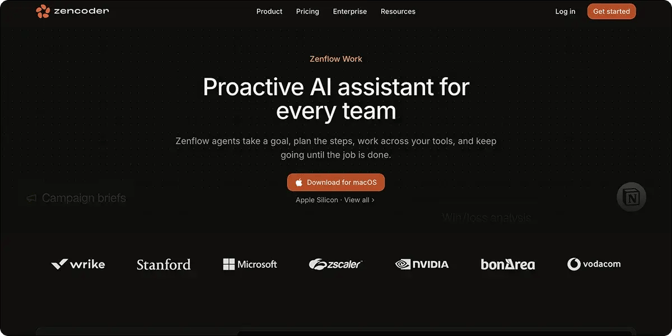
For recurring work, Zenflow Work provides a configurable, goal-based assistant environment. You can describe the result you want, connect tools such as Jira, HubSpot, or Slack, attach files, and let the agent work in the background toward completion. It even supports messaging through Telegram (as well as Slack and Discord with early access), allowing you to talk to it like you would to an assistant.
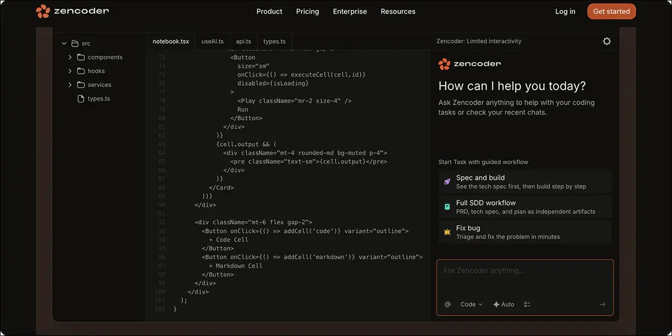
If you need a fully custom standalone assistant, Zencoder’s Coding Agent can help create the application itself. It runs inside VS Code or JetBrains, works across your whole repo, edits multiple files at once, and checks its own output using model orchestration, with Claude reviewing code GPT wrote, for example.
Try Zencoder today and have it handle the underlying setup while your team focuses on defining the assistant’s job and refining its output.

FAQ
Do you need to code to build an AI assistant?
No, you can build an AI assistant without coding. Pre-built products such as Zenflow Work let you configure AI-driven workflows and connect business tools without building a standalone application from scratch.
Can I create my own AI assistant?
Yes. You can use a pre-built customizable template, employ an AI coding agent, or build the tool manually.
Can I use Claude or ChatGPT to build my own assistant?
Yes. You can use existing AI products to configure an assistant with instructions and knowledge, or use their models and coding tools as part of a custom application.
How much does it cost to build an AI assistant?
Configurable pre-built assistants and coding agents typically run on a subscription, with platforms like Zencoder charging around $45 per user per month. Building from scratch is usually a lot more expensive. According to Craftware Technologies, a simple custom AI assistant typically costs somewhere between $15,000 and $80,000 in developer time to build, and even more at enterprise scale.