Autonomous and assistive agents are two of the most common types of AI agents organizations use to automate work, streamline business processes, and improve employee productivity across a wide range of industries.
According to MarketsandMarkets, the AI agents market is expected to grow from $7.8 billion in 2025 to $52.6 billion by 2030, reflecting increasing adoption of AI agents across businesses.
In this article, we will explore autonomous agents vs. assistive agents to help you understand their differences and choose the right approach for your needs.

Key Takeaways
- Autonomous and assistive agents solve different problems
Autonomous agents can plan, make decisions, and complete multi-step workflows with minimal human involvement. Assistive agents help people by generating suggestions, drafts, and recommendations for users to review before taking action. - The right choice depends on your workflow
Use autonomous agents to automate end-to-end processes, scale operations, and reduce manual work. Choose assistive agents when human oversight, quality control, and collaboration are essential. - Both types of AI deliver value across the business
Autonomous agents excel in areas like customer support, software development, IT operations, and logistics, while assistive agents improve productivity in writing, coding, sales, research, and project management. - Autonomy comes with greater responsibility
Because autonomous agents can act independently, they require stronger governance, monitoring, and safeguards. Assistive agents carry lower operational risk because people remain responsible for reviewing and approving important decisions. - Platforms like Zencoder simplify autonomous AI implementation
With Zenflow, Zencoder connects your existing tools, coordinates work across systems, and provides ready-to-use agent templates so teams can deploy autonomous workflows faster and start seeing value sooner.
What Are Autonomous Agents?
Autonomous agents are AI systems that can understand a goal, make decisions, and take action without needing constant human guidance. Once given an objective, they can break the work into smaller tasks, complete them, and adjust their approach as new information becomes available. This makes them well-suited for complex, multi-step tasks across areas such as customer service, marketing, sales, and business operations.
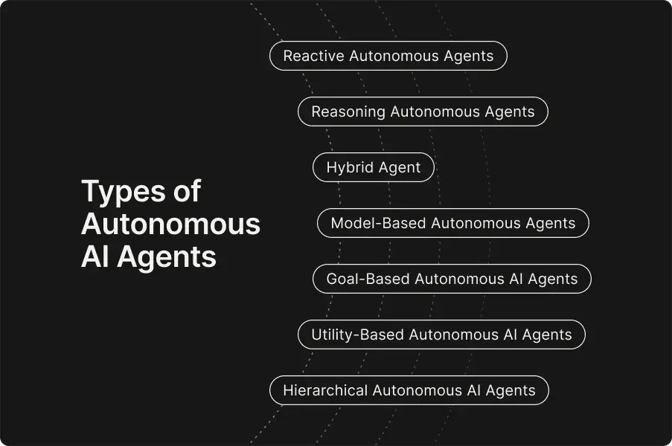
At the heart of every autonomous agent is a continuous cycle of perceiving, deciding, and acting. The process typically works like this:
- Perceive – The agent collects information from its environment, such as sensor data, API responses, databases, logs, or user inputs. It then filters and organizes that information to understand what's happening.
- Decide – Using its current understanding and the goal it's trying to achieve, the agent determines what to do next. Depending on the system, decisions may be based on predefined rules, machine learning models, optimization algorithms, or reinforcement learning.
- Act – The agent carries out the selected action, whether that's updating a database, calling an API, responding to a user, controlling a device, or triggering another system. The outcome of that action becomes new information, and the cycle begins again.
Use Cases of Autonomous Agents
Autonomous agents are being used across industries to automate complex workflows, make faster decisions, and reduce the need for constant human involvement. Below are some examples of autonomous agents’ capabilities:
- Customer support – Autonomous agents can handle customer inquiries from start to finish. They can answer questions, access customer records, process refunds, escalate complex issues when needed, and follow up with customers.
- Sales and lead qualification – They can identify potential customers, research company information, personalize outreach, schedule meetings, and keep CRM records up to date while continuously adjusting their strategy based on customer responses. For cold-calling campaigns, autonomous agents can also help sales teams research prospects and prepare relevant information before making contact. This can include using carrier lookup to verify transportation-related details and support more targeted outreach.
- Marketing automation – Autonomous agents can plan campaigns, generate content, monitor performance, optimize budgets, and adjust targeting based on real-time analytics to improve results.
- Software development – Autonomous coding agents can write code, run tests, fix bugs, review pull requests, and even deploy applications, adapting their plans based on test results or changing project requirements.
- IT operations and cybersecurity – Autonomous agents monitor systems for outages or security threats, investigate unusual activity, apply fixes, restart services, and alert teams only when human intervention is required.
- Supply chain and logistics – They optimize inventory levels, predict demand, reroute shipments, coordinate warehouse operations, and respond automatically to disruptions such as delays or stock shortages.
- Financial services – Autonomous agents can monitor transactions, detect fraud, analyze market conditions, generate investment insights, and automate compliance checks.
- Healthcare administration – They streamline administrative tasks such as appointment scheduling, patient follow-ups, insurance verification, and medical record management, allowing healthcare professionals to spend more time on patient care.
What Are Assistive Agents?
Assistive agents are AI systems built to work alongside people, making everyday tasks faster and easier to complete. Rather than carrying out work on their own, they provide suggestions, generate drafts, answer questions, or surface relevant information that users can review before taking action. This approach keeps humans involved in the decision-making process while reducing repetitive work and improving productivity.
Key characteristics of assistive agents include:
- Human oversight – Assistive agents generate suggestions, drafts, or recommendations, but a person always reviews and approves the final outcome.
- Task assistance – Rather than acting independently, assistive agents respond to user requests to help complete tasks more quickly and efficiently.
- Context awareness – They analyze available information, such as documents, conversations, or customer data, to provide relevant and personalized recommendations.
- Domain specialization – Many assistive agents are designed for specific roles or industries, which enables them to deliver more accurate and relevant assistance within their defined domains.
- Tool integration – Assistive agents work directly within existing tools, such as email clients, CRMs, project management software, and code editors, to fit naturally into everyday workflows.
- Learning from feedback – They learn from user feedback and edits over time, allowing future suggestions to better match individual preferences or organizational standards.
Use Cases of Assistive Agents
Because they are designed to collaborate with people, assistive agents are used across many business functions:
- Writing and content creation – Assistive agents help draft emails, blog posts, reports, marketing copy, and social media content. Users can then review, edit, and refine the output before publishing.
- Customer support – They suggest responses to customer inquiries, summarize conversations, retrieve knowledge base articles, and recommend the next best action while human agents handle the final communication.
- Software development – AI coding assistants generate code, explain functions, suggest bug fixes, create documentation, and recommend improvements, with developers reviewing and approving the final changes.
- Sales assistance – Assistive agents summarize customer interactions, recommend follow-up actions, draft personalized outreach emails, and provide insights that help sales teams prepare for meetings.
- Research and knowledge management – Assistive agents search for documents, summarize lengthy reports, answer questions using internal knowledge, and help users quickly find the information they need.
- Project management – They generate meeting summaries, create task lists, track deadlines, identify project risks, and recommend priorities, helping teams stay organized without requiring them to manage projects independently.
Autonomous Agents vs Assistive Agents: Key Differences
While both autonomous and assistive agents use AI to improve productivity, they are designed for distinct roles. The table below highlights the key differences across the areas that matter most when choosing between them:
|
Category |
Autonomous Agent |
Assistive Agent |
|
Decision- making |
Independently makes decisions, plans actions, and executes tasks to achieve a goal |
Suggests actions, generates content, or provides recommendations, but relies on human approval |
|
Human involvement |
Operates with minimal supervision once started, requiring human intervention only for predefined boundaries or exceptions |
Keeps humans involved throughout the process, with users reviewing and approving important actions |
|
Task scope |
Handles complex, multi-step workflows that require planning, reasoning, and adaptation |
Supports individual tasks or short workflows such as writing, summarizing, research, or recommendations |
|
Workflow execution |
Dynamically adjusts plans and chooses the next action based on changing conditions and intermediate results |
Follows the user's direction and assists with the current task rather than managing an entire workflow |
|
User interaction |
Primarily works in the background, providing updates or requesting input only when necessary |
Continuously interacts with users through chat, voice, or other interfaces to provide assistance |
|
Scalability |
Handles increasing workloads without requiring proportional increases in human resources |
Improves employee productivity, but additional work generally requires additional human reviewers |
|
Learning and adaptation |
Adapts strategies based on feedback, memory, or environmental changes to improve long-running performance |
Improves recommendations through user feedback and personalization rather than independent strategy changes |
|
Risk and governance |
Requires stronger monitoring and governance, as it can take action independently |
Entails a lower operational risk since humans remain responsible for reviewing and approving output |
Autonomous Agents vs. Assistive Agents: When to Choose Each
The right choice depends on how much autonomy you want AI to have and the type of work you need to automate. In many organizations, autonomous and assistive agents complement each other, with assistive agents supporting employees while autonomous agents handle repetitive, end-to-end workflows.
Choose autonomous agents if you need to:
- Automate complex, multi-step workflows with minimal human involvement
- Make decisions and take actions based on changing conditions
- Scale operations without increasing the number of employees
- Handle processes that require continuous monitoring and optimization
- Integrate multiple systems to complete tasks from start to finish
Choose assistive agents if you need to:
- Keep humans involved in every important decision
- Speed up writing, research, coding, or customer support without removing human oversight
- Improve employee productivity while maintaining quality control
- Generate drafts, recommendations, or summaries that users can review before taking action
- Introduce AI gradually into existing workflows with lower operational risk
Build Autonomous AI Workflows with Zencoder
Whether you're choosing autonomous agents or assistive agents, the real challenge isn't the AI itself – it's enabling it to work effectively within your existing business processes. To deliver meaningful results, AI agents need access to company data, integrations with the tools your teams already use, and the ability to coordinate tasks across multiple systems. That's where Zencoder comes in.
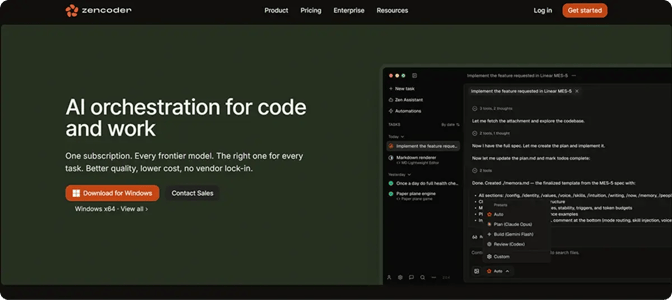
Zencoder's Zenflow helps organizations build and deploy autonomous, goal-driven workflows that span the applications they already rely on. Instead of automating isolated tasks, Zenflow's autonomous agents can break a goal into smaller steps, coordinate work across connected tools, monitor progress, and adapt as new information becomes available until the objective is complete. With integrations for Jira, Linear, GitHub, Gmail, Google Calendar, Google Docs, HubSpot, Slack, and Notion, Zenflow enables seamless automation across teams and business functions.
Zenflow agents can support a wide range of business workflows, including:
- Product & Engineering – Zenflow agents can generate standup summaries, track work across tools such as Jira, Linear, GitHub, and documentation platforms, route customer feedback to the appropriate engineering teams, and identify outdated dependencies or potential security issues.
- Sales – Agents can research prospects, gather company information, draft personalized outreach emails, manage follow-up tasks, and help sales teams stay on top of every opportunity.
- Marketing – They can monitor campaign performance, collect customer feedback, track product launch discussions, and automatically create reports that show what's working, what isn't, and where improvements can be made.
- Finance – Zenflow agents can gather financial data from various sources, prepare reports, organize documentation, and automate recurring administrative tasks, freeing finance teams to focus on analysis and planning.
- Operations – Zenflow agents can collect information from multiple business systems, track ongoing projects, automate routine processes, and keep teams aligned by providing up-to-date progress and status reports.
- HR & People – They can help create job descriptions, support employee onboarding, prepare performance review materials, and summarize employee feedback or exit interviews to help HR teams make better-informed decisions.
To help organizations get started faster, Zencoder offers a marketplace of ready-to-use autonomous agent templates. Instead of building workflows from scratch, teams can choose a pre-built template for common business tasks and customize it to fit their goals, existing tools, and internal processes. This makes it easier to deploy autonomous agents, reduces implementation time, and helps organizations start seeing value sooner.
Start your free trial today and empower your teams with autonomous agents that work across your entire tech stack.

FAQ:
1. How do you build an autonomous agent?
Building an autonomous agent involves defining a goal, giving it access to the data and tools it needs, and giving it the decision-making logic to plan and execute tasks on its own. Most organizations use AI agent platforms that provide integrations, workflows, memory, and monitoring instead of building everything from scratch.
2. Can autonomous and assistive agents work together?
Yes. Many organizations use assistive agents to support employees in decision-making and content creation, while autonomous agents handle repetitive workflows and back-office processes. Combining both approaches allows businesses to automate more work without removing human oversight where it's needed.
3. What are the biggest challenges of using autonomous agents?
The biggest challenges are making sure agents make reliable decisions, securely access company data, and integrate with existing business tools and workflows. Organizations also need proper monitoring and human oversight for sensitive or high-impact tasks to ensure agents operate safely and as intended.