
Prompt engineering is the process of designing and structuring inputs to guide AI models toward producing accurate, relevant, and well-formatted outputs.
The way a prompt is written directly impacts the quality of the response, with even small changes often leading to very different results.
In this article, we will explore seven types of prompt engineering methods for AI and how each can help you get better outcomes.

Key Takeaways
- Different prompting methods solve different problems
There’s no one-size-fits-all approach. Zero-shot is great for quick tasks, few-shot improves structure and accuracy, and advanced methods like chain-of-thought or tree-of-thoughts help with complex reasoning. The key is matching the method to the task.
- Examples and structure dramatically improve results
Adding a few clear examples or defining output formats can significantly boost accuracy. Models perform better when they understand patterns, so consistency and clarity in prompts are critical.
- Breaking tasks into workflows makes AI more practical
Prompt chaining shows that real-world use is about building structured pipelines where each step is controlled, testable, and easier to debug, much closer to how real software systems work.
- The real value comes from integrating prompts into your workflow
Knowing prompting techniques is useful, but managing them manually doesn’t scale. Tools like Zencoder take this further by embedding prompt engineering directly into your development process, automating repetitive tasks, understanding your codebase, and helping you build, test, and ship faster with less effort.
7 Types of Prompt Engineering Methods You Should Know
As AI models become more powerful, understanding different prompting techniques helps you get more reliable and relevant responses. Below are the seven best prompt engineering methods you should know.
1. Zero-Shot Prompting
Zero-shot prompting asks a model to complete a task without providing examples of the desired output. The model relies entirely on its prior training to interpret the instruction and produce a result.
For example, if we use this prompt:
“Extract the following fields from the text and return them as JSON:
- name
- issue_type
Text: “Hi, I’m John Jordan. My app crashes when I try to upload a file. You can reach me at john.jordan@gmail.com.”
In this case, the model must:
- Identify relevant entities in unstructured text
- Map them to the requested fields
- Format the response correctly as JSON
This kind of zero-shot prompt is common in real-world applications, such as parsing support tickets, extracting structured data from logs or emails, or building quick prototypes without labeled datasets.
Here are some tips to get better results from zero-shot prompting:
- Be clear and specific – Avoid vague or overly complex wording. The more precise your instructions, the better the output.
- Define the output format – If you need a specific structure, say so. For example, “Answer in one sentence” or “Return a JSON object.”
- Try different models – Not all models perform the same way, so it’s worth testing your prompt across multiple providers.
|
Pros and Cons of Zero-Shot Prompting |
|
|---|---|
|
Pros |
Cons |
|
|
2. Few-Shot Prompting
Few-shot prompting enhances zero-shot instructions by including one or more examples directly in the prompt. The idea is that the model observes a few input–output pairs and then continues the same pattern for new input. This helps it better understand the task’s format, structure, and intent.
Few-shot prompting often improves performance on tasks such as classification, transformation, and structured output generation, because the model can clearly infer the desired input–output mapping.

However, this approach uses more tokens than zero-shot prompting, and its effectiveness depends heavily on the quality and relevance of the examples. For more complex tasks, such as multi-step reasoning, few-shot prompting alone may not be sufficient and may need to be combined with techniques like chain-of-thought prompting.
Here are some tips to get better results from few-shot prompting:
- Use a few strong, relevant examples – You only need a few clear, high-quality examples that accurately represent the task.
- Keep everything consistent – Stick to the same format, structure, and wording across all examples and the final input. Consistency helps the model recognize the pattern quickly.
- Show some variation – Include different types of outputs (e.g., positive, negative, edge cases) so the model can generalize instead of just copying a narrow pattern.
|
Pros and Cons of Few-Shot Prompting |
|
|---|---|
|
Pros |
Cons |
|
|
3. Chain-of-Thought Prompting
Chain-of-thought prompting (CoT) is a technique that improves how language models handle complex tasks by encouraging them to reason step by step.
This approach is especially useful for problems that involve multiple stages of thinking, such as calculations, logical reasoning, or planning, because it reduces the chance of skipped steps or hidden errors. When a model is prompted to “think step by step,” it decomposes a problem into smaller, more manageable parts. This makes its reasoning process clearer and typically leads to more accurate and reliable outputs.
Here are some tips to get better results from chain-of-thought prompting:
- Apply it to multi-step tasks – Use it for arithmetic, logic, structured decision-making, or workflows that require sequential reasoning.
- Combine with few-shot prompting – Providing a small number of step-by-step examples can further improve performance on complex tasks.
- Manage output length – Step-by-step reasoning increases token usage. In production, you can request shorter explanations or instruct the model to reason internally but return only the final result.
|
Pros and Cons of Chain-of-Thought Prompting |
|
|---|---|
|
Pros |
Cons |
|
|
4. Self-Consistency Prompting
Self-consistency prompting is an advanced technique designed to improve the reliability of chain-of-thought reasoning. Instead of relying on a single reasoning path, which may contain hidden mistakes, the model generates multiple independent reasoning paths and then selects the most consistent final answer among them.
This approach is especially effective for tasks involving arithmetic, logic, or common-sense reasoning, where different reasoning paths may lead to different conclusions. Rather than asking “What’s the answer?”, you’re asking the model to explore multiple ways to solve the problem and then choose the answer that appears most frequently or consistently across those attempts.
Here are some tips to get better results from self-consistency prompting:
- Use it when accuracy really matters – This technique shines in situations where mistakes are costly, such as calculations, evaluations, or important decisions, because it reduces the risk of relying on a single flawed answer.
- Pair it with step-by-step reasoning – Start by prompting the model to reason step by step (chain-of-thought), then generate multiple responses. This combination significantly improves the quality and reliability of results.
- Start small, then scale up – You don’t need dozens of outputs to see the benefits. Begin with 3–5 reasoning paths and increase only if you need more certainty.
- Automate how you pick the final answer – Instead of manually reviewing outputs, use simple techniques like majority voting or answer matching to select the most consistent result.
|
Pros and Cons of Self-Consistency Prompting |
|
|---|---|
|
Pros |
Cons |
|
|
5. Tree-of-Thoughts
Tree-of-Thoughts (ToT) is a reasoning technique that expands on the chain-of-thought by exploring multiple possible paths instead of following just one. At first glance, it may seem similar to self-consistency prompting, since both involve generating multiple reasoning paths. However, the key difference is how those paths are used:
- Self-consistency generates several complete answers independently and picks the most common one.
- Tree-of-Thoughts, on the other hand, builds a solution step by step, exploring different directions along the way and deciding which ones to continue.
In ToT, the model doesn’t just produce full answers and compare them at the end. Instead, it generates multiple possible “next steps” at each stage, evaluates them, and proceeds with the most promising one. This forms a branching structure, like a tree, where different solution paths are explored, expanded, or abandoned as the process unfolds.

Here are some tips to get better results from tree-of-thoughts prompting:
- Apply it to real-world developer scenarios – It’s especially useful for things like game solving (e.g., puzzles or strategy logic), planning systems (task scheduling or routing), code generation/debugging (trying multiple approaches), and even UX or product decisions where you want to explore different solution paths.
- Generate multiple candidate steps at each stage – Instead of moving forward with one idea, have the model propose several possible next steps to explore.
- Add a simple way to evaluate options – Use a scoring method or “critic” (even a basic one) to decide which paths are worth continuing.
- Control how deep or wide the search goes – You can explore broadly (many options) or deeply (fewer, more detailed paths), depending on the task.
|
Pros and Cons of Tree-of-Thoughts |
|
|---|---|
|
Pros |
Cons |
|
|
6. Prompt Chaining
Prompt chaining breaks a complex task into smaller, sequential steps, where the output of one prompt becomes the input to the next. Instead of relying on a single, monolithic prompt, this approach creates a more modular, controllable workflow that better reflects how developers design real systems.
For example, rather than asking the model to generate code directly from API documentation, you can chain the process:
- Extract a structured API spec (endpoints, params, responses)
- Validate and normalize the data
- Generate code from the structured input

This approach improves clarity, reliability, and control over the model’s reasoning process. It also makes debugging and iteration easier, since each stage can be tested independently.
Here are some tips to get better results from this type of prompting:
- Break the problem into clear, sequential steps – Think in terms of a pipeline: Extract → Validate → Generate. Each step should have a single, well-defined responsibility.
- Test each step on its own first – Before chaining prompts together, make sure each one works reliably in isolation. This makes issues much easier to spot and fix.
- Pass structured data between steps – Use formats like JSON instead of free text. This keeps inputs consistent and reduces ambiguity for the next prompt.
- Log intermediate outputs – Always inspect what each stage produces. This gives you visibility into the system and helps you quickly identify where things go wrong.
|
Pros and Cons of Prompt Chaining |
|
|---|---|
|
Pros |
Cons |
|
|
7. Role Prompting
Role prompting is a simple yet powerful technique in which you assign the model a specific persona or professional role to shape its responses. Instead of only telling the model what to do, you also define who it should act as.
For example: “You are a senior backend engineer. Review the following API design and identify scalability issues, potential bugs, and improvements.”
By adopting this role, the model naturally focuses on things like performance, edge cases, and system design trade-offs, producing more relevant and practical output.
Role prompting is especially effective in developer workflows such as:
- Code review – “You are a senior software engineer reviewing this PR.”
- Debugging – “You are an expert debugging a production issue.”
- Security – “You are a security engineer auditing this code.”
|
Pros and Cons of Role Prompting |
|
|---|---|
|
Pros |
Cons |
|
|
From Prompting Techniques to Real Development Workflows
Understanding prompt engineering methods is only the first step. In real-world development, prompts are rarely isolated. They’re part of a larger workflow that involves codebases, tools, testing, and collaboration.
This is where tools designed for developers come into play. Instead of manually crafting and managing prompts for every task, modern AI solutions can embed these techniques directly into your workflow, making them more scalable and consistent. One such solution is Zencoder, which takes prompt engineering beyond theory and integrates it into the full software development lifecycle.
Why Should You Try Zencoder?
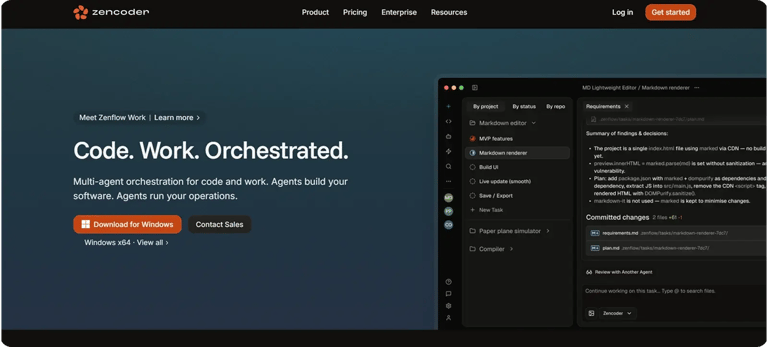
Zencoder is an AI-powered coding agent that integrates directly into the software development lifecycle (SDLC). Unlike traditional tools that treat prompts as standalone requests, Zencoder uses its Repo Grokking™ technology to analyze your entire codebase, understanding architecture, dependencies, and custom logic, so every response is context-aware and aligned with your project.
Here are some of Zencoder’s key features:
1️⃣ AI Coding Assistant – An AI-powered coding assistant that helps developers write better code, faster. It offers intelligent code generation, context-aware auto-completion, automated code reviews, and a built-in chat assistant for answering questions about your codebase.
Instead of manually writing everything from scratch, you can simply describe what you want to build. Based on this prompt, Zencoder instantly generates functional, contextually relevant code that aligns with your project’s structure and coding standards, streamlining development.
2️⃣ Zen Rules – Zen Rules let you turn repetitive prompts into reusable rules that reflect your team’s coding standards, preferences, and workflows. For more advanced use cases, developers can take this a step further by creating Custom Agents. These agents handle complex, repeatable workflows, especially those involving multiple tools or MCP integrations, helping teams automate processes and maintain consistency at scale.

3️⃣ Multi-Language & IDE Integration – Zencoder works with over 70 programming languages and integrates seamlessly with tools you already use, like Visual Studio Code and JetBrains IDEs. That means you don’t have to change your setup or learn a new environment. You can bring AI assistance straight into your current workflow and keep building the way you’re used to, just more efficiently.
4️⃣ Zentester – Zentester takes the hassle out of testing by automatically generating and updating tests based on how your application behaves. Instead of writing tests manually, you can simply describe what you want to test in plain English. From there, Zentester creates the necessary unit, integration, and end-to-end tests for you, saving time and ensuring better coverage with less effort.
Watch Zentester in action:
5️⃣ Zenflow – Zenflow is an AI-first engineering workflow system that enables multiple specialized agents to collaborate across the software development lifecycle. These agents assist with building, testing, reviewing, and deploying software, while grounding their work in the project context. By reading specifications, PRDs, and architecture documentation before generating code, Zenflow helps ensure that implementations remain consistent with defined requirements and design intent.
Get started with Zencoder today and turn your prompts into production-ready code.

FAQ:
1. How do you evaluate whether a prompt is actually effective?
An effective prompt produces consistent, accurate, and well-structured outputs across different inputs, not just a single correct result. Developers often test prompts with edge cases and measure reliability, format adherence, and the need for manual corrections.
2. Can prompt engineering replace traditional programming?
Prompt engineering complements programming rather than replacing it, as AI-generated outputs still require integration, validation, and oversight. Developers remain essential for handling logic, reviewing edge cases, and ensuring system reliability.