Artificial Intelligence (AI) enables computers to learn, reason, and make decisions like humans do, while automation uses technology to perform repetitive tasks automatically, with little or no human involvement.
If you are thinking about improving efficiency, reducing manual work, or choosing the right technology for your business, it is important to understand the difference between AI and automation. In this article, we will compare AI vs. automation so you can see how they work, where they are best used, and which one fits your goals.

Key Takeaways
- AI and automation solve different problems
Automation is best for repetitive, rule-based tasks that need consistency, while AI is designed for situations that require learning, pattern recognition, and decision-making. Businesses can see the best results when the technology they choose matches the complexity and type of problem they need to solve.
- Automation delivers reliability and efficiency
Traditional automation excels at predictable processes like approvals, data entry, testing pipelines, and infrastructure management. It reduces manual work, minimizes human error, and keeps operations running consistently at scale.
- AI is valuable when workflows require adaptability
AI can analyze unstructured data, detect anomalies, make recommendations, and adapt to changing conditions. This makes it especially useful for fraud detection, document analysis, predictive maintenance, and intelligent customer support.
- AI requires more oversight and investment than automation
Unlike automation, AI systems depend heavily on data quality, training, and continuous monitoring. They can improve over time, but this improvement often comes with higher costs, more complexity, and less predictable outputs that typically require human review.
- The most effective teams combine AI with automation
Modern organizations are moving beyond simple scripts and building intelligent workflows that pair AI decision-making with structured automation. Solutions like Zencoder's Zenflow Work help teams automate complex, cross-functional workflows using AI agents that can plan, adapt, and execute tasks across tools like Jira, GitHub, Slack, Gmail, and Notion.
What Is AI?
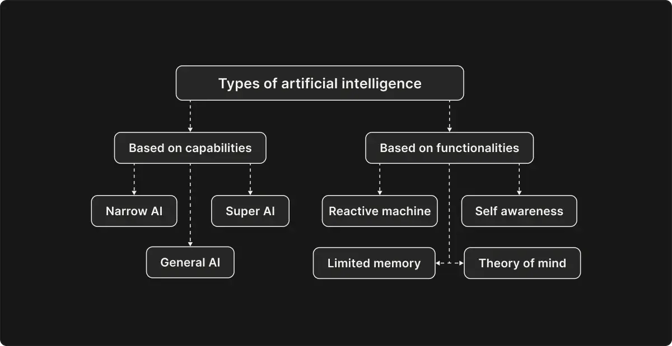
Artificial intelligence (AI) is a broad term for systems that can perform tasks typically associated with human intelligence, such as understanding language and making decisions. It's also good at recognizing patterns, and it's often used for creating different kinds of content, like images and marketing copy.
Use Cases of AI
Below are some of the most common real-world applications of AI:
|
Use Case |
Description |
|
Expense categorization and reimbursements |
AI can be used to automatically categorize business expenses and process reimbursements. This helps organizations reduce manual work, improve accuracy, and streamline financial workflows. |
|
Software development and code assistance |
AI coding tools can generate boilerplate code, suggest implementations, review pull requests, detect bugs, explain unfamiliar codebases, and help write tests or documentation. This allows developers to focus more on solving complex engineering problems rather than on repetitive tasks. |
|
Document categorization and contract analysis |
In document management and compliance, AI can organize large volumes of files by categorizing documents, extracting key information, and identifying important contract clauses. This enables teams to speed up compliance reviews and improve knowledge management. |
|
Recruitment and candidate screening |
HR teams use AI to analyze résumés, identify qualified candidates, and automate interview scheduling, allowing hiring managers to focus more on evaluating technical and cultural fit. |
|
Predictive maintenance |
In the manufacturing industry, AI can be used to analyze operational data and predict equipment failures. This allows teams to reduce or avoid downtime through more proactive maintenance planning. |
|
Fraud detection and risk management |
In financial services, AI can monitor transaction activity, identify unusual behavior, and flag potential fraud. This improves security while helping reduce false positives in risk management processes. |
Its use can also be adapted to different industries and operational needs. For example, in healthcare, AI can support patient case reviews and triage processes by analyzing clinical data more efficiently. AI is also commonly used in cybersecurity for spam filtering and threat detection, as well as in supply chain management to improve demand forecasting and inventory optimization.
What Is Automation?
Automation is the use of technology to perform tasks with little to no human involvement by following predefined rules and instructions. It works best for repetitive and predictable processes because the system executes the same actions consistently whenever specific conditions are met, without adapting or learning on its own.
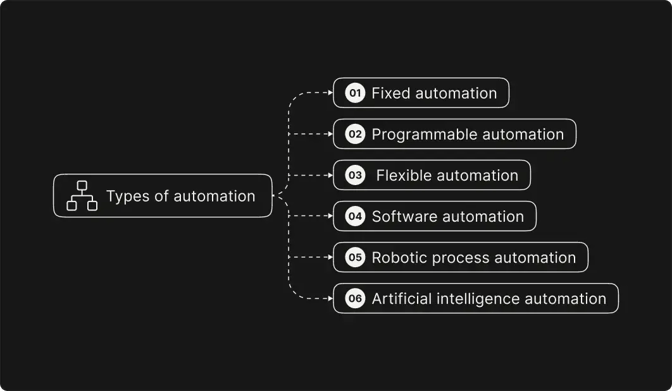
Industries such as manufacturing, finance, and IT rely on automation to improve efficiency, reduce human error, and simplify auditing, though it is less effective in situations that require judgment or flexibility.
Use Cases of Automation
Common use cases of automation include:
|
Use Case |
Description |
|
Data entry, calculations, and scheduled actions |
Automation is highly effective for repetitive and structured tasks such as entering data, performing calculations, or triggering actions based on predefined events. For example, a build system can automatically deploy a new software version when a pull request is merged. |
|
Approvals and notifications |
Automation can automatically send approval requests and notifications based on predefined rules. This helps speed up processes like expense approvals, ticket handling, and code reviews. |
|
Application logins and API interactions |
Robotic process automation (RPA) bots can log into applications, connect to APIs, transfer data between systems, and extract structured information from documents. These capabilities are especially useful for integrating legacy systems and streamlining operational workflows. |
|
Automated testing and continuous integration |
Development teams frequently use automation to run test suites whenever code is committed to a repository. Continuous integration pipelines can automatically perform static analysis, execute unit tests, and build applications, helping ensure only verified code is merged. |
|
Transaction processing and financial reconciliations |
In finance, automation can handle tasks such as processing transactions, reconciling records, and generating reports. Since these processes follow clear rules, automation helps reduce errors and improve consistency. |
|
Infrastructure provisioning and IT maintenance |
IT teams use automation to provision user accounts, configure servers, manage infrastructure, and perform routine maintenance. This reduces manual errors, speeds up onboarding, and improves scalability across systems. |
Its use can also be adapted to different operational and industry-specific needs. For example, in manufacturing, automation is widely used in robotic assembly lines for tasks such as welding, packaging, and quality control.
Automation is also commonly used in email handling, attachment processing, and web scraping workflows to support reporting, customer support operations, and large-scale data collection.
For example, businesses can use web scraping APIs to automatically collect product prices from multiple websites and feed the data into internal systems for analysis.
AI vs. Automation: Key Differences
Organizations often need to decide whether to automate a task with straightforward scripts or to employ AI techniques. Here are the key differences between AI and automation across seven categories:
1. Autonomy and Decision-Making
Automation is designed to execute specific actions in a specific order. It is effective when the process is clearly defined, such as when sending notifications, moving data between systems, or generating reports based on fixed conditions. In this sense, automation is primarily task-oriented: It executes instructions that have been given in advance.
AI can operate with a higher level of autonomy because it can assess information before choosing an action. Instead of just executing a fixed sequence, an AI system may compare options, interpret context, and decide what step is most appropriate. For example, an AI assistant could review a customer request, classify the issue, decide which system to check, and suggest a response. This makes AI useful when the correct path is not always obvious at first.
2. Learning and Adaptation
Automation stays reliable over time unless someone changes the workflow, which helps keep results consistent when the same input is used. However, automation does not learn from previous cases. If a process changes, the rules need to be updated manually.
AI systems can improve when they are exposed to new data, feedback, or examples. A model used for fraud detection, customer support, or document classification can become more accurate as it learns from past outcomes. This makes AI valuable in environments where patterns shift over time.
3. Implementation Complexity and Skill Requirements
Automation is usually easier to build because the logic is straightforward. Many automation tools use visual workflows, triggers, and rule-based steps, making them accessible to teams without deep technical expertise. The main challenge is understanding the business process clearly enough to translate it into a workflow.
AI projects are more complex because they depend on data quality, model selection, testing, and performance evaluation. They often require collaboration between experts in different departments.
4. Predictability and Reliability
Automation is highly predictable because it always follows the same rules. This makes automation ideal for tasks such as payroll processing, database backups, or CI/CD pipelines.
AI systems are probabilistic rather than deterministic. The same input may produce slightly different outputs depending on the model and context. While AI can handle uncertainty more effectively, it may also produce incorrect or inconsistent results. Because of this, AI solutions often require validation or fallback mechanisms.
5. Cost and Resource Requirements
Automation is typically more affordable to implement and maintain. Once a workflow is set up, it can usually run with minimal ongoing costs.
AI systems often require a larger investment. In many cases, AI solutions also need continuous monitoring and updates, which can increase both operational and infrastructure costs over time.
6. Human Involvement
Automation is designed to reduce human involvement in repetitive tasks. After workflows are created, the system can usually operate with minimal supervision, though people are still needed to maintain and update the rules as processes change.
With AI systems, people may need to review outputs, provide feedback, retrain models, or step in when the system encounters uncertain or unusual situations.
AI vs. Automation: When to Use Each Technology
Choosing between automation and AI depends on the complexity of the process, the type of data involved, and the level of adaptability or decision-making required. While both technologies improve efficiency, they solve different kinds of problems.
When to Choose Automation
Choose automation for:
- Data entry and file transfers – Moving information between systems, updating records, and synchronizing databases using predefined rules
- Scheduled and operational tasks – Running backups, batch jobs, report generation, monitoring scripts, and infrastructure provisioning on a fixed schedule
- Workflow routing and approvals – Automating approvals, notifications, ticket escalation, and task assignments within structured business processes
- Process standardization and optimization – Creating consistent workflows that reduce manual effort and establish a strong operational foundation before introducing AI capabilities
Automation is less effective when processes involve ambiguity, rapidly changing inputs, or decisions that depend heavily on context and human judgment. When a process changes often or depends on human judgment and context, trying to automate it with fixed rules can create fragile systems that break easily and need constant updates.
When to Choose AI
Choose AI for:
- Unstructured data processing – Classifying documents, analyzing customer emails, interpreting images, translating language, or extracting insights from text
- Predictive analytics and anomaly detection – Forecasting demand, identifying equipment failures, detecting fraud, or monitoring unusual system behavior using historical data
- Personalized and adaptive experiences – Recommending products, tailoring communication, optimizing resource allocation, or selecting the next best action in a workflow. An AI legal receptionist is another example, helping commercial law firms answer client inquiries, qualify leads, and schedule consultations automatically while improving response times.
- Intelligent decision support – Enhancing existing automation with AI-driven insights, prioritization, or recommendations that adapt to changing conditions
AI is not the best choice for simple, clearly defined tasks that can be handled reliably with deterministic logic. Using AI in those cases may introduce unnecessary complexity, variability, and maintenance overhead. AI should also not be used when there is not enough good-quality data, proper oversight, or expert knowledge to ensure the system works accurately and reliably.
Zencoder: Combine Intelligent AI Agents with Structured Automation
In practice, the most effective engineering organizations do not treat AI and automation as competing technologies. Instead, they combine the two approaches to create intelligent, reliable, and scalable workflows. This is where Zencoder can help you.
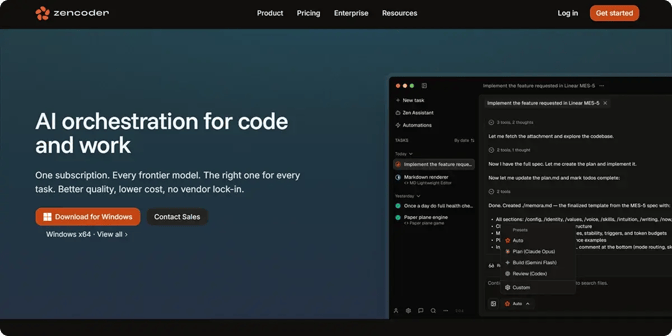
Rather than relying solely on rigid rule-based automation, Zenflow Work uses proactive AI agents that can understand goals, plan tasks, coordinate across tools, and continue working until the objective is complete. The platform combines AI-driven decision-making with structured automation, allowing teams to automate complex multi-step workflows without sacrificing visibility or control.
Zenflow Work integrates with tools such as Jira, GitHub, Gmail, Slack, Notion, Google Docs, HubSpot, and Linear, enabling teams to orchestrate work across engineering, operations, marketing, sales, finance, and support.
Key Zenflow Work capabilities include:
- Goal-based AI agents – Teams define the desired outcome, and agents determine the steps needed to complete the task, adapt to changing context, and monitor progress automatically.
- Cross-tool workflow orchestration – Agents can coordinate actions across multiple platforms, including project management tools, communication apps, CRMs, and documentation systems.
- Autonomous operational workflows – Teams can automate recurring processes such as standup reporting, lead enrichment, customer request triage, executive dashboards, follow-up sequences, and release coordination.
- Multi-step reasoning and execution – Zenflow agents can make decisions, gather information, prioritize actions, and dynamically continue workflows.
- Built-in integrations and file handling – Zenflow Work can interact with emails, tickets, calendars, documents, spreadsheets, PDFs, and internal systems to streamline day-to-day operations.
- Scalable AI-powered productivity – Organizations can reduce manual coordination work, improve operational efficiency, and free teams to focus on higher-value strategic tasks.
Start your free trial today and discover how Zenflow Work helps teams automate complex workflows with AI agents that can plan, adapt, and execute work across your existing tools.

FAQ:
1. Can AI and automation work together in the same workflow?
Yes, AI and automation are often combined to create smarter and more efficient workflows. Automation handles repetitive tasks, while AI adds decision-making, adaptability, and context awareness.
2. What are the biggest risks when implementing AI in business processes?
AI systems can produce inaccurate results if they are trained on poor-quality data or lack proper oversight. They also require ongoing monitoring, maintenance, and governance to remain reliable over time.