As organizations continue to automate more of their operations, the question is no longer whether to automate, but how. Many teams are now deciding between traditional rule-based automation and newer AI-driven orchestration approaches for managing complex workflows. However, these approaches differ in many ways, and understanding how they work can help you build more efficient, scalable, and better-suited solutions for complex systems. In this article, we will explore AI orchestration vs. traditional automation and examine where each approach delivers the most value.

Key Takeaways
- Traditional automation follows predefined rules, while AI orchestration coordinates multiple AI models, tools, and workflows to achieve broader outcomes.
- Traditional automation works best for repetitive, structured tasks, whereas AI orchestration is designed for dynamic, multi-step processes that require context and decision-making.
- AI orchestration can adapt to changing conditions in real time, making it better suited for complex business operations and intelligent workflow management.
- Traditional automation is simpler and less expensive to implement initially, but it becomes harder to maintain as workflows grow in complexity.
- AI orchestration enables end-to-end process automation, reducing manual handoffs and improving efficiency across interconnected systems.
- Governance, monitoring, and human oversight remain critical because AI-orchestrated workflows can make decisions and trigger actions autonomously.
- Organizations should choose traditional automation for stable, rules-based processes and AI orchestration for workflows involving multiple systems, data sources, and decision points.
- In software development, AI orchestration coordinates planning, coding, testing, review, and validation activities across multiple agents, helping teams automate larger portions of the development lifecycle while maintaining quality controls.
What Is AI Orchestration?
AI orchestration is the process of coordinating multiple AI models, tools, and workflows so they work together to complete a task. Instead of relying on a single model or automated script, orchestration connects several AI components, such as machine learning models, data pipelines, and APIs, and manages their interactions.
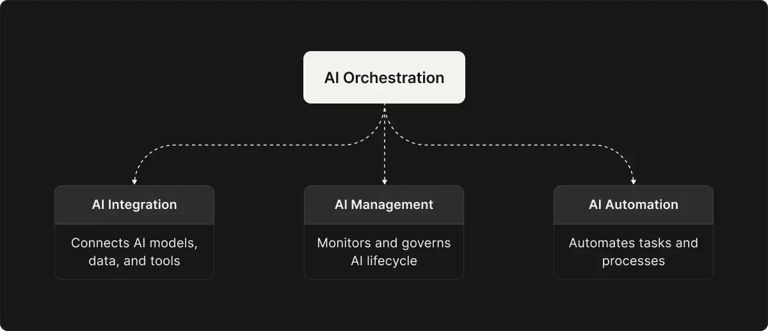
An orchestration layer makes sure each step happens in the right order and with the right context. For example, one model might collect or prepare data, another might analyze it, and another might generate a response or trigger an action.
Here are the key characteristics of AI orchestration:
- Coordination of multiple AI components – Effective AI Agent orchestration manages how different AI models, agents, and tools work together within a workflow, determining precisely when each component should run to optimize the end-to-end process.
- End-to-end intelligence – The system maintains context across multiple steps and embeds AI-driven decision-making into processes. This allows workflows to adapt and deliver personalized or data-driven outcomes as conditions change.
- Unified management – AI orchestration brings the deployment, integration, and governance of AI solutions into a single framework. This makes it easier for organizations to scale AI securely and efficiently across the enterprise.
- Adaptive and context-aware – Unlike rigid automation systems, AI orchestration can respond to dynamic situations. It can make decisions and take actions autonomously, involving human input only when exceptions or complex cases arise.
- Continuous oversight and control – Even as automation runs largely on its own, orchestration platforms provide monitoring and governance. This ensures AI workflows remain compliant, transparent, and aligned with business goals while unlocking new delivery business opportunities.
How Does AI Orchestration Work?
AI orchestration bridges all components of an AI-driven workflow and automates their interactions. Here are the basic steps illustrating how AI orchestration functions:
🟢 Step 1: Connect all components (Integration) – First, all relevant AI models, data pipelines, and tools are integrated into a single system. The orchestration layer links these components, usually via APIs, so they can communicate and share data.
🟢 Step 2: Trigger tasks automatically (Workflow automation) – Once everything is connected, the orchestrator automatically runs tasks based on a defined workflow. It decides:
- Which AI model or tool should run
- When it should run
- What data it should receive
🟢 Step 3: Make decisions and route the process – The orchestration system also controls how the workflow moves forward. It can include rules or AI-based logic to handle different situations. Depending on the results from earlier steps, the system chooses the next action. For example:
- If the AI analysis detects a specific pattern → the workflow follows Path A.
- If the pattern is not detected → the workflow follows Path B.
🟢 Step 4: Monitor and manage the workflow – During execution, the orchestration layer monitors the entire process. It can:
- Allocate computing resources to AI models
- Track the status of each step
- Detect errors or performance issues
If something goes wrong, the system can retry the step, switch to a backup model, or alert a human operator.
🟢 Step 5: Improve the system over time – The system logs outcomes and performance data from each step in the workflow. This information can be used to improve AI models and refine the workflow. Over time, this allows the system to:
- Learn from past results
- Deploy updated models
- Integrate new data sources
Benefits and Challenges of AI Orchestration
AI orchestration brings significant advantages by combining intelligent automation with holistic process management, but it also introduces new challenges.
Benefits:
Here are the key benefits of AI orchestration:
- Greater scalability – AI orchestration allows systems to grow alongside the business by coordinating additional models, tools, or data sources as demand increases. By dynamically allocating resources, it keeps workflows running smoothly even as workloads and complexity expand.
- Increased efficiency – AI orchestration automates entire workflows rather than just individual tasks, removing manual handoffs and reducing delays. As multi-step processes move seamlessly through an AI pipeline, businesses experience faster turnaround times and significantly improved productivity.
- Smarter decision making – AI orchestration enhances processes by enabling smarter decisions throughout the workflow. By combining predictive models with contextual data, it can determine the best next step, such as escalating an issue only when AI detects high priority, resulting in more adaptive and accurate outcomes.
Challenges:
The main challenges of AI orchestration are:
- Integration complexity – Implementing AI orchestration often involves connecting multiple tools, models, and data sources that were not originally designed to work together. Building and maintaining this architecture can be technically challenging and typically requires experienced engineers and careful system design.
- Governance and compliance – When AI systems are involved in decision-making, organizations must ensure strong oversight and clear accountability. This requires implementing safeguards such as audit logs, approval checkpoints, and bias monitoring to maintain security, compliance, and trust in AI-driven workflows.
- Resource and skill requirements – Deploying AI orchestration at scale can require significant investment in infrastructure, platforms, and specialized expertise. Teams may need new technical skills to design and maintain these systems, and organizations must also consider risks such as vendor lock-in when relying on a single platform or provider.
What Is Traditional Automation?
Traditional automation is the use of technology to perform tasks or processes exactly as predefined, with minimal human intervention. The goal is to replace manual, repetitive work with scripted action sequences. This type of automation is typically rule-based, which means that every decision is explicitly programmed in advance. The system simply follows the same set of instructions each time the process runs. For example, a script might collect data from a form and automatically enter it into another system without requiring human assistance.
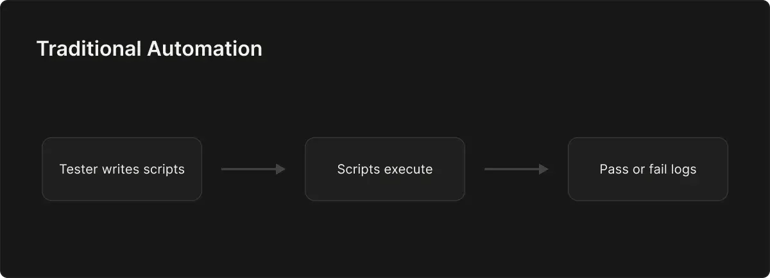
The key characteristics of traditional automation include:
- Rule-based operation – Traditional automation follows clear, predefined instructions that must be written by humans in advance. It does exactly what it was programmed to do, no more and no less.
- Linear workflows – Tasks are carried out in a fixed, step-by-step sequence. The workflow will not change direction unless alternative paths were specifically programmed beforehand.
- Requires structured input – These systems work best with clean, structured data, such as information stored in spreadsheets or databases. When given unexpected or unstructured input, they often struggle or fail because they cannot interpret or understand the data.
- Binary decision-making – Decisions are made through simple rule checks, usually based on true-or-false conditions. Traditional automation does not use probability or reasoning. If a situation falls outside the predefined rules, the system cannot determine what to do.
How Does Traditional Automation Work?
Traditional automation operates on a straightforward “if-this-then-that” principle. A trigger event (such as receiving a new file or reaching a scheduled time) starts the automation, which then executes a series of predefined steps. Here is how this process works:
🟢 Step 1: Rule definition – First, a human defines the exact workflow and rules. For example, an IT specialist or business analyst maps out the steps of a task (e.g., “Copy data from Column A to System X, then send confirmation email”). Every condition and action must be specified at this stage.
🟢 Step 2: Trigger – The automation is set to trigger on a certain event or schedule. A simple trigger might be “when a new order is received in the database, start the order processing script.” Triggers can also be manual (a user clicks “run”) or time-based (every night at 12 a.m.).
🟢 Step 3: Sequential execution – Once triggered, the automation executes each step in sequence as programmed. For example, in a new-hire onboarding automation, the bot might:
- Extract data from a hiring form
- Create a record in the HR system
- Send a welcome email
- Update the payroll system
🟢 Step 4: No deviation – The automation does exactly what the rules tell it to do, without deviation. This predictability is both a strength and a weakness. If something unexpected happens, such as a missing form field or a change in the software interface, the automation usually cannot adjust. Instead, it may stop, fail, or wait for human intervention.
🟢 Step 5: Completion – After executing all steps, the automation stops, and the outcome (processed data, generated report, etc.) is delivered to the designated place. The process will repeat from step 2 whenever the trigger condition is met again. Any improvements or changes to this workflow require going back to step 1 (redefining the rules and updating the script).
Benefits and Challenges of Traditional Automation
Traditional automation offers clear benefits for well-structured tasks, but it also comes with notable limitations.
Benefits:
The main advantages of traditional automation are:
- Efficiency and speed – Traditional automation performs repetitive tasks faster than humans and can run continuously without fatigue. By executing routine processes in milliseconds, it increases throughput, reduces processing time, and minimizes errors.
- Consistency and accuracy – Because automated systems follow predefined rules exactly, they deliver consistent and reliable results every time. This makes them ideal for structured tasks like data entry or reporting, and it also allows employees to focus on higher-value work.
- Cost savings on labor – Automation can significantly reduce labor costs by handling high-volume, repetitive work that would otherwise require many hours of manual effort.
Challenges:
Here are the key challenges of traditional automation:
- Rigidity and brittleness – Traditional automation is highly rigid and operates only within the conditions for which it was programmed. Even small changes, such as a new file format or unexpected input, can cause the process to fail.
- Limited scope – These systems perform well in structured environments but struggle with tasks involving unstructured data, context, or judgment. As a result, they are best suited to stable processes in which all scenarios can be predefined.
- High maintenance – Automations often require frequent updates whenever processes, systems, or exceptions change. Over time, maintaining and troubleshooting these scripts can become resource-intensive, reducing some of the efficiency gains automation initially provides.
AI Orchestration vs. Traditional Automation: Detailed Comparison
While both AI orchestration and traditional rule-based automation aim to streamline work and reduce manual effort, they differ fundamentally in design and capabilities. Below is a breakdown of how these two approaches contrast across key dimensions:
|
Dimension |
AI Orchestration |
Traditional Automation |
|
Architecture and Scope |
Coordinates end-to-end workflows across multiple systems, AI models, and tools within one process |
Focuses on individual tasks or small sequences with no central coordination |
|
Design Complexity |
More complex to design, requiring integration of models, tools, and data pipelines |
Simple to design, usually a script or bot following predefined steps |
|
Adaptability and Intelligence |
Adaptive and context-aware, using AI to interpret data and adjust workflows dynamically |
Rule-based and rigid, performing only what it was explicitly programmed to do |
|
Debugging and Maintenance |
Harder to debug due to multiple interacting components and models |
Easier to troubleshoot, but many automations can increase maintenance workload |
|
Performance and Efficiency |
Optimized for complex, large-scale workflows and can run tasks in parallel |
Very efficient for simple repetitive tasks, typically executed sequentially |
|
Scalability |
Highly scalable, able to add more agents, services, or processes easily |
Limited scalability, often requiring additional bots or scripts to handle growth |
|
Cost and Investment |
Higher upfront cost, but strong long-term ROI through broader automation |
Lower initial cost, but maintenance and scaling can increase long-term expenses |
|
Human Involvement |
Requires minimal human intervention, mainly for oversight or exceptions |
Requires humans to handle exceptions, updates, and monitoring |
|
Ideal Use Cases |
Complex, dynamic workflows involving multiple systems and decision-making. |
Repetitive, well-defined tasks with structured data and stable rules. |
Applying AI Orchestration with Zencoder
Traditional automation has long helped streamline repetitive software development tasks such as build pipelines and deployment scripts. However, as AI becomes embedded in engineering workflows, the challenge shifts from automating individual steps to coordinating multiple AI systems involved in development. This is why AI orchestration is increasingly seen as the future of intelligent automation in software development.
Platforms like Zencoder are addressing this shift by introducing orchestration layers, such as Zenflow, that coordinate AI agents across structured development workflows.
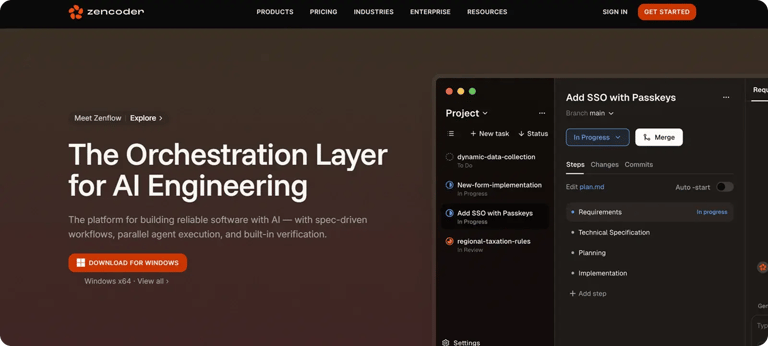
Zenflow applies orchestration principles to the software development lifecycle by coordinating multiple AI agents responsible for planning, implementation, testing, and verification. Instead of operating as isolated assistants, agents work within structured workflows that define how tasks move from specification to validated output.
How Zenflow Implements AI Orchestration:
- Workflow-defined execution – Development tasks are executed through defined workflows rather than independent prompts or isolated agent calls. Each workflow specifies stages such as planning, coding, testing, and review, ensuring that AI agents operate within a structured process.
- Spec-driven task execution – Agents operate with access to specifications, requirement documents, and architecture context before generating code. This keeps implementation aligned with design intent and reduces inconsistencies between generated outputs and project requirements.
- Parallel multi-agent coordination – Multiple agents can execute tasks simultaneously in isolated environments. Independent work streams can progress in parallel while the orchestration layer manages dependencies and prevents conflicts across the codebase.
- Integrated verification mechanisms – Testing and validation are embedded directly into the workflow. Automated tests and review steps act as verification gates, preventing incomplete or faulty outputs from advancing to later stages.
- Model-agnostic orchestration – Workflows can incorporate different AI models within the same process, allowing teams to combine capabilities from multiple providers rather than relying on a single model.
- Human oversight within automated workflows – Engineers can intervene at defined checkpoints to review outputs, approve transitions, or guide execution without interrupting the overall workflow.
Try Zencoder for free today and start orchestrating AI agents across your development workflows to build, test, and ship software faster.