Agentic engineering is a software development approach that enables AI to execute complete engineering tasks independently instead of only generating code in response to prompts.
When done well, agentic engineering offloads the mechanical work of implementation, freeing you to focus on architecture and judgment rather than boilerplate.
In this article, you'll learn about agentic engineering and the best practices for using it.

Key Takeaways
- Agentic engineering is about building complete workflows
Unlike traditional automation, which executes predefined scripts, agentic engineering enables AI agents to plan, implement, test, fix, and refine changes with minimal supervision, while developers retain control over final decisions. - Clear goals and the right context lead to better results
AI agents perform best when they receive detailed requirements, repository context, coding standards, and success criteria. The more precise the instructions, the more accurate and reliable the outcome. - Testing and human review are essential for production-quality software
Even though an AI agent can complete tasks independently, automated testing, security checks, and developer review are still needed to verify quality, catch issues, and ensure the implementation meets business requirements. - Agentic engineering is for reliable software delivery, not rapid prototyping
While vibe coding excels at speed and experimentation, agentic engineering prioritizes planning, verification, documentation, security, and maintainability, so it’s better suited to production systems and long-term codebases. - The right platform makes adopting agentic engineering much easier
Platforms like Zencoder's Zenflow Code provide structured workflows, multi-agent orchestration, built-in testing, repository intelligence, and approval controls, helping teams implement agentic engineering safely while improving development speed and code quality.
What Is Agentic Engineering?
Agentic engineering is a software development approach where AI agents independently complete parts of the development process while working toward goals and within rules set by human developers.
Instead of only generating code when prompted, these agents can:
- Understand requirements to determine what needs to be built or changed
- Plan tasks by breaking a complex goal into smaller, manageable steps
- Modify multiple files across the codebase when the implementation requires it
- Run commands and tests to verify that the changes work as expected
- Identify and fix errors when tests fail, or problems are detected
- Refine the implementation until it meets the defined requirements before presenting the final result
This shifts the developer's role from writing every line of code to defining objectives, providing context, reviewing the agent's decisions, and approving the outcome.
How Does Agentic Engineering Work?
Agentic engineering turns software development into a repeatable workflow that AI agents can execute with limited supervision. Here's how the process typically works:
1. Defining the Outcome
The first step is to clearly define the desired outcome. Instead of asking the AI to generate a specific piece of code, you describe the complete objective, the constraints it must follow, and your idea of a successful result.
For example, imagine a SaaS company wants customers to export account audit logs as a CSV file. A simple prompt like, "Build a CSV export button," leaves too much open to interpretation. A better agentic task would include requirements such as:
- Only administrators can export audit logs
- Exports must respect the user's selected date range
- Timestamps must use the account's configured time zone
- The endpoint must support up to 100,000 records
- The interface should display export progress and notify users if the export fails
- The implementation must include automated tests and updated documentation
With these requirements in place, the agent has enough context to begin working independently.
2. Gathering Repository Context
Before making any changes, the AI agent explores the existing codebase to understand how the project works. It examines:
- Folder structure to understand how the project is organized
- Configuration files to identify project settings and environment requirements
- Dependencies to see which libraries and frameworks are already in use
- Database models to understand how data is structured and stored
- Coding conventions to match the project's existing style and patterns
- Existing tests to learn how functionality is validated
- Similar features that have already been implemented so it can reuse existing logic instead of creating duplicate solutions
Continuing with the audit log export example, the agent might discover that the application already has a background job system for processing large reports. It could also find an authorization helper that protects administrator-only features and a shared utility for formatting dates and times.
These help the agent build the new feature in a way that matches the rest of the application. Instead of creating duplicate code or introducing a different approach, it can reuse existing components, follow established patterns, and maintain a consistent architecture.
Many teams make this process even more efficient by including machine-readable documentation, such as an AGENTS.md file. This file provides coding agents with project-specific instructions, such as how to set up the development environment, run tests, follow coding standards, and comply with repository-specific rules before making changes.
3. Creating an Implementation Plan
After understanding both the task and the codebase, the AI agent creates a step-by-step plan for completing the work. For the example task, the plan may include the following steps:
- Add an export request endpoint
- Reuse the existing administrator permission check
- Queue large exports through the project’s job system
- Generate the CSV with account-specific time-zone formatting
- Store the completed file using the current report-storage mechanism
- Add export status and download controls to the audit-log page
- Create unit, integration, and authorization tests
- Update the administrator documentation
A plan gives the developer an opportunity to catch architectural mistakes before the agent modifies several files. It also gives the agent a stable checklist against which it can evaluate progress.
4. Executing the work
With a plan in place, the AI agent begins implementing the feature. Depending on the tools it has access to, it may be able to modify the codebase, run commands, test its changes, and update the project just as a developer would.
During the audit log export task, the agent might:
- Create a new branch to keep the changes isolated
- Implement the export endpoint and related backend logic
- Update the user interface with export status and download controls
- Modify configuration files if new settings are required
- Run database migrations if the feature introduces schema changes
- Install approved dependencies if additional libraries are needed
- Commit related changes as logical units of work
The agent may also discover that the original plan needs adjustment. For example, it could determine that streaming the CSV directly from the API would cause request timeouts for large exports. Within its established boundaries, it can revise the plan and instead use the existing background job infrastructure.
5. Verifying and Improving the Implementation
Once the feature is complete, the AI agent verifies that everything works as expected. It runs tests and analyzes the results to identify and fix any issues before the work is considered complete.
To verify the audit log export feature, the agent might:
- Run unit tests to confirm individual components work correctly
- Execute integration tests to ensure the feature works with the rest of the application
- Compile the project to check for build errors
- Run the linter and static analysis tools to identify code quality and potential reliability issues
- Perform security checks to detect common vulnerabilities
- Test the feature in the application to confirm it behaves as expected from a user's perspective
For example, the first version of the audit log export feature might pass all unit tests but fail an integration test because timestamps are displayed incorrectly during daylight saving time transitions. The agent can analyze the test results, identify the faulty time zone conversion, update the implementation, and rerun the tests until the problem is resolved.
6. Reviewing the Complete Change
After completing its checks, the agent presents the implementation for human review. The output should include the code changes, a summary of major decisions, test results, known limitations, and any assumptions made during the task.
The developer then reviews the implementation to confirm it meets both the technical and business requirements. Instead of only checking whether the code compiles, they should ask questions such as:
- Does the implementation satisfy the original business requirement?
- Does it follow the project's architecture and coding standards?
- Are authorization and security rules implemented correctly?
- Could the feature expose sensitive data or create security risks?
- Are errors and failure scenarios handled appropriately?
- Will the code be easy to maintain in the future?
- Do the tests cover the most important use cases and potential risks?
- Did the agent make any unnecessary or unrelated changes?
Agentic Engineering Best Practices
Follow these best practices to help AI agents deliver more reliable and accurate outcomes:
1. Start With Clear Tasks
AI agents perform best when they have a well-defined objective. Clearly explain what needs to change, what should remain unchanged, how success will be measured, and when the agent should stop and ask for help. Start with low-risk tasks such as fixing reproducible bugs, adding tests, updating documentation, or completing small refactors. As the workflow proves reliable, gradually expand to more complex work.
2. Give the Agent the Right Context
Provide the information the agent needs to complete the task, such as setup instructions, coding standards, folder structure, testing requirements, and any restricted actions. Store these guidelines in the repository to keep them current as the project evolves, avoiding irrelevant information that could distract the agent from key requirements.
3. Rely on Automated Quality Checks
Use automated tests and validation tools instead of relying only on written instructions. Unit tests, integration tests, linting, type checking, security scans, and performance tests help verify the agent's work. Whenever possible, pair every important requirement with a corresponding test. This gives the agent clear feedback, reduces guesswork, and makes it easier to confirm the task was completed correctly.
4. Limit Access and Permissions
Give the agent only the tools and permissions it needs to complete the task. Run it in an isolated branch, container, or development environment where changes can be safely reviewed, tested, or discarded. Require human approval for high-risk actions such as modifying infrastructure, adding new dependencies, merging protected branches, or deploying to production.
5. Review How the Work Was Done
Review more than just the final code. Ask the agent to explain how it completed the task, what decisions it made, which tests it ran, and whether any uncertainties remain. If the same mistakes happen repeatedly, improve your repository documentation, automated checks, or task templates.
Agentic Engineering vs. Vibe Coding
Although both agentic engineering and vibe coding use AI to generate code from natural-language prompts, they follow distinct workflows. Here are the key differences between the two:
|
Category |
Agentic engineering |
Vibe coding |
|
Primary goal |
Deliver a defined engineering outcome |
Turn an idea into working software quickly |
|
Typical starting point |
A specification, issue, acceptance criteria, or technical plan |
A conversational description of what the user wants |
|
AI role |
Plans and executes multi-step work within defined boundaries |
Generates code in response to iterative natural-language prompts |
|
Human role |
Defines requirements, designs the environment, reviews decisions, and approves results |
Guides the output based largely on whether the application appears to work |
|
Verification |
Uses tests, linters, type checks, security tools, logs, and acceptance criteria |
Often relies on running the application and checking the visible result |
|
Planning |
Investigation and planning before or during implementation |
Direct progression from idea to generated code |
|
Security |
Controlled permissions, secrets, dependencies, and sensitive actions |
Limited focus on security during experimentation |
|
Documentation |
Recorded decisions and implementation details for future maintenance |
Prototype-first approach with documentation as a lower priority |
|
Best use cases |
|
|
|
Main risk |
Incorrect changes caused by poor context or weak verification |
Unsecured working code that’s difficult to maintain |
How Zencoder Supports Agentic Engineering
Agentic engineering requires a platform that can coordinate planning, implementation, testing, verification, and code reviews while keeping developers in control. Zencoder helps you adopt agentic engineering by combining AI coding assistance with structured, multi-agent engineering workflows.
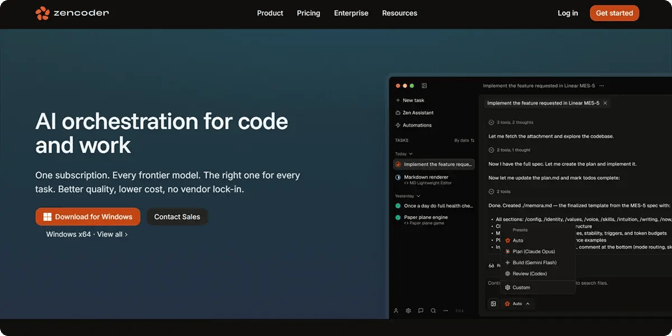
One of the platform's core capabilities is Zenflow Code, a multi-agent AI engineering platform that helps development teams build, test, review, and deliver software more efficiently. Whether you're experimenting with AI-assisted development or building fully agentic engineering workflows, it provides the structure, automation, and safeguards you need to ship reliable software at scale.
Key features include:
- Spec-driven workflows – Build from requirements, PRDs, and architecture documents so implementations stay aligned with project goals.
- Multi-agent orchestration – Coordinate specialized AI agents for coding, testing, refactoring, and code reviews using shared project context.
- Built-in verification – Automatically run tests and AI-powered code reviews throughout the development process to catch issues before code reaches production.
- Parallel execution – Run multiple engineering tasks simultaneously in isolated environments to speed up feature development, bug fixes, and refactoring.
- Repository intelligence – Give AI agents a deeper understanding of your codebase so they can produce more accurate implementations and maintain consistency across projects.
- Governance and approval controls – Standardize engineering workflows with approval gates, role-based permissions, and human review for high-risk changes.
Try Zencoder for free today and see how Zenflow Code can help your team build, test, and ship software with greater speed and confidence.

FAQ:
1. Does agentic engineering replace software developers?
No. AI agents can automate tasks such as coding, testing, debugging, and documentation, but developers are still responsible for defining requirements, reviewing results, making architectural decisions, and ensuring the software is secure and reliable.
2. Is agentic engineering the same as using an AI coding assistant?
Not exactly. An AI coding assistant may suggest code or answer questions without controlling the wider workflow. Agentic engineering equips the AI with the context and tooling needed to run end-to-end workflows, from planning and writing code to testing and debugging.
3. Can non-developers use agentic engineering?
Yes, but mostly for simpler projects such as prototypes or internal tools. Building production software still requires technical expertise to review the agent's work, ensure it is secure and maintainable, and confirm it meets business requirements.
4. What is agentic context engineering?
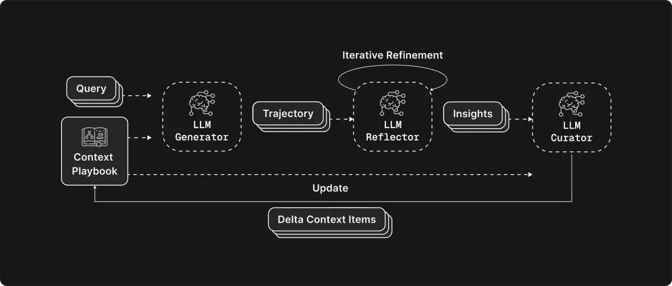
Broadly, it means engineering the context an agent works from, including its instructions, memory, and tool results, so that information stays accurate as a task runs. The term also refers more narrowly to ACE, a research framework where the agent refines its own context as an evolving “playbook.”
5. What is agentic data engineering?
Agentic data engineering is the use of AI agents to autonomously build data pipelines, write transformations, and monitor data quality from a high-level goal. The engineer sets the intent and reviews the results while the agent does the work.