Qodo is an AI code review and governance platform that provides automated, context-aware code reviews across your development workflow.
While it’s a popular option, some developers report issues such as slow performance, testing difficulties, a steep learning curve, poor UI design, and recurring bugs. That’s why we created a list of the nine best Qodo alternatives so you can choose a tool that better fits your workflow and needs.

9 Best Qodo Alternatives to Try in 2026
Before exploring our top picks, here is a quick overview of what awaits you:
|
Tool |
Best For |
IDE Compatibility |
Code Review Capabilities |
Technology / Core Strength |
Pricing |
|
Zencoder |
Full AI-powered SDLC automation (teams & enterprises) |
VS Code, JetBrains, 20+ IDEs |
Advanced (auto-fix + testing workflows) |
Multi-agent workflows + deep repo understanding |
Free → $19–$250+/mo |
|
CodeRabbit |
Code review automation |
GitHub + IDE integrations |
PR reviews |
Context-aware AI + adaptive learning |
From $30/mo |
|
Cursor |
Autonomous AI coding and productivity |
Built-in AI IDE (VS Code-based) |
Strong (PR + suggestions) |
Multi-file AI agents + parallel execution |
Free → ~$20/mo |
|
Snyk Code |
Security-first development |
IDEs + CI/CD pipelines |
Security-focused review |
AI SAST + vulnerability detection |
Free → ~$25/mo |
|
Amazon Q Developer |
AWS developers and cloud workflows |
VS Code, JetBrains, Eclipse |
Strong (review + security fixes) |
AWS-integrated AI assistant |
Free → $19/mo |
|
Codacy |
Code quality and compliance tracking |
VS Code + integrations |
PR checks + governance |
Policy enforcement + analytics |
Free → $18/mo |
|
SonarQube Cloud |
Enterprise code quality and CI/CD gating |
IDEs + CI/CD tools |
Static analysis + quality gates |
Continuous inspection + DevOps integration |
Free → $32/mo |
|
Bito AI |
Complex codebases and system understanding |
IDE integrations |
Deep contextual reviews |
Cross-repo intelligence + impact analysis |
From $15/mo |
|
GitHub Copilot |
Everyday coding and value |
VS Code, JetBrains, Neovim |
PR reviews + suggestions |
AI pair programming + deep IDE integration |
Free → $10–$19/mo |
How We Selected These Qodo Alternatives
To identify the best Qodo alternatives in 2026, we:
- Analyzed leading AI coding tools and platforms, focusing on solutions that enhance different stages of the software development lifecycle, from code generation and review to testing, security, and automation
- Evaluated core capabilities and use cases, prioritizing tools that provide strong value in areas such as code quality, developer productivity, automation, and collaboration across teams
- Assessed AI performance and context awareness, selecting platforms that demonstrate deep codebase understanding, accurate suggestions, and the ability to handle complex, multi-file, or multi-repo environments
- Reviewed integration and workflow compatibility, ensuring each tool fits seamlessly into modern development stacks, including IDEs, version control systems, CI/CD pipelines, and team collaboration tools
- Compared scalability and team readiness, highlighting solutions that support everything from individual developers to large engineering organizations with advanced governance, security, and customization options
1. Zencoder
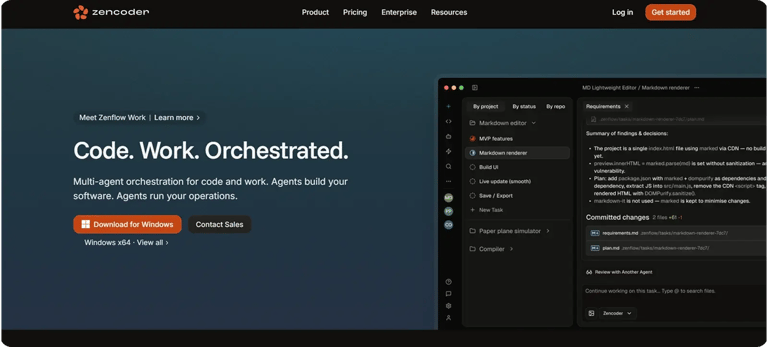
Zencoder is an AI-powered coding agent that enhances the software development lifecycle (SDLC) by improving productivity, accuracy, and creativity. Powered by advanced AI technology, Repo Grokking™, it performs a comprehensive analysis of your entire codebase, gaining a deep understanding of its structure, patterns, and unique logic.
With its Code Review Agent, it analyzes your code, but goes even further by automatically generating fixes, running tests, and maintaining code through coordinated multi-agent workflows across the entire development lifecycle.
Key Features:
1️⃣ Integrations – Zencoder integrates with over 20 developer environments, simplifying your entire development lifecycle. It’s the only AI coding agent offering such extensive integration.
2️⃣ Zenflow Code – This AI-first engineering platform is designed to coordinate multiple AI agents into a structured, reliable software development workflow. Instead of acting like a simple coding assistant, Zenflow Code manages the entire lifecycle from planning to deployment.
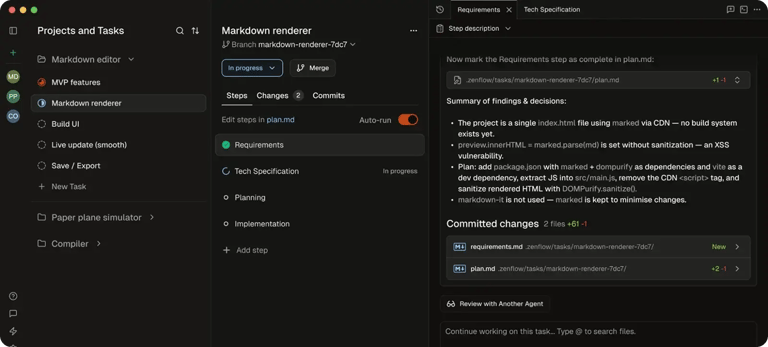
With Zenflow Code, you can:
- Build with spec-driven workflows – Define what you want (features, bug fixes, refactors) using specs, PRDs, or architecture docs, and agents will follow them strictly, ensuring code stays aligned with requirements and avoids “AI drift.”
- Run multi-agent execution – Use coordinated AI agents that specialize in building, testing, reviewing, and refactoring code across your stack, all working together in structured workflows.
- Execute tasks in parallel – Launch multiple coding tasks at once in isolated environments, allowing faster development without breaking your main codebase.
- Verify code automatically – Every workflow includes built-in testing and cross-agent reviews. If something fails, agents fix it before you even see it.
- Automate engineering workflows – Schedule recurring tasks like PR reviews, bug triage, or backlog updates, and let Zenflow run them continuously in the background.
- Integrate your entire toolchain – Connect with tools like GitHub, Jira, CI/CD systems, and more through 100+ integrations, giving agents full context of your development environment.
- Scale across teams and repositories – Enable agents to understand dependencies across multiple repos, ensuring changes in one place don’t break another.
3️⃣ Zenflow Work – This proactive AI assistant platform is built for entire teams, not just developers. It uses autonomous agents that take a goal, plan the steps, and continuously work across your tools until the task is fully completed.

With Zenflow Work, you can:
- Define outcomes, not tasks – Simply describe what “done” should look like, and agents will plan, execute, and iterate until the goal is achieved.
- Automate multi-step workflows – From standups and meeting prep to follow-ups and reporting, agents handle complex, ongoing tasks across multiple tools and systems.
- Continuously monitor and adapt – Agents track emails, product data, social platforms, and internal tools in real time, updating outputs (docs, reports, dashboards) as new information changes.
- Work across your entire stack – Integrates with tools like Jira, Linear, GitHub, Gmail, Slack, Google Docs, and more, allowing agents to read, write, and take action directly where work happens.
- Start instantly with templates – Use pre-built workflows (like standup summaries, lead research briefs, or dependency audits) and customize them to match your team’s goals.
- Handle communication loops – Automatically send follow-ups, monitor replies, and escalate when needed—perfect for sales, support, and operations workflows.
- Manage tasks from intake to completion – Agents can pick up work from tickets, messages, or files, execute it, and deliver results without manual coordination.
4️⃣ Multi-Repo Search – Multi-Repo Search lets you index and search across multiple repositories, making it easier for AI agents to understand and navigate complex, multi-repo architectures. You can quickly add and manage repositories through a simple web admin panel, giving agents seamless access to all indexed code whenever they need it.
5️⃣ Zentester – Automate testing at every level with AI, so you can catch bugs early and ship high-quality code faster. Describe what you want to test in plain English, and Zentester takes care of the rest, adapting as your code evolves.
Watch Zentester in action:
6️⃣ Security treble – Zencoder ensures enterprise-grade protection with SOC 2 Type II, ISO 27001, and ISO 42001 certifications, making it the only AI coding agent with all three.
Pricing
Zencoder offers a Free plan and a Starter plan (free for 7 days), which starts at $19 per user/month. It also offers a Core plan starting at $49 per user/month, an Advanced plan starting at $119 per user/month, a Max plan starting at $250 per user/month, and an Enterprise plan with custom pricing.


2. CodeRabbit

CodeRabbit is an AI-powered code review tool that helps teams catch bugs, improve code quality, and speed up pull request reviews by automatically analyzing changes and suggesting fixes. It integrates with platforms such as GitHub and IDEs, using context-aware analysis and customizable rules to deliver fast, consistent, and intelligent feedback throughout the development workflow.
Key Features:
- Agentic code reviews – Detects subtle bugs, edge cases, and logic issues while minimizing noisy or low-value alerts
- Context-aware analysis – Leverages full codebase understanding plus external sources (e.g., issues, docs) to deliver more accurate and relevant feedback
- Customizable review workflows – Enables teams to define coding standards, rules, and processes through flexible YAML-based configuration
- Adaptive learning system – Improves review quality over time by learning from developer feedback and aligning with team-specific preferences
Pricing
CodeRabbit offers two paid plans starting at $30 per month and an Enterprise plan with custom pricing.

3. Cursor

Cursor is an AI-powered coding environment that helps developers build software faster by using autonomous agents, smart autocomplete, and a deep understanding of entire codebases. It can plan, write, test, and even deploy features for you, letting you focus on decisions while the AI handles the implementation.
Key Features:
- Agent mode – Executes complex coding tasks autonomously, including building features, debugging, and running commands with minimal supervision
- Multi-file composer – Applies coordinated changes across multiple files using full codebase context, enabling efficient large-scale refactoring
- Parallel AI agents – Runs multiple agents simultaneously on separate tasks, accelerating development through parallel workflows
- AI code review – Analyzes pull requests and code changes automatically, identifying issues and suggesting improvements before merge
Pricing
Cursor offers a free plan and three paid plans starting at $20 per month.

4. Snyk Code

Snyk is a developer-focused security platform that uses AI-powered static application security testing (SAST) to find, prioritize, and automatically fix vulnerabilities directly in code, IDEs, and workflows. It helps teams secure applications faster by providing real-time scanning, actionable insights, and automated remediation without disrupting the development process.
Key Features:
- Real-time vulnerability fixing – Detects and automatically fixes security issues directly in the IDE and pull requests without requiring build steps
- AI-driven security intelligence – Uses machine learning trained on millions of code patterns to deliver accurate, context-aware vulnerability detection
- Risk-based issue prioritization – Identifies and surfaces the most critical and exploitable vulnerabilities to reduce noise and improve developer focus
- Broad ecosystem compatibility – Supports multiple languages, IDEs, CI/CD pipelines, and modern AI/LLM libraries for seamless integration across development workflows
Pricing
Snyk offers a Free plan, two paid plans starting at $25, and an Enterprise plan with custom pricing.

5. Amazon Q Developer

Amazon Q Developer is a generative AI–powered assistant from AWS that helps developers build, test, document, and optimize code across the entire software development lifecycle. It integrates with IDEs, the AWS Console, and tools such as Slack and GitHub to provide expert guidance, automate tasks, and improve productivity and code quality.
Key Features:
- Automated code reviews – Analyzes code to identify bugs, inefficiencies, and anti-patterns, improving overall code quality
- Security vulnerability scanning – Detects security risks in code and recommends fixes directly within the development workflow
- Code transformation & modernization – Automates large-scale refactoring and upgrades (e.g., Java version updates) to reduce manual effort
- AWS-aware development assistance – Provides cloud-specific insights like cost optimization, architecture guidance, and issue troubleshooting
Pricing
Amazon Q Developer offers a Free plan and a Pro plan starting at $19 per month.

6. Codacy

Codacy is an all-in-one platform that helps engineering teams maintain high standards of code quality and security across their development workflows. It enables organizations to build and scale software efficiently by ensuring consistency, reliability, and governance without slowing down delivery.
Key Features:
- AI policy governance – Defines and enforces consistent AI coding standards across all projects to reduce risk and maintain control
- Context-aware code review – Delivers intelligent pull request analysis with meaningful feedback while minimizing false positives
- Continuous compliance tracking – Generates real-time audit evidence and security reports to keep teams consistently compliance-ready
- Risk visibility and scoring – Provides a centralized view of codebase risks with scoring and checklists to track overall security posture
Pricing
Codacy offers a Free plan, a Team plan starting at $18 per month, and a Business plan with custom pricing.

7. SonarQube Cloud

SonarQube Cloud is a SaaS platform that automatically analyzes code for quality issues and security vulnerabilities, helping developers catch problems before they reach production. It integrates with CI/CD and DevOps tools to provide real-time feedback, enforce quality standards, and improve overall code reliability across teams.
Key Features:
- Auto-provisioning & instant analysis – Creates projects and starts code analysis as soon as a repository is added, with no manual setup required
- Quality gates enforcement – Applies customizable pass/fail rules in CI/CD pipelines to block code that doesn’t meet defined quality or security standards
- Advanced security analysis (SAST & secrets detection) – Identifies vulnerabilities and exposed secrets directly in source code before deployment
- IDE-integrated feedback – Provides real-time issue detection and fixes inside the developer’s coding environment with synced quality rules
Pricing
SonarQube Cloud offers a Free plan, a Team plan starting at $32 per month, and an Enterprise plan with custom pricing.

8. Bito AI

Bito AI is an AI-powered development platform that creates a contextual “knowledge layer” of your codebase, commits, docs, and issues to help engineers and coding agents understand complex systems. It enables faster, more accurate development by automating tasks such as technical design, feasibility analysis, impact assessment, and code reviews, while keeping your code secure and private.
Key Features:
- Production issue triaging – Identifies root causes of bugs and failures across services using real system context, reducing debugging time
- Spec-to-design generation – Automatically produces detailed technical designs from requirements, grounded in your actual architecture
- Cross-repo impact analysis – Identifies how changes affect multiple services and dependencies before implementation
- Context-aware code reviews – Reviews code with full system understanding to catch architectural issues and downstream risks beyond simple diffs
Pricing
Bito AI offers two paid plans starting at $15 per month and an Enterprise plan with custom pricing.

9. GitHub Copilot

GitHub Copilot is an AI-powered coding assistant that helps developers write, understand, and improve code directly within their editor, terminal, or GitHub workflows. It supports multiple models and agents, enabling faster development by suggesting code, automating tasks, and collaborating alongside developers across different tools and environments.
Key Features:
- Automated code review – Reviews pull requests across languages, flags issues, and suggests fixes to improve code quality before merging
- AI-powered security fixes – Detects vulnerabilities and generates targeted code changes to resolve security issues automatically
- Pull request summaries – Generates concise summaries of code changes and highlights what reviewers should focus on
- Context-aware project knowledge – Uses shared code, docs, and instructions to provide more accurate, team-specific suggestions
Pricing
For individuals, Copilot offers a Free plan and two paid plans, starting at $10 per month.
For businesses, it offers two paid plans, starting at $19 per month.

How to Choose the Best Qodo Alternative?
Choosing the best Qodo alternative ultimately depends on how you want AI to support your development workflow–whether you’re focused on improving code quality, accelerating reviews, or fully automating your software lifecycle.
If your priority is smarter code reviews and security-focused insights, tools like CodeRabbit, Snyk Code, Codacy, and SonarQube Cloud are strong options. These are especially useful in larger teams, production environments, or projects with strict quality and compliance requirements. However, they may not be the best fit for early-stage development, rapid prototyping, or solo projects, where the overhead of configuration and analysis can slow you down.
For developers seeking more hands-on coding assistance and productivity boosts within their editor, solutions like Cursor, GitHub Copilot, Bito AI, and Amazon Q Developer offer powerful capabilities. These tools shine when you need to write code faster, explore ideas, or reduce repetitive work. On the other hand, they may be less suitable when deep codebase understanding, strict security validation, or highly controlled outputs are required, as they can occasionally generate inconsistent or unverified suggestions.
However, if your goal is to move beyond isolated tools and adopt a fully autonomous, AI-driven development approach, Zencoder is the best choice. With Zencoder, you can:
- Coordinate specialized AI agents across planning, coding, testing, refactoring, and review using structured workflows through Zenflow Code
- Maintain high software quality with automated testing, AI-powered code reviews, and continuous validation through Zentester
- Automate complex, multi-step workflows across your entire toolchain, reducing manual coordination across teams
- Enable agents to understand and operate across multiple repositories with deep context, ensuring safe and scalable changes
- Integrate seamlessly with your development ecosystem, including GitHub, Jira, CI/CD systems, and more
- Scale AI-driven development across teams with enterprise-grade security and compliance certifications
Start your free trial today and see how Zencoder can transform your entire software development lifecycle with AI-driven automation.

FAQ
1. What are the best ways to use AI code review tools effectively?
The best way to use AI code review tools is to integrate them into your workflow by running automated reviews on every pull request and customizing rules to match your coding standards. You should also combine AI feedback with human reviews to catch deeper architectural and business logic issues.
2. When should you use AI coding tools in your development workflow?
AI coding tools should be used throughout the entire development lifecycle, including planning, coding, reviewing, testing, and maintenance. Using them consistently at every stage improves productivity, reduces errors, and helps you maintain higher code quality.
3. How do you choose the right AI coding tool for your needs?
To choose the right AI coding tool, consider your primary use case, such as code generation, code review, security, or end-to-end workflow automation. It’s also important to evaluate factors like IDE compatibility, team size, integration capabilities, and pricing before making a decision.