Claude Code Agents are autonomous AI assistants that can take ownership of coding tasks, allowing you to work on several parts of a project simultaneously instead of handling everything one step at a time.
If you've reached the point where a single Claude Code session feels limiting and you're wondering how developers use multiple agents to accelerate their workflow, this guide is for you. In this article, you'll learn how to set up and manage Claude Code parallel agents, coordinate their work effectively, and use them to build faster, more scalable development workflows.

Key Takeaways
- Break large projects into independent workstreams before using agents
Parallel agents are most effective when work is clearly divided into separate tasks, such as APIs, database changes, testing, documentation, and UI development. - Use isolated environments to prevent conflicts
Give each agent its own workspace using Git worktrees, branches, separate IDE windows, or containers. This keeps changes isolated, reduces the risk of overwriting work, and makes parallel development much easier to manage. - Start with planning before implementation
Use planning and research agents to understand the codebase, identify dependencies, and create a clear execution strategy. Investing time in planning helps agents work more efficiently and reduces costly rework later. - Match the right agent model to the task
Different agent types serve different purposes. Use lightweight subagents for research and discovery, coordinated agent teams for larger initiatives, and dynamic workflows for complex projects like migrations, audits, or large-scale code generation. - Scale parallel development with structured orchestration
Platforms like Zencoder provide multi-agent orchestration, spec-driven workflows, automated validation, parallel execution environments, and integrations with tools like GitHub, Jira, and CI/CD systems. This allows engineering teams to safely scale AI-powered development while maintaining quality, visibility, and governance.
What Are Parallel Agents?
Parallel agents are autonomous AI assistants that work on different parts of a task simultaneously. By dividing work among specialized agents, organizations can tackle larger, more complex workflows without relying on a single agent to complete every step.
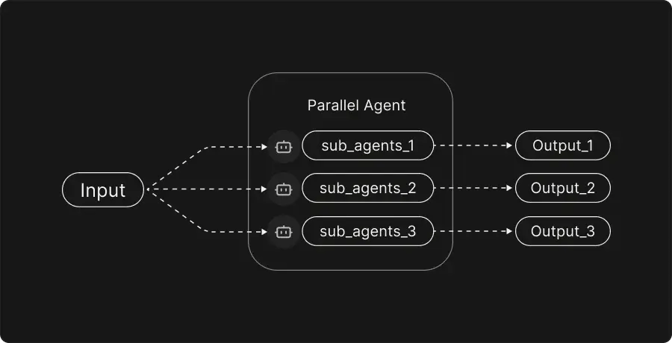
Common types of parallel agents include:
- Cooperative agents – Agents share information and collaborate toward a common goal. By coordinating their efforts, they can solve complex problems more efficiently and produce higher-quality outcomes.
- Competitive (adversarial) agents – These agents operate with conflicting objectives, often challenging or testing the work of other agents. While less common in day-to-day development, they are valuable for security analysis, stress testing, and identifying weaknesses.
- Mixed agents – These systems combine collaboration and competition, allowing agents to work together on some tasks while independently validating or challenging results on others.
- Hierarchical (supervisory) agents – Agents operate within a structured hierarchy where one or more coordinating agents assign tasks, monitor progress, and consolidate outputs from subordinate agents into a final result.
- Independent parallel agents – Agents work on separate tasks without direct interaction, making them ideal for dividing large projects into smaller, parallel streams of work that can be completed simultaneously.
Claude Code Parallel Agents
Claude Code can parallelize work using four key mechanisms:
- Subagents
- Agent view
- Agent teams
- Dynamic workflows
The best option depends on how much control you want to retain—whether you prefer to delegate tasks and review results later, or have Claude coordinate multiple agents on your behalf. In the table below, you can see the main approaches and when each one is most useful.
|
Approach |
What it gives you |
Best used when |
|
Subagents |
Lightweight delegated workers that handle a specific task in their own context and return a concise summary of their findings |
You need to offload a side task, such as searching files, analyzing logs, or gathering information, without cluttering the main conversation |
|
Agent view |
A centralized interface to launch, monitor, and manage multiple background agent sessions from one place |
You have several independent tasks running at the same time and want an easy way to track progress and intervene only when necessary |
|
Agent teams |
A coordinated group of agents managed by a lead agent, with shared task lists and communication between team members |
You want Claude to break a larger project into smaller pieces, assign work automatically, and keep all contributors aligned |
|
Dynamic workflows |
Automated workflows that orchestrate many subagents, combine their outputs, and cross-check results for accuracy and completeness |
The task is too large for a few agents, such as codebase-wide audits, large migrations, multi-source research, or generating plans from multiple perspectives |
How to Use Claude Code Agents to Parallelize Development
Instead of waiting for one task to finish before starting the next, Claude Code agents can work on multiple parts of a project at the same time. Here is how to use Claude Code parallel agents:
1. Identify and Decompose the Task
Before launching agents, clarify what needs to be built and break the feature into independent workstreams. For example, you might split a feature like "build a real-time notifications system" into:
- Define notification types and user workflows
- Design the notification database schema
- Implement notification API endpoints
- Build real-time delivery infrastructure
- Create the notification center UI
- Write integration and performance tests
- Document the feature and deployment process
Each of these subtasks can then be assigned to separate agents, allowing development to proceed in parallel with fewer dependencies and merge conflicts.
2. Set Up an Isolated Workspace
The next step is to ensure that each agent has its own workspace. This is important because multiple agents may modify files simultaneously, leading to conflicts. Common approaches include:
- Multiple IDE windows or tabs – If you're working locally, open a separate editor window or workspace for each agent.
- Git branches or worktrees – Create a dedicated branch or worktree for each subtask. Git worktrees allow you to check out multiple branches into separate directories, making it easy to isolate changes.
- Containers or devcontainers – For tasks that require different dependencies or environments, spin up separate containers. Tools like devcontainer or Docker ensure that one agent's environment doesn't pollute another's.
3. Use Plan Mode to Analyze and Strategize
After breaking the task into smaller components and setting up the necessary workspaces, begin in Plan Mode. Starting with planning ensures that each subagent receives clear, well-defined instructions before any implementation begins.
In Plan Mode, you can:
- Explore the codebase – Use read-only tools such as Read, Glob, Grep, and LS to understand the existing code and architecture. This allows you to gather context, ask questions, and investigate the codebase without making any changes.
- Research external resources – Use WebSearch and WebFetch to find relevant documentation, best practices, examples, or reference implementations that can inform your approach.
- Create a detailed execution plan – Develop a high-level strategy that outlines the responsibilities of each agent. Ask Claude to identify task dependencies, potential risks, assumptions, and any questions that need clarification before work begins. Record the plan in a shared document such as CLAUDE.md or capture it as comments for future reference.
4. Spawn Subagents for Independent Tasks
Once you have a clear plan, create subagents to work on independent tasks in parallel. In Claude Code, you can instruct the model to create a separate subagent for each task. For example, your prompt can be:
Please create three subagents. Subagent A will handle database schema changes for the users table. Subagent B will implement the API endpoints for login and registration. Subagent C will write integration tests for authentication. Each subagent should work independently, report progress, and then synthesize the results into a final summary.
Claude Code includes several built-in subagents designed for different types of work:
- Explore is a fast, read-only subagent optimized for codebase discovery, file searches, and architecture analysis. It's ideal for understanding unfamiliar codebases and gathering information without cluttering the main conversation.
- Plan is a research-focused subagent that gathers context and analyzes the codebase to create implementation plans before any code changes are made.
- General-purpose is a versatile subagent capable of both investigation and execution. It can perform research, modify code, run commands, and handle complex multi-step tasks that require both analysis and implementation.
While these built-in subagents cover most common workflows, you can also create custom subagents tailored to specific responsibilities. The table below can help you create and configure custom subagents in Claude Code.
|
Action |
Details |
|
1. Open the subagents interface |
Run /agents in Claude Code. |
|
2. Choose a location |
Navigate to the Library tab, select Create New Agent, and choose Personal. This saves the subagent in ~/.claude/agents/, making it available across all projects. |
|
3. Generate with Claude |
Select Generate with Claude and provide a description of the agent, such as: "A code improvement agent that scans files and suggests improvements for readability, performance, and best practices." Claude automatically generates the identifier, description, and system prompt. |
|
4. Select tools |
Choose the tools the subagent can access. For a code-review agent, you may restrict access to read-only tools. If all tools remain enabled, the subagent inherits the same tool access as the main conversation. |
|
5. Select a model |
Choose the model that will power the subagent. Sonnet is a good default because it provides a balance of speed and reasoning capability. |
|
6. Choose a color |
Assign a color to make the subagent easier to identify in the Claude Code interface. |
|
7. Configure memory |
Optionally enable persistent memory. Selecting User scope creates a memory directory at ~/.claude/agent-memory/, allowing the subagent to retain insights and patterns across sessions. |
|
8. Save and test |
Review the configuration and save the subagent. Once created, it becomes immediately available and can be invoked with prompts such as: "Use the code-improver agent to suggest improvements in this project." |
5. Coordinate Communication and Dependencies
While subagents work independently, some coordination might be necessary. For instance, Subagent B may need the database schema defined by Subagent A. There are two ways to handle this:
- Sequential handoffs – Start dependent subagents only after prerequisite work is complete. This is similar to a pipeline in which the product manager writes a ticket, the developer implements it, and the reviewer analyzes it.
- Agent Teams – When tasks have dependencies but can still make progress in parallel, use an agent team. Agent teams enable agents to communicate directly, share task lists, and coordinate their work. A lead agent oversees the team, manages dependencies, and ensures everyone stays aligned.
6. Monitor Progress and Provide Feedback
Regularly monitor progress and provide feedback to ensure work stays aligned with project goals. Claude's agent view makes this easier by allowing you to see what each subagent is working on, review their messages, and step in when necessary. Some effective practices include:
- Set milestones – Ask subagents to report back after completing key phases of their work. Regular checkpoints make it easier to track progress and identify issues before they become larger problems.
- Review partial outputs – Evaluate code, documentation, or other deliverables as they are produced. Early feedback helps keep work aligned with requirements and prevents subagents from drifting in different directions.
- Use timeboxing – Assign a fixed period for focused work, such as “work for 20 minutes and then provide an update.” Timeboxing helps maintain momentum, limits unnecessary exploration, and improves cost efficiency by preventing excessively long agent sessions.
Scaling Parallel Agent Workflows with Zencoder
While Claude Code parallel agents make it possible to execute multiple tasks simultaneously, coordinating those agents becomes increasingly difficult as projects grow in size and complexity. Teams need a way to standardize workflows, manage dependencies between agents, automatically verify outputs, and ensure AI-generated code remains aligned with project requirements. This is where Zencoder can help you.
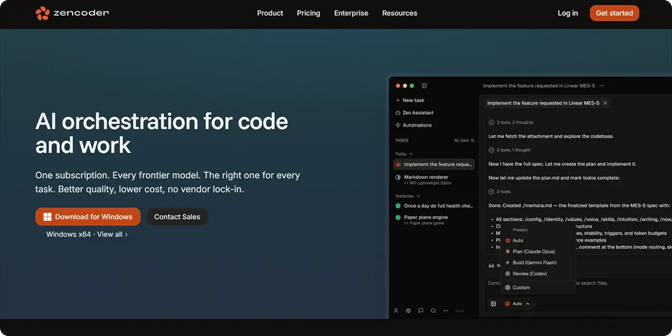
Built for AI-first engineering teams, Zencoder's Zenflow platform provides a structured framework to orchestrate multiple AI agents throughout the software development lifecycle. Instead of treating agents as isolated assistants, Zenflow enables them to work within predefined workflows, where planning, implementation, testing, and review can occur in parallel, with shared context and clear oversight.
Its key capabilities include:
- Spec-driven workflows – Agents use PRDs, specifications, and architecture documents as the source of truth, helping keep implementations aligned with requirements and reducing drift.
- Multi-agent orchestration – Specialized agents can collaborate on planning, coding, testing, reviewing, and refactoring tasks, enabling simultaneous progress across multiple streams.
- Built-in validation and feedback loops – Outputs are automatically tested, reviewed, and verified before reaching developers, helping catch issues early and improve quality.
- Parallel execution in isolated environments – Multiple workflows can run concurrently without interfering with one another, reducing conflicts while improving development velocity.
- Scheduled automation – Workflows can be triggered by pull requests, tickets, webhooks, or recurring schedules to automate routine engineering work.
- Multi-repository intelligence – Agents can understand dependencies across repositories and services, making it easier to coordinate large-scale changes.
- MCP-powered integrations – Agents can connect to GitHub, Jira, Linear, Sentry, Datadog, CI/CD systems, and other tools, allowing them to operate within existing workflows.
- Model-agnostic execution – Different AI providers and specialized models can be combined in a single workflow, enabling teams to use the best model for each task.
- Enterprise-grade security and governance – Approval gates, audit trails, role-based access controls, and compliance certifications help organizations safely scale AI-assisted development.
Start your free trial today and see how Zencoder helps engineering teams orchestrate parallel AI workflows, automate development tasks, and ship high-quality software faster.

FAQ:
1. How many parallel agents should I run at the same time?
The ideal number depends on the project's complexity and the independence of the tasks. Most teams start with 3–5 agents and gradually increase the number as they develop processes to manage coordination and dependencies.
2. What types of tasks should not be assigned to parallel agents?
Tasks with heavy dependencies, unclear requirements, or shared code ownership are often better handled sequentially. Parallel agents work best when responsibilities can be clearly separated without creating frequent conflicts or rework.
3. How do you measure whether parallel agents are actually improving productivity?
Track metrics such as development cycle time, pull request throughput, bug rates, and deployment frequency before and after adopting parallel agents. A successful implementation should reduce bottlenecks and delivery times while maintaining or improving code quality.