According to the 2025 Stack Overflow Developer Survey, 84% of developers already use or plan to use AI tools in their development process, and 52% say AI tools or AI agents have had a positive impact on their productivity.
Every company today seeks to automate workflows, but to do so effectively, it needs the right tools. In this article, we'll explore seven of the best AI tools for automating developer workflows to help you find the one that fits your team.

How We Selected the Best AI Tools for Automating Developer Workflows
Evaluating AI developer tools is more complex than comparing feature lists or code completion quality. The best platforms combine codebase awareness, AI agent orchestration, workflow automation, tool integrations, and enterprise capabilities that improve productivity across the entire software development lifecycle.
To create this list, we evaluated over 30 AI developer tools using the following weighted scoring system:
- Workflow automation and AI capabilities (40%): We evaluated how effectively each platform automates development tasks, including coding, testing, debugging, code reviews, documentation, and multi-step workflows.
- Developer experience and codebase context (25%): We assessed codebase awareness, multi-file understanding, repository context, ease of use, and the extent to which each tool integrates with existing developer workflows.
- Integrations and deployment flexibility (20%): We compared native integrations with IDEs, Git providers, CI/CD platforms, project management tools, and APIs, as well as deployment options across cloud, self-hosted, and enterprise environments.
- Independent user reviews (15%): We analyzed recent reviews from G2, Gartner Peer Insights, and Capterra, as well as discussions in developer communities such as Reddit, to evaluate real-world usability, reliability, and overall user satisfaction.
7 Best AI Tools for Automating Developer Workflows
Before diving deeper into our top picks, here is a quick overview:
|
Tool |
Best for |
Not ideal for |
|
Zencoder |
AI-assisted software development, multi-file coding, testing, and workflow automation |
Developers seeking a single-purpose AI coding tool |
|
Claude Code |
AI-assisted coding within existing developer workflows and IDE/terminal environments |
Enterprise-wide workflow orchestration |
|
Cursor |
Autonomous coding, debugging, and feature development |
Cross-application workflow automation |
|
n8n |
Workflow automation, API integrations, and AI-powered business processes |
AI-first coding and software development |
|
Sourcegraph |
Large-codebase search, code intelligence, and repository navigation |
Small projects that don't require enterprise-scale code search |
|
Qodo |
AI-powered code reviews, testing, and code quality |
End-to-end software development automation |
|
Warp |
AI-powered terminal workflows, DevOps automation, and agent orchestration |
Enterprise code governance and quality management |
1. Zencoder
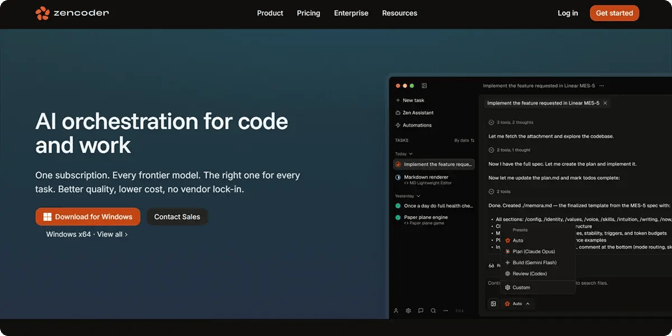
Zencoder is an AI-powered development platform that automates coding tasks and software engineering workflows across the entire development lifecycle. By combining AI coding assistance, autonomous agents, automation, and AI-driven testing into a single platform, it helps development teams reduce repetitive work, improve code quality, and accelerate software delivery.
Key Features:
1. Repo Grokking™ – Zencoder's proprietary Repo Grokking™ technology analyzes your entire codebase to understand its architecture, dependencies, coding patterns, and project-specific logic across multiple repositories. This gives AI agents the context they need to generate more accurate code, identify issues more effectively, refactor code safely, and maintain consistency across projects.
2. Zenflow Code – Zenflow Code is an AI-powered engineering platform that uses multiple AI agents to help teams build, test, and deliver software more efficiently. Here's what it offers:
- Flexible workflows – Includes pre-built workflows for common development tasks while allowing teams to create custom workflows that fit their own development processes
- Multi-agent orchestration – Coordinates specialized AI agents for coding, testing, refactoring, code review, and verification, enabling them to collaborate using shared project context
- Requirements-first development – Uses requirements documents, PRDs, and architecture documentation as context before generating code, helping ensure implementations align with project goals
- Built-in validation – Automatically runs tests and AI-powered code reviews throughout development to identify and resolve issues before changes reach developers
- Parallel execution – Runs multiple development tasks simultaneously in isolated environments, enabling features, bug fixes, and refactoring work to progress without conflicts
3. Zen CLI – Zen CLI is a developer-first platform that brings AI coding CLIs and IDEs into a single workflow, allowing developers to use their preferred tools without changing the way they work. It offers:
- CLI integration – Connects AI coding tools such as Claude Code, Codex, Gemini, Grok, and custom CLIs directly to VS Code and JetBrains, with support for debugging, IntelliSense, and seamless context switching
- Flexible deployment – Supports on-premises, hybrid, cloud, and air-gapped deployments, so it’s suitable for organizations with diverse security and infrastructure requirements
- Multi-repository support – Brings multiple repositories into a single workspace, giving developers the context they need to code, test, and review changes across projects
- Extensible architecture – Uses a JSON-RPC foundation that makes it easy to integrate new AI coding tools and IDEs as development workflows evolve
4. AI Coding Assistant – Zencoder's AI Coding Assistant helps developers write, review, and improve code more efficiently with AI-powered automation and real-time assistance. It includes:
- Automated code generation – Generates production-ready code from natural language prompts and project context
- AI-powered code reviews – Detects bugs, security vulnerabilities, and code quality issues before they become larger problems
- Context-aware code completion – Suggests accurate code completions based on the surrounding code and project context, reducing repetitive typing
- Built-in AI chat – Provides coding guidance, answers technical questions, and helps developers complete development tasks more efficiently
5. Zen Agents – Zen Agents are customizable AI teammates that understand your codebase, integrate with your development tools, and automate development tasks across your organization. With Zen Agents, you can:
- Build custom AI agents – Create specialized agents for tasks such as pull request reviews, testing, refactoring, documentation, and other development workflows
- Connect your development tools – Integrate with Jira, GitHub, Stripe, and other services through a no-code MCP interface, allowing agents to work within your existing workflows
- Deploy agents at scale – Roll out agents to entire teams with one click, and ensure they are consistent across the organization through automatic updates and shared access
- Pre-built agent marketplace – Access a library of ready-to-use and open-source agents that can be deployed immediately or customized to fit your team's needs
6. Security and compliance – Zencoder is built with enterprise-grade security and compliance to help protect your code and development data. It:
- Is certified for SOC 2 Type II, ISO 27001, and ISO 42001
- Maintains detailed audit trails for AI activities and user actions
- Does not permanently store your source code
- Never uses your code or data to train AI models
Pricing
Zencoder offers a Pro plan starting at $45 per month, a Pro Plus plan starting at $95 per month, and a Pro Max plan starting at $195 per month. It also includes an Enterprise plan with custom pricing.

2. Claude Code

Claude Code is an AI coding assistant that works directly within your development workflow, helping you understand code, write features, fix bugs, run tests, and create pull requests. Its agentic capabilities enable it to coordinate multi-file changes and automate complex software engineering tasks with minimal manual effort. It is particularly well-suited for individual developers and engineering teams looking to accelerate day-to-day software development within existing tools.
Key Features:
- Agentic codebase search – Analyzes your entire codebase to understand project structure, dependencies, and the relation of components before making changes
- Multi-file code changes – Edits multiple files in a single task while maintaining consistency across your project
- GitHub and terminal integration – Works with GitHub, GitLab, your terminal, and CLI tools to automate development workflows within your existing toolchain
- Automated routines and parallel agents – Runs scheduled workflows, such as dependency audits, and can execute complex tasks using multiple AI agents working in parallel
Pricing
Claude Code offers a Free plan and two paid plans, starting at $17 per month.

3. Cursor

Cursor is an AI-powered coding agent that helps developers build, test, debug, and review software across the entire development workflow. It understands your codebase and can autonomously complete development tasks in your IDE, terminal, GitHub, and Slack. It is ideal for developers and software teams that want an AI-first coding environment capable of handling end-to-end development tasks.
Key Features:
- Autonomous task execution – Completes multi-step development tasks such as building features, fixing issues, and running tests with minimal human intervention
- Codebase-aware refactoring – Understands the entire repository to make coordinated multi-file edits and generate reviewable code changes
- Terminal and CI automation – Executes terminal commands, runs builds and tests, and automates recurring maintenance through scheduled workflows
- Automation guardrails – Provides configurable permissions, rules, and execution modes to keep AI-driven development safe and under developer control
Pricing
Cursor offers a Free plan, two paid plans starting at $20 per month, and an Enterprise plan with custom pricing.

4. n8n

n8n is an AI workflow automation platform that enables teams to build, automate, and orchestrate workflows and AI agents using a visual interface, code, or a combination of both. It connects AI models, APIs, databases, and over 500 integrations, giving teams full visibility and control over how automated workflows and AI agents operate. It is a strong choice for developers, DevOps engineers, and technical teams that need flexible, self-hosted automation across applications and AI services.
Key Features:
- AI workflow builder – Generates complete workflows from natural-language prompts, then lets developers refine, debug, and extend them via chat instead of building everything manually
- Code-first flexibility – Supports JavaScript and Python anywhere in a workflow, allowing you to combine visual automation with custom code when low-code capabilities aren't enough
- Advanced debugging and testing – Enables step-by-step execution, replaying previous data, viewing logs, and testing individual workflow steps to quickly identify and fix automation issues
- Self-hosting and enterprise deployment – Supports on-premises deployment, Git-based version control, isolated environments, and scalable infrastructure, so teams can securely build, deploy, and manage automation in production
Pricing
n8n offers three paid plans starting at €24 per month (~$28), and an Enterprise plan with custom pricing.

5. Sourcegraph

Sourcegraph is an AI-powered code intelligence platform that gives developers and AI agents complete context across entire codebases, making it easier to understand, search, and evolve software at scale. It helps engineering teams improve code quality, accelerate development, and safely automate large-scale code changes. It is best suited for enterprise engineering teams managing large, complex codebases.
Key Features:
- AI-powered code migrations – Automates large-scale code changes, framework upgrades, dependency updates, and security remediations across codebases
- MCP server for AI agents – Enables AI agents to complete development tasks more reliably by providing complete codebase context, reducing manual intervention and failed attempts
- Code monitoring and alerts – Automatically monitors code changes and notifies teams or integrated tools (Slack, Jira, PagerDuty, etc.) when specific conditions are met
- Living documentation – Maintains an up-to-date knowledge base of your codebase, reducing manual documentation work and ensuring project knowledge stays current
Pricing
Sourcegraph offers an Enterprise plan starting at $16,000.

6. Qodo

Qodo is an AI-powered code review and governance platform that helps engineering teams improve code quality throughout the software development lifecycle. It is designed for development teams and enterprise organizations that need to maintain consistent coding standards, streamline code reviews, and govern AI-assisted software development at scale.
Key Features:
- Cross-repository code intelligence – Understands relationships between repositories, dependencies, and services to identify breaking changes and provide full-system context before code is merged
- AI-powered issue detection – Uses specialized AI review agents to identify logic errors, requirement gaps, security risks, and coding standard violations with actionable recommendations
- Self-learning coding standards – Automatically discovers coding conventions from your codebase, pull request history, and architectural patterns, then continuously enforces and updates those rules
- Engineering governance and analytics – Provides centralized visibility into code quality, review findings, compliance, and repository health with audit trails, risk tracking, and quality metrics across teams
Pricing
Qodo offers a 14-day free trial, a usage-based Pro Team plan starting at $0.012 per credit, and an Enterprise plan with custom pricing.

7. Warp

Warp is an open agentic development environment that combines a modern terminal with AI agents and cloud orchestration. It enables developers to build, run, and manage software development workflows from a single platform. Warp suits individual developers, DevOps teams, and enterprise engineering organizations looking to automate development workflows and manage software delivery at scale.
Key Features:
- Multi-agent orchestration – Coordinates multiple AI agents to work on different development tasks simultaneously, improving automation for complex coding workflows
- Cloud agent execution – Launches AI agents in the cloud from the terminal, SDK, or CLI, enabling long-running and scalable development tasks without relying on a local machine
- Codebase indexing – Indexes entire repositories so AI agents can understand project context and generate more accurate code changes across large codebases
- Centralized governance and usage controls – Provides team-wide visibility, permission controls, and credit caps to manage AI agent usage securely across engineering organizations
Pricing
Warp offers a Free plan, a Build plan starting at $20 per month, and a Max plan with custom pricing.

How to Choose the Best AI Tool For Automating Developer Workflows
Choosing the best AI tool for automating developer workflows depends on which parts of your software development process you want to automate. Some platforms focus on AI-assisted coding, while others specialize in workflow orchestration, code quality, governance, or end-to-end development automation.
If your primary goal is to speed up coding and daily development tasks, tools like Claude Code, Cursor, and Warp are excellent choices. For teams looking to automate engineering processes beyond writing code, n8n, Sourcegraph, and Qodo offer broader capabilities, from workflow and API automation to code search, review, and governance.
However, if you want a platform that combines AI coding, autonomous agents, workflow orchestration, testing, and enterprise automation in a single solution, Zencoder is the strongest choice. With Zencoder, you can:
- Automate the entire software development lifecycle, from planning and coding to testing, reviews, and deployment
- Coordinate specialized AI agents that collaborate on coding, refactoring, documentation, testing, and code reviews
- Give AI a deep understanding of your repositories through Repo Grokking™ for more accurate and reliable automation
- Build custom AI workflows and agents that integrate with GitHub, Jira, IDEs, CI/CD pipelines, and other development tools
Try Zencoder today and eliminate repetitive development tasks with AI-powered automation built for modern engineering teams.

FAQ:
1. How do you automate developer workflows with AI?
Automating developer workflows with AI starts with identifying repetitive tasks and then integrating AI tools into the existing development workflow. A structured implementation approach helps teams automate more effectively while maintaining code quality and developer oversight.
2. What's the difference between AI workflows and AI agents?
AI workflows automate predefined sequences of tasks, while AI agents can make decisions, adapt to changing conditions, and complete multi-step objectives with minimal human intervention. Many modern development platforms combine both approaches for more flexible and efficient software automation.
3. What developer tasks can be automated with AI?
AI can automate development tasks such as code generation, testing, debugging, code reviews, documentation, refactoring, dependency updates, and CI/CD activities. More advanced AI agents can also coordinate multi-step workflows that involve several tools and stages of the software development lifecycle.
4. What are the benefits of automating developer workflows?
Automating developer workflows can reduce repetitive work, speed up development, improve consistency, and help teams identify issues earlier in the development process. It also allows developers to spend more time on architecture, problem-solving, and other work that requires human judgment.