Devin AI is the world's first AI software engineer, capable of handling complex development tasks such as writing code, debugging, and deploying applications with minimal human input.
If you are thinking about using Devin for your projects or development workflow, it is important to understand what it can actually do and where it still falls short. In this Devin review, we'll explore its key features, strengths, and limitations to help you decide if it's the right tool for you.
We'll also explore an alternative option, Zencoder, in case you're looking for a more well-rounded development solution.

Key Takeaways
- Devin is built to function like a true autonomous software engineer
Unlike traditional AI coding assistants that only suggest snippets, Devin can independently write, test, debug, and deploy software inside its own development environment. It uses long-term memory and reasoning to manage complex engineering workflows with minimal human input.
- Its biggest strength is automating tedious engineering work
Devin shines in areas that typically slow teams down, including visual QA testing, pull request reviews, bug investigation, regression testing, and repetitive operational workflows. It can interact with applications like a real user, helping teams catch UI and workflow issues earlier in the development cycle.
- Devin's codebase intelligence helps teams move faster on large projects
Features such as Ask Devin and DeepWiki enable developers to search, understand, and navigate complex repositories far more efficiently. Instead of manually digging through files and documentation, teams can ask questions about architecture, dependencies, and implementation details, helping speed up onboarding, task scoping, and development planning.
- Devin works best for experienced engineering teams, not beginners
While powerful, Devin still requires strong human oversight. Developers report issues such as unpredictable compute costs, session drift, unintended codebase changes, and slower execution for smaller tasks.
- The future of AI engineering is full workflow automation
AI engineering platforms are evolving beyond simple coding assistance to automate larger parts of the software development lifecycle. Solutions like Zencoder help teams scale this approach further through multi-agent collaboration, automated testing, IDE integrations, and workflow orchestration across engineering tools and business systems.
What Is Devin?
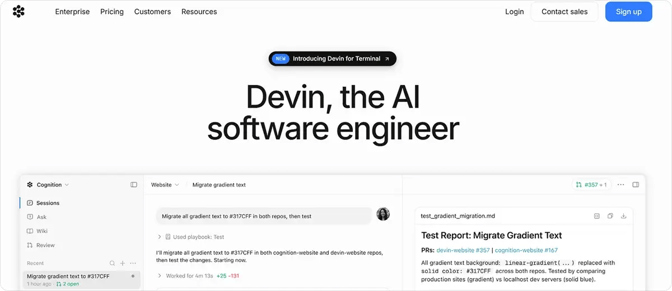
Devin, created by Cognition AI, is the world's first fully autonomous software engineering agent, designed to work alongside developers or complete complex coding tasks independently. Unlike traditional AI coding assistants that only generate snippets, Devin operates inside a complete sandboxed development environment with its own shell, code editor, and browser, allowing it to write, run, test, and debug code end to end. It uses long-term reasoning and persistent memory to track decisions across thousands of steps, enabling it to manage complex workflows such as refactoring applications, building features, and deploying software.
Pricing
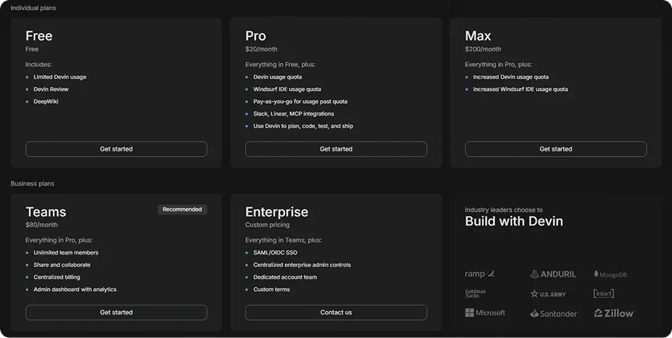
For individuals, Devin offers a Free plan, a Pro plan for $20 per month, and a Max plan at $200 per month, with each tier unlocking higher usage limits, integrations, and advanced development capabilities.
For businesses, Devin offers a Teams plan starting at $80 per month with collaboration features, centralized billing, and admin analytics, as well as an Enterprise plan with custom pricing.
Devin's Key Capabilities:
Below is a breakdown of Devin's core capabilities and the features that set it apart from traditional AI coding assistants.
1. Visual QA and End-to-End Testing
Visual QA is one of the most time-consuming aspects of software development, especially for frontend teams. Devin's ability to interact with browsers and desktop environments enables it to perform real user-style testing workflows rather than relying solely on traditional automated tests.
With access to a full Linux desktop environment, Devin can:
- Launch and run applications visually
- Navigate applications through the browser and desktop UI
- Interact with buttons, forms, and other UI elements
- Validate complete user workflows
- Detect layout inconsistencies and visual regressions
- Perform repetitive QA tasks automatically
- Record testing sessions and send screen recordings for review
- Simulate real user behavior beyond unit testing
- Self-verify its work before opening a pull request
Rather than validating only isolated functions, Devin interacts with the application like a real user, helping uncover UI, workflow, and integration issues earlier in development.
2. PR Review and Workflow Automation
Every pull request includes a link to Devin Review, a system designed to make large and complex diffs easier to understand. Devin Review improves the review process by:
- Breaking large diffs into logically grouped sections
- Generating precise explanations for code changes
- Flagging potential bugs or risky modifications
- Detecting copy-and-move changes automatically
- Supporting conversational Q&A about the pull request
The platform also includes an Autofix feature. When Devin Review or external tools such as GitHub bots identify issues, Devin can automatically update the PR to resolve bugs, CI failures, or linting problems.
3. Automated Bug Detection and Fixing
Devin operates as an autonomous debugging agent that investigates issues, traces root causes, and implements fixes with minimal human intervention. In practice, Devin can:
- Analyze bug reports and reproduce issues independently
- Search relevant code paths and inspect application logic
- Review the git history to identify regressions or breaking changes
- Diagnose root causes and generate clear investigation summaries
- Propose or implement fixes directly in the codebase
- Create regression tests to prevent recurring failures
- Integrate with monitoring and observability platforms like Datadog
- Pull logs, inspect runtime behavior, and evaluate database state
- Open pull requests automatically with validated fixes
- Continuously iterate on failed CI builds until all checks pass
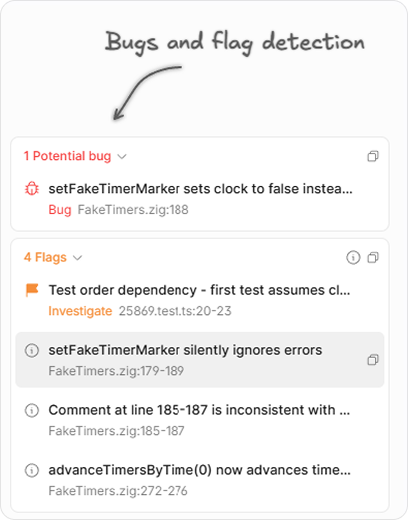
Internally, Cognition uses Devin for automated bug triage workflows. For example, when a ticket is labeled as a bug in Linear, Devin can automatically read the report, investigate the relevant systems, analyze historical changes, and generate a detailed summary that includes the likely root cause and a recommended fix.
4. Ask Devin (Codebase Q&A)
Once a repository is connected, Devin automatically indexes the entire codebase, turning it into a searchable and interactive knowledge system. Instead of manually searching through files, developers can ask questions about the application's architecture, logic, or specific features. Using Ask Devin, teams can:
- Search and understand large codebases quickly
- Explore architecture and implementation details
- Identify relevant files, functions, and dependencies
- Clarify requirements before starting development
- Scope tasks more efficiently
- Generate implementation context automatically
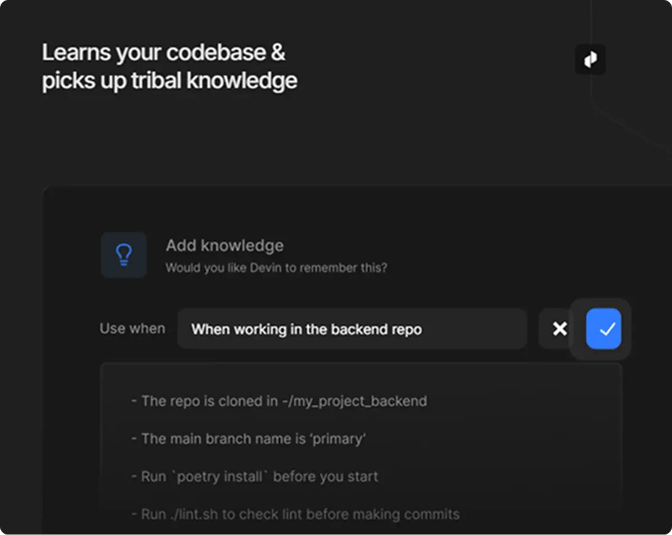
To support this workflow, Devin also includes DeepWiki, an automated documentation system that generates repository wikis with architecture summaries, diagrams, and code references. This improves developer onboarding and helps both engineers and Devin better understand complex systems. In practice, developers often use Ask Devin to investigate the codebase and refine the scope of a task before launching a development session.
5. DANA (Data Analyst Agent)
Unlike Ask Devin, which focuses on understanding and working with codebases, DANA is a specialized Devin agent built for database querying, analytics, and data visualization workflows.
It allows teams to ask data questions in natural language and receive fast, metrics-focused answers without needing to manually write SQL or involve engineers for every request.
DANA connects directly to data warehouses and databases, including Redshift, PostgreSQL, Snowflake, and BigQuery, through MCP integrations. Because it maintains knowledge of the database schema, it can understand table relationships and automatically generate accurate queries.
Teams can use DANA to:
- Query databases and analyze business metrics
- Generate charts, dashboards, and visualizations
- Answer ad-hoc analytics questions
- Automate repetitive reporting tasks
6. Scheduled Workflows and Application Development
Beyond coding tasks, Devin can automate many of the repetitive workflows that software teams deal with daily. Teams often need to generate release notes, monitor user feedback, maintain documentation, or run recurring system checks. Devin handles these processes through scheduled tasks and reusable Playbooks.
Playbooks are customizable workflows that define objectives, execution steps, post-conditions, and restricted actions. Once configured, they can be reused by any team member to automate repetitive engineering tasks such as:
- Running database migrations
- Ingesting data into Redshift
- Performing design-system audits
- Integrating with third-party APIs
- Updating internal documentation
This allows teams to standardize workflows and reduce manual operational work. Before implementation begins, Devin can also generate a development plan outlining the proposed approach. Developers can refine the plan before execution begins, clarifying requirements early and reducing unnecessary Agent Compute Unit (ACU) usage.
Limitations of Devin AI
While Devin AI can significantly accelerate development workflows, there are several limitations you should consider before adoption. Devin AI is not ideal for:
- Beginners who lack the experience needed to review and validate generated code
- Users seeking a lightweight code-completion assistant rather than an autonomous AI engineer
- Projects that require strict architectural or coding-standard compliance from the very first iteration
- Teams operating under tight or highly predictable budget constraints
Based on user feedback and hands-on experiences shared by developers, the following issues are among the most commonly reported limitations:
- ACU (compute usage) costs can become difficult to predict on larger or more complex projects.
- Devin may modify unrelated parts of the codebase, including shared logic and framework components.
- Long-running sessions may lose focus over time and drift away from the original instructions.
- High-ACU sessions can become less reliable and may require a complete restart to restore performance.
- Initial environment setup can be cumbersome, especially when configuring machines, credentials, secrets, and integrations.
- Limited native support for some enterprise tools can result in additional manual configuration and credential management.
- Execution and debugging workflows can feel slower than direct manual development for smaller tasks.
- Generated code still requires careful human review to prevent unintended side effects in larger systems.
Meet Zencoder: A New Approach to AI Engineering
Devin introduced a major shift toward autonomous software engineering, especially for teams looking to automate debugging, pull requests, and end-to-end development workflows. However, for many organizations, Devin still poses challenges in workflow control, scalability, predictable execution, and integration flexibility.
One popular alternative is Zencoder. It is an AI-powered engineering platform designed to improve the entire software development lifecycle (SDLC) through intelligent automation, multi-agent collaboration, and deep understanding of codebases.
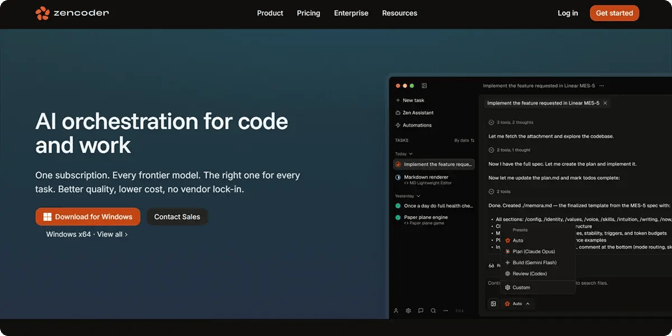
Unlike standalone autonomous coding agents, Zencoder combines AI coding assistance, multi-agent orchestration, automated testing, workflow automation, and enterprise-scale integrations into a complete engineering ecosystem.
How Zencoder Delivers More for Your Team
1. Deeper codebase understanding with Repo Grokking™ – Zencoder's proprietary Repo Grokking™ technology deeply analyzes your entire codebase, understanding architecture, dependencies, coding patterns, and project-specific logic across multiple repositories. This enables more accurate code generation, smarter debugging, safer refactoring, and better long-term consistency than traditional context-limited coding agents.
2. AI-first engineering workflows with Zenflow Code – Rather than operating as a single autonomous coding assistant, Zenflow Code coordinates multiple specialized AI agents across the full development lifecycle. With Zenflow Code, teams can:
- Run parallel development tasks in isolated environments
- Automate testing and cross-agent validation
- Perform AI-driven code reviews and refactoring
- Schedule recurring engineering workflows
- Integrate directly with GitHub, Jira, CI/CD pipelines, and 100+ development tools
- Scale AI workflows across multiple repositories and engineering teams
3. Integrated AI coding assistant across your IDEs – Unlike Devin's more isolated execution environment, Zencoder integrates directly into existing developer workflows with support for 70+ programming languages and major IDEs, including VS Code and JetBrains. Its AI Coding Assistant provides:
- Intelligent code completion
- AI-powered chat assistance
- Automated code generation
- Real-time code review agents
- Context-aware recommendations aligned with your codebase and standards
4. Advanced autonomous testing with Zentester – Zencoder extends automation beyond coding with Zentester, an AI-powered testing platform that continuously validates applications at every layer. Zentester can:
- Automatically generate and maintain test suites as code evolves
- Test UI, APIs, databases, and end-to-end workflows
- Detect edge cases and high-risk execution paths
- Simulate realistic user behavior patterns
- Adapt tests automatically as applications change
5. Cross-functional automation with Zenflow Work – Beyond engineering, Zenflow Work enables AI agents to automate operational and collaborative workflows across the business. Instead of assigning individual tasks, teams define desired outcomes, and autonomous agents continuously execute work until objectives are completed.
Zenflow Work can:
- Automate standups, reporting, and follow-ups
- Monitor emails, tickets, and product systems in real time
- Coordinate workflows across Jira, GitHub, Gmail, Slack, Linear, and Google Docs
- Manage tasks from intake to completion without manual coordination
- Continuously adapt outputs as new information changes
Devin vs. Zencoder: Final Verdict
Devin represents an important evolution in autonomous software engineering, especially for teams looking to automate coding, debugging, and development workflows within dedicated execution environments.
Zencoder builds on that concept with a broader AI-powered engineering platform designed to support the entire software development lifecycle. By combining Repo Grokking™, AI coding assistants, multi-agent execution, automated testing, workflow orchestration, and enterprise-scale integrations, Zencoder goes beyond autonomous coding to help teams manage, automate, and scale engineering workflows more effectively.
For startups, enterprises, and engineering leaders seeking to increase development velocity without sacrificing reliability, flexibility, or operational control, Zencoder offers a more comprehensive, scalable approach to AI-driven software engineering.
Try Zencoder for free today and scale your engineering workflows with intelligent AI agents built for modern development teams.

FAQ
1. How secure is Devin when working with production code and sensitive company data?
Devin operates within isolated, sandboxed environments and supports controlled repository access, helping reduce risk when working with sensitive systems. However, organizations still need strong human oversight, access controls, and review processes to ensure AI-generated changes remain secure and compliant.
2. Can Devin replace junior developers or entire engineering teams?
Devin is designed to automate repetitive engineering work and improve developer productivity, not fully replace engineering teams. Experienced developers are still needed to guide tasks, review code, validate architectural decisions, and manage complex systems.
3. How does Devin compare to GitHub Copilot, Cursor, and other AI coding tools?
Unlike GitHub Copilot or Cursor, which primarily assist developers within the IDE, Devin operates as an autonomous AI engineer capable of handling end-to-end workflows independently. Devin is better suited for multi-step automation and debugging workflows, while traditional AI coding assistants are often faster for everyday coding tasks and inline suggestions.